Join us at FabCon Atlanta from March 16 - 20, 2026, for the ultimate Fabric, Power BI, AI and SQL community-led event. Save $200 with code FABCOMM.
Register now!The Power BI Data Visualization World Championships is back! Get ahead of the game and start preparing now! Learn more
Hi Community,
I have a graph like below.
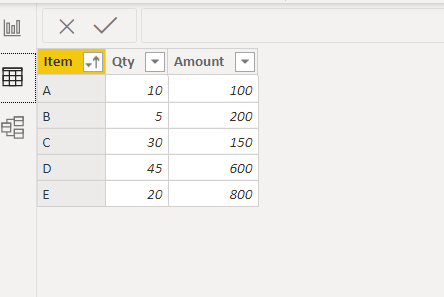
And the table looks like this.
How to show qty of each items next to axis on the graph.
For example:
What I expect is the Y axis looks like below.
A (10)
B (5)
C (30)
Thanks in advance.
Solved! Go to Solution.
Hi @Anonymous ,
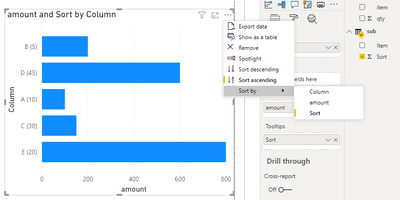
Add sort column to tooltips filed of the visual then you can sort the visual by sort column.
Best Regards,
Jay
Community Support Team _ Jay Wang
If this post helps, then please consider Accept it as the solution to help the other members find it more quickly.
Hi @Anonymous ,
If you are saying to show Amount as bar and Qty as lable next to axis, the answer is no.
However, you might be able to create a calculated column as below to splice Item and Qty column.
Column = 'Table'[Item]&" ("&'Table'[Qty]&")"
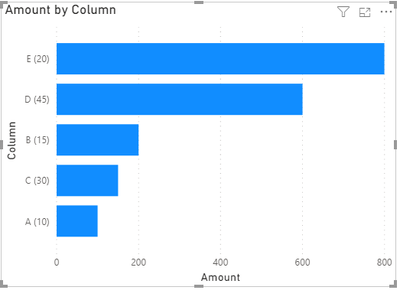
Then use this column as y-axis.
Best Regards,
Jay
Community Support Team _ Jay Wang
If this post helps, then please consider Accept it as the solution to help the other members find it more quickly.
Thanks @Anonymous,
It is exactly same graph with what I expected.
I used the calculated column as you created, but when I use the new calculated column.
It didn't work with sort by column option.
I wanted to customized sort so made below table.
| Item | Sort |
| B | 1 |
| D | 2 |
| A | 3 |
| C | 4 |
| E | 5 |
This table has relation(1:*) with main table on Item column.
I want to use Item column to make search box by using slicer.
Is there any way to make the calculated column sorted by the above table?
Thanks.
Hi @Anonymous ,
Add sort column to tooltips filed of the visual then you can sort the visual by sort column.
Best Regards,
Jay
Community Support Team _ Jay Wang
If this post helps, then please consider Accept it as the solution to help the other members find it more quickly.
@Anonymous , I assume that you want to show Name and the value together.
Enable Display label and Set Position - Inside Base
That the nearest you can get
The Power BI Data Visualization World Championships is back! Get ahead of the game and start preparing now!
| User | Count |
|---|---|
| 40 | |
| 36 | |
| 34 | |
| 31 | |
| 27 |
| User | Count |
|---|---|
| 136 | |
| 103 | |
| 66 | |
| 65 | |
| 56 |