Join us at FabCon Atlanta from March 16 - 20, 2026, for the ultimate Fabric, Power BI, AI and SQL community-led event. Save $200 with code FABCOMM.
Register now!The Power BI Data Visualization World Championships is back! It's time to submit your entry. Live now!
Hi Community,
I have a graph like below.
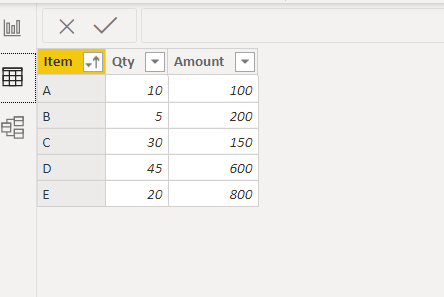
And the table looks like this.
How to show qty of each items next to axis on the graph.
For example:
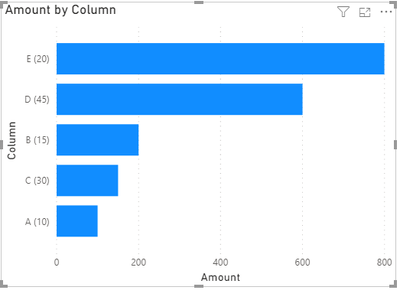
What I expect is the Y axis looks like below.
A (10)
B (5)
C (30)
Thanks in advance.
Solved! Go to Solution.
Hi @Anonymous ,
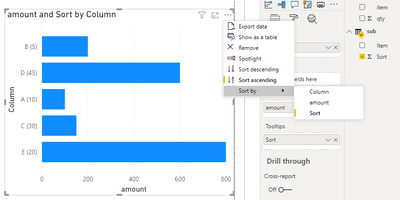
Add sort column to tooltips filed of the visual then you can sort the visual by sort column.
Best Regards,
Jay
Community Support Team _ Jay Wang
If this post helps, then please consider Accept it as the solution to help the other members find it more quickly.
Hi @Anonymous ,
If you are saying to show Amount as bar and Qty as lable next to axis, the answer is no.
However, you might be able to create a calculated column as below to splice Item and Qty column.
Column = 'Table'[Item]&" ("&'Table'[Qty]&")"
Then use this column as y-axis.
Best Regards,
Jay
Community Support Team _ Jay Wang
If this post helps, then please consider Accept it as the solution to help the other members find it more quickly.
Thanks @Anonymous,
It is exactly same graph with what I expected.
I used the calculated column as you created, but when I use the new calculated column.
It didn't work with sort by column option.
I wanted to customized sort so made below table.
| Item | Sort |
| B | 1 |
| D | 2 |
| A | 3 |
| C | 4 |
| E | 5 |
This table has relation(1:*) with main table on Item column.
I want to use Item column to make search box by using slicer.
Is there any way to make the calculated column sorted by the above table?
Thanks.
Hi @Anonymous ,
Add sort column to tooltips filed of the visual then you can sort the visual by sort column.
Best Regards,
Jay
Community Support Team _ Jay Wang
If this post helps, then please consider Accept it as the solution to help the other members find it more quickly.
@Anonymous , I assume that you want to show Name and the value together.
Enable Display label and Set Position - Inside Base
That the nearest you can get
The Power BI Data Visualization World Championships is back! It's time to submit your entry.
Check out the January 2026 Power BI update to learn about new features.
| User | Count |
|---|---|
| 61 | |
| 47 | |
| 39 | |
| 24 | |
| 23 |
| User | Count |
|---|---|
| 144 | |
| 106 | |
| 63 | |
| 38 | |
| 31 |