Join us at FabCon Atlanta from March 16 - 20, 2026, for the ultimate Fabric, Power BI, AI and SQL community-led event. Save $200 with code FABCOMM.
Register now!The Power BI Data Visualization World Championships is back! Get ahead of the game and start preparing now! Learn more
Hi,
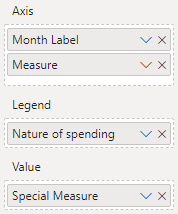
I am working on a stacked column chart, where I want to customize the colors based on both the legend information and the x-axis information. Here is as far as I've come:
As you can see I have the x-axis split in Budget/Forecast by Month, and in the legend I have "Nature of spending":
What I would like to do, is have the colors be different for Budget and Forecast. It's not very obvious in the current layout, that it's two different columns per month. But I can only speficify the color based on the legend:
Any ideas on how to do this? - Without having to pay for a custom visual developed by third party?
Solved! Go to Solution.
@PSEJR I don't think it is possible at this point to add conditional formatting when you are using legend. Look for an idea on ideas forum and vote for it.
I would ❤ Kudos if my solution helped. 👉 If you can spend time posting the question, you can also make efforts to give Kudos whoever helped to solve your problem. It is a token of appreciation!
Subscribe to the @PowerBIHowTo YT channel for an upcoming video on List and Record functions in Power Query!!
Learn Power BI and Fabric - subscribe to our YT channel - Click here: @PowerBIHowTo
If my solution proved useful, I'd be delighted to receive Kudos. When you put effort into asking a question, it's equally thoughtful to acknowledge and give Kudos to the individual who helped you solve the problem. It's a small gesture that shows appreciation and encouragement! ❤
Did I answer your question? Mark my post as a solution. Proud to be a Super User! Appreciate your Kudos 🙂
Feel free to email me with any of your BI needs.
Hi @PSEJR ,
As @parry2k said,you may vote for these idea:
https://ideas.powerbi.com/forums/265200-power-bi-ideas/suggestions/20328412-color-scale-legend
Best Regards,
Liang
If this post helps, then please consider Accept it as the solution to help the other members find it more quickly.
@PSEJR I don't think it is possible at this point to add conditional formatting when you are using legend. Look for an idea on ideas forum and vote for it.
I would ❤ Kudos if my solution helped. 👉 If you can spend time posting the question, you can also make efforts to give Kudos whoever helped to solve your problem. It is a token of appreciation!
Subscribe to the @PowerBIHowTo YT channel for an upcoming video on List and Record functions in Power Query!!
Learn Power BI and Fabric - subscribe to our YT channel - Click here: @PowerBIHowTo
If my solution proved useful, I'd be delighted to receive Kudos. When you put effort into asking a question, it's equally thoughtful to acknowledge and give Kudos to the individual who helped you solve the problem. It's a small gesture that shows appreciation and encouragement! ❤
Did I answer your question? Mark my post as a solution. Proud to be a Super User! Appreciate your Kudos 🙂
Feel free to email me with any of your BI needs.
The Power BI Data Visualization World Championships is back! Get ahead of the game and start preparing now!
| User | Count |
|---|---|
| 40 | |
| 38 | |
| 36 | |
| 29 | |
| 28 |
| User | Count |
|---|---|
| 127 | |
| 88 | |
| 78 | |
| 66 | |
| 65 |