
We've captured the moments from FabCon & SQLCon that everyone is talking about, and we are bringing them to the community, live and on-demand. Starts on April 14th. Register now
Hello,
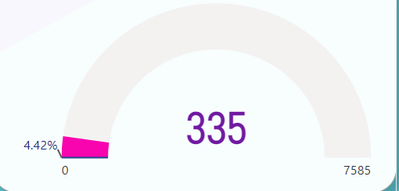
I have a visual where I need the Target Value to be a percentage. Normally the Target Value is set on the gauge around where the progress is filled in. Because my Target Value is a percent it is being displayed on the Min Value. Is there a way to make the Target Value display on a different area of the gauge, or alternatively is there a way to ONLY get rid of the Min Value being displayed? In this case, I would like to not have the zero displayed.
Solved! Go to Solution.
Hi @Werbenmanjensen ,
Maybe you can try below sample pbix.
If the problem is still not resolved, please provide detailed error information and let me know immediately. Looking forward to your reply.
Best Regards,
Henry
If this post helps, then please consider Accept it as the solution to help the other members find it more quickly.
Hi @Werbenmanjensen ,
Maybe you can try below sample pbix.
If the problem is still not resolved, please provide detailed error information and let me know immediately. Looking forward to your reply.
Best Regards,
Henry
If this post helps, then please consider Accept it as the solution to help the other members find it more quickly.
Thank you, Henry! This is genius!
If you have recently started exploring Fabric, we'd love to hear how it's going. Your feedback can help with product improvements.
A new Power BI DataViz World Championship is coming this June! Don't miss out on submitting your entry.
Share feedback directly with Fabric product managers, participate in targeted research studies and influence the Fabric roadmap.
| User | Count |
|---|---|
| 57 | |
| 38 | |
| 33 | |
| 19 | |
| 16 |
| User | Count |
|---|---|
| 67 | |
| 66 | |
| 40 | |
| 34 | |
| 25 |