cancel
Showing results for 
Search instead for 
Did you mean: 

Vote for your favorite vizzies from the Power BI Dataviz World Championship submissions. Vote now!

Reply
user_dil
Frequent Visitor

Customised Dates

Hi All,


I'm trying to create a simple line chart with a customized date format using as the X-axis. 

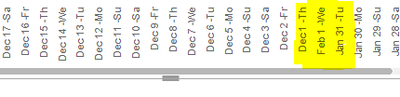
Date type: Dec 1- Th, Dec 2-Fr, ....., Jan 31-Tu, Feb 1-We, Feb 2-Th likewise up to current date.


I was able to create the date format by merging the relevant columns. But the issue I'm facing is how to sort them correctly.


Hope someone can give me guidance on that.

Thanks!


1 ACCEPTED SOLUTION
FreemanZ
Community Champion
Community Champion

hi @user_dil 

you can get the column with one step, like:

Column = FORMAT([Date], "mmm-dd") &"-"& LEFT( FORMAT( [Date],"ddd"), 2)


to sort a visual, you can still pull the original [date] column to the tooltip of the visual and use the [Date] column to sort the axis. 

View solution in original post

3 REPLIES 3
FreemanZ
Community Champion
Community Champion

hi @user_dil 

you can get the column with one step, like:

Column = FORMAT([Date], "mmm-dd") &"-"& LEFT( FORMAT( [Date],"ddd"), 2)


to sort a visual, you can still pull the original [date] column to the tooltip of the visual and use the [Date] column to sort the axis. 

danextian
Super User
Super User

Hi @user_dil ,


Does the table that has this calculated column have an actual dates column? If so you can create a calculated column to sort the custom date format by

=( 'Table'[Date], "mmdd" )


Dane Belarmino | Microsoft MVP | Proud to be a Super User!

Did I answer your question? Mark my post as a solution!


"Tell me and I’ll forget; show me and I may remember; involve me and I’ll understand."
Need Power BI consultation, get in touch with me on LinkedIn or hire me on UpWork.
Learn with me on YouTube @DAXJutsu or follow my page on Facebook @DAXJutsuPBI.

Hi @danextian 

I did as you said but not getting the sort as I want.


user_dil_0-1675400772689.png


Helpful resources

Announcements
Power BI DataViz World Championships

Power BI Dataviz World Championships

Vote for your favorite vizzies from the Power BI World Championship submissions!

Sticker Challenge 2026 Carousel

Join our Community Sticker Challenge 2026

If you love stickers, then you will definitely want to check out our Community Sticker Challenge!

January Power BI Update Carousel

Power BI Monthly Update - January 2026

Check out the January 2026 Power BI update to learn about new features.

FabCon Atlanta 2026 carousel

FabCon Atlanta 2026

Join us at FabCon Atlanta, March 16-20, for the ultimate Fabric, Power BI, AI and SQL community-led event. Save $200 with code FABCOMM.