Get certified for free when you join Fabric Data Days 2026 and dive into Fabric, Power BI, SQL, AI, and other essential data skills.
Join nowJuly 7 - July 17 | Round 2 of the Power BI Dataviz World Championships. Don't miss your chance! Learn more
Hi all, I'm trying to implement the following login to classify customers in a new column but need some help.
PREMIUM : if all the Cloud products of a customer are 10
PREMIUM ELIGIBLE : if all products (any Product Type) of a customer are in range : >= 5 and <10
NOT ELIGIBLE : if customer has any product < 4 (any Product Type)
PREMIUM PLUS : customers with products > 11 (any Product Type)
| Customer ID | Product Type | Product | Customer Type (desired column) |
| A | Cloud | 10 | Premium |
| A | Cloud | 10 | Premium |
| B | Cloud | 5 | Premium Eligible |
| B | Data Center | 9 | Premium Eligible |
| C | Data Center | 3 | Not Eligible |
| C | Data Center | 9 | Not Eligible |
| D | Cloud | 11 | Premium Plus |
| D | Cloud | 11 | Premium Plus |
Solved! Go to Solution.
Hi,
Try this calculated column formula
=if(CALCULATE(COUNTROWS(Data),FILTER(Data,Data[Customer ID]=EARLIER(Data[Customer ID])&&Data[Product]<4))>0,"Not eligible",if(AND(CALCULATE(COUNTROWS(Data),FILTER(Data,Data[Customer ID]=EARLIER(Data[Customer ID])&&Data[Product Type]="Cloud"))*Data[Product]=CALCULATE(SUM(Data[Product]),FILTER(Data,Data[Customer ID]=EARLIER(Data[Customer ID])&&Data[Product Type]="Cloud"&&Data[Product]=10)),CALCULATE(COUNTROWS(Data),FILTER(Data,Data[Customer ID]=EARLIER(Data[Customer ID])&&Data[Product Type]="Cloud"))>0),"Premium",if(CALCULATE(COUNTROWS(Data),FILTER(Data,Data[Customer ID]=EARLIER(Data[Customer ID])&&Data[Product]>=5&&Data[Product]<10))>0,"Premium Eligible","Premium Plus")))
Hope this helps.
Hi @Anonymous ,
Per your request,the calculated column is as below:
Customer Type =
VAR c =
CALCULATE (
MIN ( 'Table'[Product] ),
ALLEXCEPT ( 'Table', 'Table'[Customer ID] )
)
VAR d =
CALCULATE (
MAX ( 'Table'[Product] ),
ALLEXCEPT ( 'Table', 'Table'[Customer ID] )
)
RETURN
IF (
'Table'[Product] = 10,
"PREMIUM",
IF (
c >= 5
&& d < 10,
"PREMIUM ELIGIBLE",
IF (
c <= 4
&& d > 4,
"NOT ELIGIBLE ",
IF ( d >= 11, "PREMIUM PLUS ", BLANK () )
)
)
)
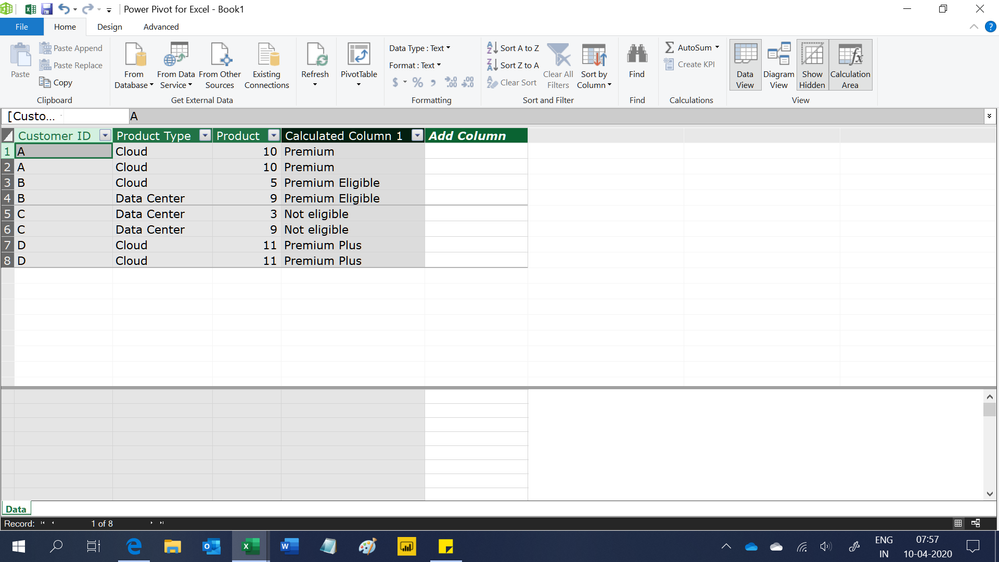
Finally you will see:
For the related .pbix file,pls click here.
Hi @Anonymous ,
Per your request,the calculated column is as below:
Customer Type =
VAR c =
CALCULATE (
MIN ( 'Table'[Product] ),
ALLEXCEPT ( 'Table', 'Table'[Customer ID] )
)
VAR d =
CALCULATE (
MAX ( 'Table'[Product] ),
ALLEXCEPT ( 'Table', 'Table'[Customer ID] )
)
RETURN
IF (
'Table'[Product] = 10,
"PREMIUM",
IF (
c >= 5
&& d < 10,
"PREMIUM ELIGIBLE",
IF (
c <= 4
&& d > 4,
"NOT ELIGIBLE ",
IF ( d >= 11, "PREMIUM PLUS ", BLANK () )
)
)
)
Finally you will see:
For the related .pbix file,pls click here.
Hi,
Try this calculated column formula
=if(CALCULATE(COUNTROWS(Data),FILTER(Data,Data[Customer ID]=EARLIER(Data[Customer ID])&&Data[Product]<4))>0,"Not eligible",if(AND(CALCULATE(COUNTROWS(Data),FILTER(Data,Data[Customer ID]=EARLIER(Data[Customer ID])&&Data[Product Type]="Cloud"))*Data[Product]=CALCULATE(SUM(Data[Product]),FILTER(Data,Data[Customer ID]=EARLIER(Data[Customer ID])&&Data[Product Type]="Cloud"&&Data[Product]=10)),CALCULATE(COUNTROWS(Data),FILTER(Data,Data[Customer ID]=EARLIER(Data[Customer ID])&&Data[Product Type]="Cloud"))>0),"Premium",if(CALCULATE(COUNTROWS(Data),FILTER(Data,Data[Customer ID]=EARLIER(Data[Customer ID])&&Data[Product]>=5&&Data[Product]<10))>0,"Premium Eligible","Premium Plus")))
Hope this helps.
@Anonymous hey isn't we did similar in other post?
Subscribe to the @PowerBIHowTo YT channel for an upcoming video on List and Record functions in Power Query!!
Learn Power BI and Fabric - subscribe to our YT channel - Click here: @PowerBIHowTo
If my solution proved useful, I'd be delighted to receive Kudos. When you put effort into asking a question, it's equally thoughtful to acknowledge and give Kudos to the individual who helped you solve the problem. It's a small gesture that shows appreciation and encouragement! ❤
Did I answer your question? Mark my post as a solution. Proud to be a Super User! Appreciate your Kudos 🙂
Feel free to email me with any of your BI needs.
Join us in Barcelona for FabCon and SQLCon, the Fabric, Power BI, SQL, and AI community event. Save €200 with code FABCMTY200.
Join Fabric Data Days 2026: 60 days of free live/on-demand sessions, challenges, study groups, and certification opportunities.
| User | Count |
|---|---|
| 23 | |
| 22 | |
| 18 | |
| 17 | |
| 13 |
| User | Count |
|---|---|
| 63 | |
| 44 | |
| 42 | |
| 40 | |
| 39 |