This time we’re going bigger than ever. Fabric, Power BI, SQL, AI and more. We're covering it all. You won't want to miss it.
Learn moreDid you hear? There's a new SQL AI Developer certification (DP-800). Start preparing now and be one of the first to get certified. Register now
Hello,
I was wonering how to use customize short for below graph in powerBi -
I want in below order -
hire 24
onboarding 11
change job 17
termination 25
Can anyone help me with this?
Solved! Go to Solution.
Hi @Anonymous ,
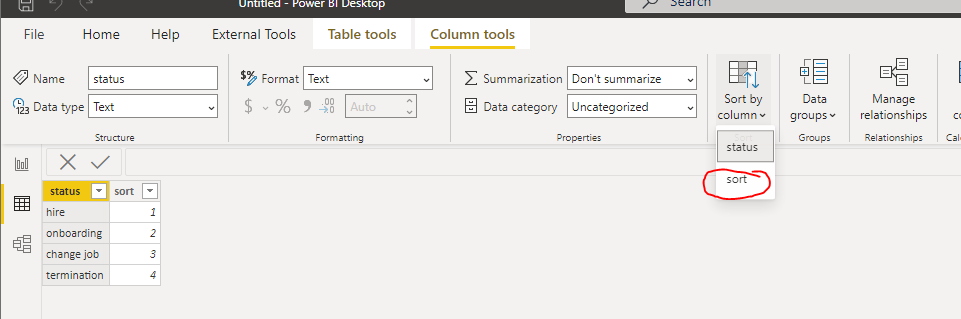
You need to create a new sort table by your customize sort:
Create a one to many relationship between sort table and fact table or you can use the following measure:
measure = Calculate([Your original measure], treatas(values(sort[status]),table[status]))
Then use the new column in the sort table as x-axis and the measure for the values.
Please refer to the pbix file. and you can also refer to https://radacad.com/sort-a-column-with-a-custom-order-in-power-bi
If this post helps, then please consider Accept it as the solution to help the other members find it more quickly.
Best Regards,
Dedmon Dai
Hi @Anonymous ,
You need to create a new sort table by your customize sort:
Create a one to many relationship between sort table and fact table or you can use the following measure:
measure = Calculate([Your original measure], treatas(values(sort[status]),table[status]))
Then use the new column in the sort table as x-axis and the measure for the values.
Please refer to the pbix file. and you can also refer to https://radacad.com/sort-a-column-with-a-custom-order-in-power-bi
If this post helps, then please consider Accept it as the solution to help the other members find it more quickly.
Best Regards,
Dedmon Dai
Hi, @Anonymous
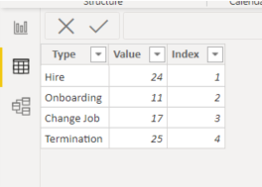
I suggest having one more column that shows the index number for hire - 1 / onboarding - 2 / Change job - 3 / termination - 4 . Then you can sort by index number.
Thanks.
Hi, My name is Jihwan Kim.
If this post helps, then please consider accept it as the solution to help other members find it faster, and give a big thumbs up.
Linkedin: linkedin.com/in/jihwankim1975/
Twitter: twitter.com/Jihwan_JHKIM
Hi, @Anonymous
Thank you for your feedback.
I am not sure whether my sample suits your case or not.
Please check the below picture and the very short video (Link down below).
The column has to be together with the index column.
https://www.dropbox.com/s/9lh5nbfdo1jwm51/Presentation3.mp4?dl=0
Hi, My name is Jihwan Kim.
If this post helps, then please consider accept it as the solution to help other members find it faster, and give a big thumbs up.
Linkedin: linkedin.com/in/jihwankim1975/
Twitter: twitter.com/Jihwan_JHKIM
Check out the April 2026 Power BI update to learn about new features.
Sign up to receive a private message when registration opens and key events begin.
If you have recently started exploring Fabric, we'd love to hear how it's going. Your feedback can help with product improvements.
| User | Count |
|---|---|
| 36 | |
| 33 | |
| 31 | |
| 21 | |
| 16 |
| User | Count |
|---|---|
| 66 | |
| 55 | |
| 31 | |
| 24 | |
| 23 |