Join us at FabCon Atlanta from March 16 - 20, 2026, for the ultimate Fabric, Power BI, AI and SQL community-led event. Save $200 with code FABCOMM.
Register now!The Power BI Data Visualization World Championships is back! Get ahead of the game and start preparing now! Learn more
Hello,
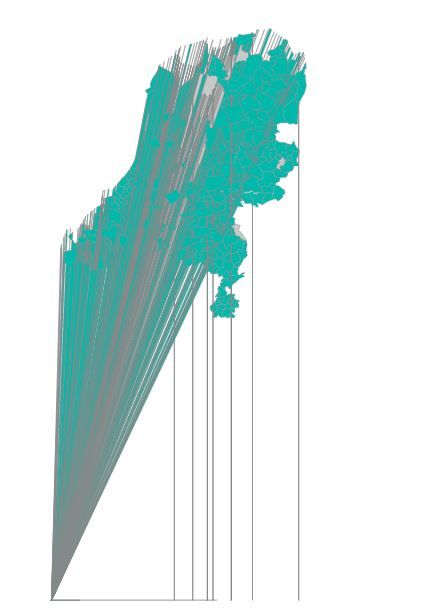
I want to create a custom shape map with dutch townships. I have a Topojson file and loaded this into the shape map visual. The result is almost correct but there are some strange lines running to the corner (image attached). When i load the file in mapshaper the map shows correctly.
I hope someone knows what is going wrong.
Kind regards,
Tiemen
Solved! Go to Solution.
It's a reasonably common issue. I can't quite remember the exact solution but it's either using the wrong 'projection' type within powerbi (in the format section of the shapemap)
OR the map has to be edited in mapshaper to change the co-ordinate system to wgs84.
See these threads : https://community.powerbi.com/t5/Desktop/Problem-using-custom-shape-map/m-p/55795
It's a reasonably common issue. I can't quite remember the exact solution but it's either using the wrong 'projection' type within powerbi (in the format section of the shapemap)
OR the map has to be edited in mapshaper to change the co-ordinate system to wgs84.
See these threads : https://community.powerbi.com/t5/Desktop/Problem-using-custom-shape-map/m-p/55795
Thanks! I used QGIS to change it to the right coordinate system. Mapshaper shows an error
The Power BI Data Visualization World Championships is back! Get ahead of the game and start preparing now!
| User | Count |
|---|---|
| 38 | |
| 35 | |
| 33 | |
| 32 | |
| 29 |
| User | Count |
|---|---|
| 134 | |
| 96 | |
| 78 | |
| 67 | |
| 65 |