cancel
Showing results for 
Search instead for 
Did you mean: 

A new Data Days event is coming soon! This time we’re going bigger than ever. Fabric, Power BI, SQL, AI and more. Don't miss out.

Reply
Anonymous
Not applicable

Custom filter

Hi All,


I want to create a button that can act as a filter for my dataset. 


Example - I have 20 item categories - A1, A2, A3, ........., and A20.

In this case, I want a button that can filter the value of my sales as

Button 1 - all categories except A1, 

Button 2 - all categories except A3, and

Button 3 - all categories


Alternatively, this can done by using slicer. However, in my case it is not user friendly as item categories number is high and requirment is for specific filters only. 


Please suggest me a simple method to achieve this.


Thank you

1 ACCEPTED SOLUTION
JoaoMarcelino
Responsive Resident
Responsive Resident

Dear @Anonymous ,

Welcome to this amazing community 🙂

1. I would do it, for example, with 3 bookmarks:

Bookmark 1 - Drag category to page filter pane -> select "basic filtering" -> add new bookmark -> select everything from categories but A1 -> update bookmark

Bookmark 2 - add new bookmark -> select everything from categories but A3 -> update bookmark
Bookmark 3 - add new bookmark -> select everything from categories ->update bookmark


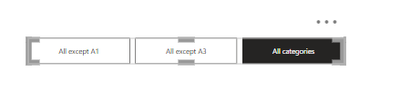
2. Rename the bookmarks as intended (e.g. "All except A1", "All except A3" and "All Categories")

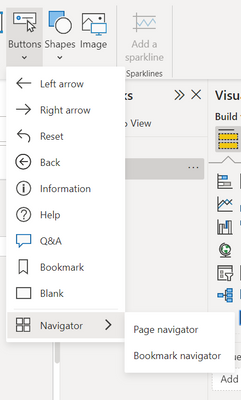
3. Go to Insert -> Buttons -> Navigator -> Bookmark navigator

JoaoMarcelino_0-1669818705824.png


4. The result is this:

JoaoMarcelino_1-1669818768620.png

It takes about 5minutes to do it 🙂
Create report bookmarks in Power BI to share insights and build stories - Power BI | Microsoft Learn

Hope I was of assistance!
Cheers
Joao Marcelino
If you liked my solution, please give it a thumbs up. And if I did answer your question, please mark this post as a solution. Thanks!

View solution in original post

1 REPLY 1
JoaoMarcelino
Responsive Resident
Responsive Resident

Dear @Anonymous ,

Welcome to this amazing community 🙂

1. I would do it, for example, with 3 bookmarks:

Bookmark 1 - Drag category to page filter pane -> select "basic filtering" -> add new bookmark -> select everything from categories but A1 -> update bookmark

Bookmark 2 - add new bookmark -> select everything from categories but A3 -> update bookmark
Bookmark 3 - add new bookmark -> select everything from categories ->update bookmark


2. Rename the bookmarks as intended (e.g. "All except A1", "All except A3" and "All Categories")

3. Go to Insert -> Buttons -> Navigator -> Bookmark navigator

JoaoMarcelino_0-1669818705824.png


4. The result is this:

JoaoMarcelino_1-1669818768620.png

It takes about 5minutes to do it 🙂
Create report bookmarks in Power BI to share insights and build stories - Power BI | Microsoft Learn

Hope I was of assistance!
Cheers
Joao Marcelino
If you liked my solution, please give it a thumbs up. And if I did answer your question, please mark this post as a solution. Thanks!

Helpful resources

Announcements
May Power BI Update Carousel

Power BI Monthly Update - May 2026

Check out the May 2026 Power BI update to learn about new features.

Fabric SQL PBI Data Days

Data Days 2026 coming soon!

Sign up to receive a private message when registration opens and key events begin.

New to Fabric survey Carousel

New to Fabric Survey

If you have recently started exploring Fabric, we'd love to hear how it's going. Your feedback can help with product improvements.

Power BI DataViz World Championships carousel

Power BI DataViz World Championships - June 2026

A new Power BI DataViz World Championship is coming this June! Don't miss out on submitting your entry.