cancel
Showing results for 
Search instead for 
Did you mean: 

Try your skills in the Power BI Dataviz World Championship! Round one ends June 26. Join now

Reply
deepguptaac
Frequent Visitor

Custom filter buttons

Hi folks,

I am currently building a sales report which has one Sales Summary containing data as below:

deepguptaac_0-1669807011869.png

And one item category classification sheet as below:

deepguptaac_1-1669807092042.png

And one cost sheet as below:

deepguptaac_2-1669807649566.png

Using these sheets, I have created multiple Measures. 
Now, I want to filter the data using item category criteria. Some examples of criteria are Sales without Item category A, Sales of item category A and item category B, etc. There are some fixed criteria by which I want the reports to be filtered. 
As this can be achieved by using filters for the page. However, it could be more user-friendly as the item categories are multiple and the criterias are only few.


Kindly suggest a way to use a slicer or button based on the criterias.


Thanks

1 ACCEPTED SOLUTION
v-yadongf-msft
Community Support
Community Support

Hi @deepguptaac 


If you want to custom filter buttons, I think field parameter is suitable for you. Here's my sample.


My test table:
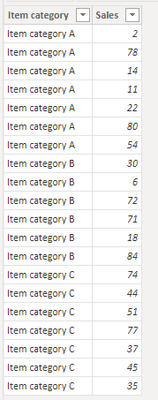
vyadongfmsft_0-1669862351720.png


Create some measures of criteria you want to filter:

Without Item category A = CALCULATE(SUM('Table'[Sales]),FILTER('Table','Table'[Item category] <> "Item category A"))

Item category A & B = CALCULATE(SUM('Table'[Sales]),FILTER('Table','Table'[Item category] = "Item category A" || 'Table'[Item category] = "Item category B"))

Item category C = CALCULATE(SUM('Table'[Sales]),FILTER('Table','Table'[Item category] = "Item category C"))


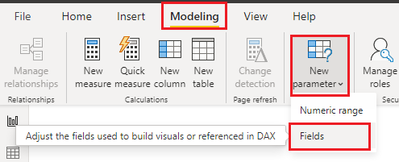
Enable field parameters:
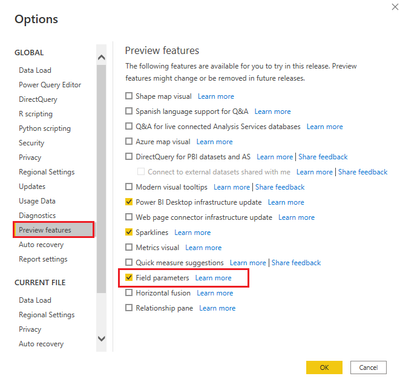
vyadongfmsft_1-1669862577748.png


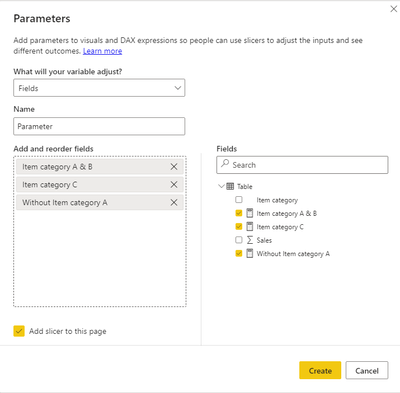
Create field parameters:

vyadongfmsft_2-1669862677996.png

vyadongfmsft_3-1669862700063.png


You will get a parameter table like this:
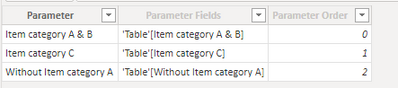
vyadongfmsft_4-1669862775174.png


Then you can use the field paramter to create slicer to filter your report:
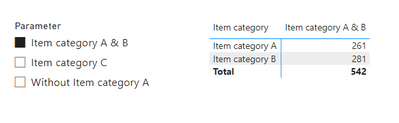
vyadongfmsft_6-1669862854201.pngvyadongfmsft_7-1669862867618.png

Best regards,

Yadong Fang

If this post helps, then please consider Accept it as the solution to help the other members find it more quickly.

View solution in original post

3 REPLIES 3
deepguptaac
Frequent Visitor

Hi @v-yadongf-msft ,


Thanks for the solution. 


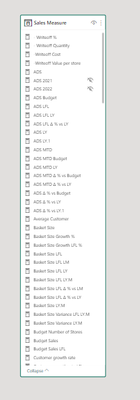
However, this solve my problem partially only as I have more than 100 measures calculating sales performance. So, I will have to create all the measures again adding filters. 

deepguptaac_0-1669874200882.png


I was looking for a universal slicer which accordingly filters all the measures present on a certain pages similar to the functionality of filter pane.

Hi @deepguptaac ,


You don't need to create all the measures again to add filters.  You just only need to add measures to field parameters.


Since you have created all the measures, field parameters is very convenient for you.


Best regards,

Yadong Fang

If this post helps, then please consider Accept it as the solution to help the other members find it more quickly.

v-yadongf-msft
Community Support
Community Support

Hi @deepguptaac 


If you want to custom filter buttons, I think field parameter is suitable for you. Here's my sample.


My test table:

vyadongfmsft_0-1669862351720.png


Create some measures of criteria you want to filter:

Without Item category A = CALCULATE(SUM('Table'[Sales]),FILTER('Table','Table'[Item category] <> "Item category A"))

Item category A & B = CALCULATE(SUM('Table'[Sales]),FILTER('Table','Table'[Item category] = "Item category A" || 'Table'[Item category] = "Item category B"))

Item category C = CALCULATE(SUM('Table'[Sales]),FILTER('Table','Table'[Item category] = "Item category C"))


Enable field parameters:

vyadongfmsft_1-1669862577748.png


Create field parameters:

vyadongfmsft_2-1669862677996.png

vyadongfmsft_3-1669862700063.png


You will get a parameter table like this:

vyadongfmsft_4-1669862775174.png


Then you can use the field paramter to create slicer to filter your report:
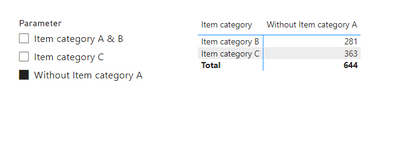
vyadongfmsft_6-1669862854201.pngvyadongfmsft_7-1669862867618.png

Best regards,

Yadong Fang

If this post helps, then please consider Accept it as the solution to help the other members find it more quickly.

Helpful resources

Announcements
Fabric Data Days is here Carousel

Fabric Data Days 2026

Don't miss out on Data Days, June 15 through August 7. Learn Fabric, Power BI, SQL, AI and more.

Power BI DataViz World Championships carousel

Power BI DataViz World Championships - June 2026

A new Power BI DataViz World Championship is coming this June! Don't miss out on submitting your entry.