Join us at FabCon Atlanta from March 16 - 20, 2026, for the ultimate Fabric, Power BI, AI and SQL community-led event. Save $200 with code FABCOMM.
Register now!The Power BI Data Visualization World Championships is back! Get ahead of the game and start preparing now! Learn more
Hi Folks
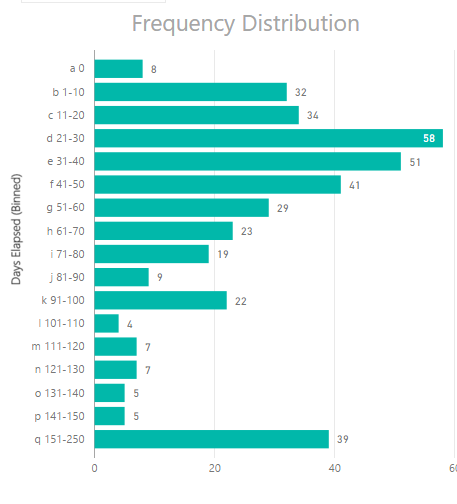
I have created a frequency distribution (see below). The bins are text columns. Is there are way to custom sort the bins, so that they are in a logical order (0 as first bin, 1-10 next, 11-20 and so on). As a hack I have added a text prefix (a, b , c to allow sorting), but that is a rubbish solution.
Does anyone have a better idea?
Cheers
Steve
Solved! Go to Solution.
@stfox Probably easieast/fastest thing will be to change your formula for the custom bins by adding another 0
000
001-010,
011-020,
etc...
Other than that you would need to create another Index Column(number) and then sort Day Elapsed (Binned) by that column.
Like we do with Month names (so they sort 1-12) and not A-Z
@stfox Probably easieast/fastest thing will be to change your formula for the custom bins by adding another 0
000
001-010,
011-020,
etc...
Other than that you would need to create another Index Column(number) and then sort Day Elapsed (Binned) by that column.
Like we do with Month names (so they sort 1-12) and not A-Z
Thanks! Ok - there was also subtle step (to avoid the greyed out sort button) that I only figured out when I watched this video demo of the same technique.
Cheers
Steve
Check out the November 2025 Power BI update to learn about new features.
Advance your Data & AI career with 50 days of live learning, contests, hands-on challenges, study groups & certifications and more!