This time we’re going bigger than ever. Fabric, Power BI, SQL, AI and more. We're covering it all. You won't want to miss it.
Learn moreDid you hear? There's a new SQL AI Developer certification (DP-800). Start preparing now and be one of the first to get certified. Register now
Hello everyone
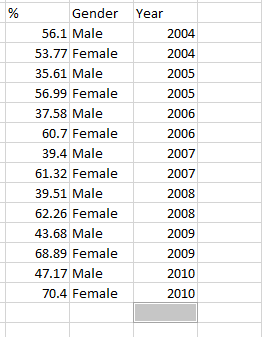
I have a table like in the picture
I want to make this table as below?
I gave it as an example, but it continues until 2021-2022-2023.
thanks.
Solved! Go to Solution.
Hi @hakanbacak60. Remove the column attitude. Then select the Gender column and find Unpivot Other Columns in the ribbon. That should get you where you want to be. Hope this helps!
Hi @hakanbacak60. I'm reciting this from memory so it might not be perfect, but if you look a little bit, it might get you where you want to go. Select columns Gender and Year. Somewhere on the Ribbon is Transform > Group By. Look for that. Sum up the % column. The downside of doing that is that it's going to remove individual percentages and you're stuck with aggregations which might finder further analysis.
I would suggest creating a DAX measure for this. Could simply be SUM([%]) but hard to tell without knowing how you intend to use it.
Thank you. So how can I do the operation in the picture by adding a new column.
Hi @hakanbacak60. I'm reciting this from memory so it might not be perfect, but if you look a little bit, it might get you where you want to go. Select columns Gender and Year. Somewhere on the Ribbon is Transform > Group By. Look for that. Sum up the % column. The downside of doing that is that it's going to remove individual percentages and you're stuck with aggregations which might finder further analysis.
I would suggest creating a DAX measure for this. Could simply be SUM([%]) but hard to tell without knowing how you intend to use it.
Hi @hakanbacak60. Remove the column attitude. Then select the Gender column and find Unpivot Other Columns in the ribbon. That should get you where you want to be. Hope this helps!
Check out the April 2026 Power BI update to learn about new features.
Sign up to receive a private message when registration opens and key events begin.
If you have recently started exploring Fabric, we'd love to hear how it's going. Your feedback can help with product improvements.
| User | Count |
|---|---|
| 36 | |
| 33 | |
| 31 | |
| 21 | |
| 16 |
| User | Count |
|---|---|
| 66 | |
| 55 | |
| 31 | |
| 24 | |
| 23 |