cancel
Showing results for 
Search instead for 
Did you mean: 

Did you hear? There's a new SQL AI Developer certification (DP-800). Start preparing now and be one of the first to get certified. Register now

Reply
hakanbacak60
New Member

Custom editing in Power Query

Hello everyone


I have a table like in the picture


2022-08-27_16-47-10.png


I want to make this table as below?


2022-08-27_16-50-43.png

I gave it as an example, but it continues until 2021-2022-2023.


thanks.

2 ACCEPTED SOLUTIONS
littlemojopuppy
Community Champion
Community Champion

Hi @hakanbacak60.  Remove the column attitude.  Then select the Gender column and find Unpivot Other Columns in the ribbon.  That should get you where you want to be.  Hope this helps!

View solution in original post

Hi @hakanbacak60.  I'm reciting this from memory so it might not be perfect, but if you look a little bit, it might get you where you want to go.  Select columns Gender and Year.  Somewhere on the Ribbon is Transform > Group By.  Look for that.  Sum up the % column.  The downside of doing that is that it's going to remove individual percentages and you're stuck with aggregations which might finder further analysis.

I would suggest creating a DAX measure for this.  Could simply be SUM([%]) but hard to tell without knowing how you intend to use it.

View solution in original post

5 REPLIES 5
hakanbacak60
New Member

Thank you @littlemojopuppy 


I did what you said and it worked. And it was really instructive.

hakanbacak60
New Member

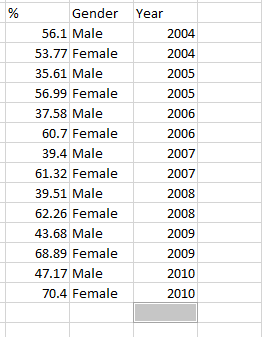
Thank you. So how can I do the operation in the picture by adding a new column.


2022-08-28_23-48-21.png


Hi @hakanbacak60.  I'm reciting this from memory so it might not be perfect, but if you look a little bit, it might get you where you want to go.  Select columns Gender and Year.  Somewhere on the Ribbon is Transform > Group By.  Look for that.  Sum up the % column.  The downside of doing that is that it's going to remove individual percentages and you're stuck with aggregations which might finder further analysis.

I would suggest creating a DAX measure for this.  Could simply be SUM([%]) but hard to tell without knowing how you intend to use it.

Thank you @littlemojopuppy 


I did what you said and it worked. And it was really instructive.

littlemojopuppy
Community Champion
Community Champion

Hi @hakanbacak60.  Remove the column attitude.  Then select the Gender column and find Unpivot Other Columns in the ribbon.  That should get you where you want to be.  Hope this helps!

Helpful resources

Announcements
April Power BI Update Carousel

Power BI Monthly Update - April 2026

Check out the April 2026 Power BI update to learn about new features.

Fabric SQL PBI Data Days

Data Days 2026 coming soon!

Sign up to receive a private message when registration opens and key events begin.

New to Fabric survey Carousel

New to Fabric Survey

If you have recently started exploring Fabric, we'd love to hear how it's going. Your feedback can help with product improvements.

Power BI DataViz World Championships carousel

Power BI DataViz World Championships - June 2026

A new Power BI DataViz World Championship is coming this June! Don't miss out on submitting your entry.