cancel
Showing results for 
Search instead for 
Did you mean: 

Data Days is here! Join us now for 60+ days of learning, challenges, and connection. Learn more

Reply
steveo2302
Frequent Visitor

Custom data labels display nothing

Hi,


I have a simple measure for a data label - the number of customers. When I add this as a custom label on a 100% stacked column chart the data labels disappear. Is this a bug or am I missing something more nuanced?


TIA,

Steve

1 ACCEPTED SOLUTION
Ritaf1983
Super User
Super User

Hi @steveo2302 

There are no bugs with this feature (tried it on my machine just now).

If you don't see your custom labels in most cases it is a lack of pixels(place) issue (if the dax is correct and the value is not blank).
Try to resize your graph / make the fonts smaller / filter some categories / make sure that the option "overflow text is switched on as a custom label)

If it doesn't help share some dummy pbix file.

If this post helps, then please consider Accepting it as the solution to help the other members find it more quickly


Regards,
Rita Fainshtein | Microsoft MVP
https://www.linkedin.com/in/rita-fainshtein/
Blog : https://www.madeiradata.com/profile/ritaf/profile

View solution in original post

3 REPLIES 3
Anonymous
Not applicable

Hi @steveo2302 ,


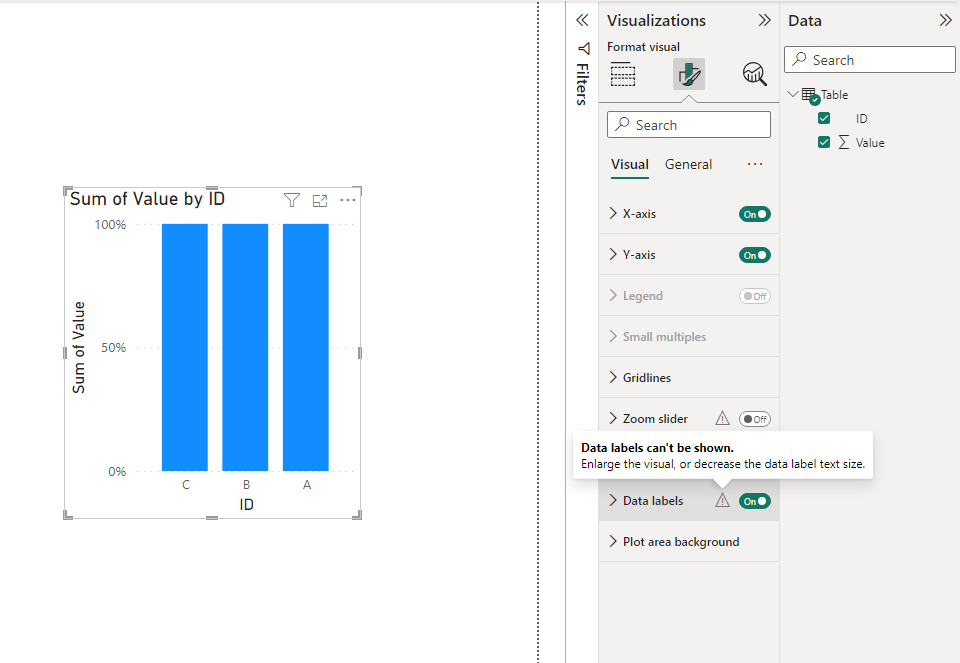
Please check the below tip. If your visual is small, the data labels won't be shown. Please try enlarging the visual.

vstephenmsft_0-1695025426897.png

If the problem still exists, please provide me with more details. Thanks.


Best Regards,

Stephen Tao


If this post helps, then please consider Accept it as the solution to help the other members find it more quickly.           

Hi Stephen,


It wasnt to do with the size as it displayed correctly for the normal data labels - it seems to be something to do with small multiples. When the custom labels is turned on it wont display anything, so I've worked around it for now using multiple charts. 

Thanks for looking though.

Steve

Ritaf1983
Super User
Super User

Hi @steveo2302 

There are no bugs with this feature (tried it on my machine just now).

If you don't see your custom labels in most cases it is a lack of pixels(place) issue (if the dax is correct and the value is not blank).
Try to resize your graph / make the fonts smaller / filter some categories / make sure that the option "overflow text is switched on as a custom label)

If it doesn't help share some dummy pbix file.

If this post helps, then please consider Accepting it as the solution to help the other members find it more quickly


Regards,
Rita Fainshtein | Microsoft MVP
https://www.linkedin.com/in/rita-fainshtein/
Blog : https://www.madeiradata.com/profile/ritaf/profile

Helpful resources

Announcements
Fabric Data Days is here Carousel

Fabric Data Days 2026

Don't miss out on Data Days, June 15 through August 7. Learn Fabric, Power BI, SQL, AI and more.

May Power BI Update Carousel

Power BI Monthly Update - May 2026

Check out the May 2026 Power BI update to learn about new features.

Power BI DataViz World Championships carousel

Power BI DataViz World Championships - June 2026

A new Power BI DataViz World Championship is coming this June! Don't miss out on submitting your entry.