cancel
Showing results for 
Search instead for 
Did you mean: 

The Power BI Data Visualization World Championships is back! Get ahead of the game and start preparing now! Learn more

Reply
Anonymous
Not applicable

Custom column measures

Hi everyone, I am probably doing something wrong here...

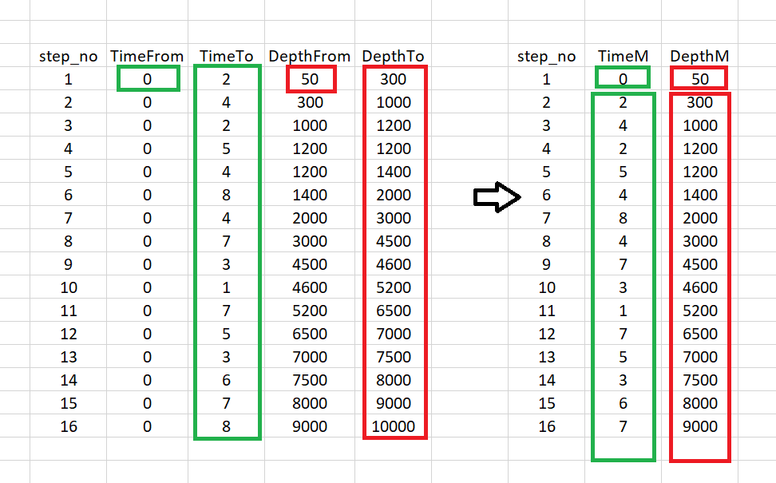
I have a table that contains these 5 columns on the left (the picture below). So I've created (with your help) two measures called TimeM and DepthM from original columns TimeFrom/TimeTo and DepthFrom/DepthTo respectively. So it basically copies first rows from TimeFrom and DepthFrom into the corresponding measures, and copies entire columns TimeTo and DepthTo, all of them are filtered by the step_no. The problem is that during this transformation the last row from both TimeTo (value 😎 and DepthTo (value 10000) is not visible in TimeM and DepthM visual as there no steps after step_no 16. 

222.PNG


How can I plot these two measures TimeM and DepthM without missing the last row from original columns? I am not allowed to add more rows to the step_no column, the order and number of steps should stay the same. What about creating an extra column that is related to the step_no and can be extended to include 17 rows?

6 REPLIES 6
ryan_mayu
Super User
Super User

@Anonymous 

maybe you can try create a new table for this

newtable = 
VAR first=SELECTCOLUMNS(FILTER('Table','Table'[step_no]=min('Table'[step_no])),"stop_no",'Table'[step_no],"TimeM",'Table'[timefrom],"DepthM",'Table'[depthfrom])
VAR middle=SELECTCOLUMNS(FILTER('Table','Table'[step_no]>min('Table'[step_no])),"stop_no",'Table'[step_no],"TimeM",MAXX(FILTER('Table','Table'[step_no]=EARLIER('Table'[step_no])-1),'Table'[timeto]),"DepthM",MAXX(FILTER('Table','Table'[step_no]=EARLIER('Table'[step_no])-1),'Table'[depthto]))
VAR last=SELECTCOLUMNS(FILTER('Table','Table'[step_no]=max('Table'[step_no])),"stop_no","","TimeM",'Table'[timeto],"DepthM",'Table'[depthto])
return union(first,middle,last)

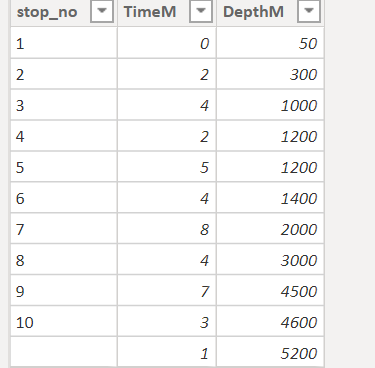
I only used 10 rows of your sample data

1.PNG


Did I answer your question? Mark my post as a solution!

Proud to be a Super User!


Anonymous
Not applicable

@ryan_mayu would I be able to plot DepthM vs TimeM then? 

I've also run into this:

The expression refers to multiple columns. Multiple columns cannot be converted to a scalar value.

@Anonymous 

Yes, I think so, that was a new table. could you please share more details of plotting depthM and timeM?


Did I answer your question? Mark my post as a solution!

Proud to be a Super User!


amitchandak
Super User
Super User

@Anonymous ,


timeM = maxx(filter(Table, [step_no] =earlier([step_no]) -1),[Time_no])


Depth M seems same as Depth from ?

Share with Power BI Enthusiasts: Full Power BI Video (20 Hours) YouTube
Microsoft Fabric Series 60+ Videos YouTube
Microsoft Fabric Hindi End to End YouTube
Anonymous
Not applicable

Hi @amitchandak thanks! couple of questions about this expression:

1. what is [Time_no] ?

2. can it be converted into a column instead?


Regarding Depth M, it is a copy of the column DepthTo starting from the second row down (first row is from the colmn DepthFrom).

Hope it makes it more understandable.

Anonymous
Not applicable

@amitchandak DepthM rows starting from the second are copies of rows from the DepthTo

Helpful resources

Announcements
Power BI DataViz World Championships

Power BI Dataviz World Championships

The Power BI Data Visualization World Championships is back! Get ahead of the game and start preparing now!

December 2025 Power BI Update Carousel

Power BI Monthly Update - December 2025

Check out the December 2025 Power BI Holiday Recap!

FabCon Atlanta 2026 carousel

FabCon Atlanta 2026

Join us at FabCon Atlanta, March 16-20, for the ultimate Fabric, Power BI, AI and SQL community-led event. Save $200 with code FABCOMM.