Join us at FabCon Atlanta from March 16 - 20, 2026, for the ultimate Fabric, Power BI, AI and SQL community-led event. Save $200 with code FABCOMM.
Register now!Get Fabric Certified for FREE during Fabric Data Days. Don't miss your chance! Request now
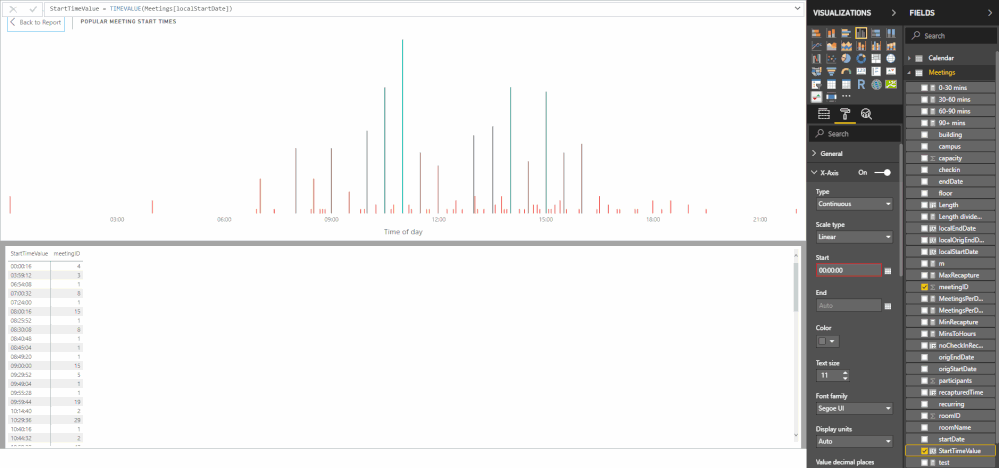
I have a stacked bar chart which uses a DAX calculater TIMEVALUE as the x-axis as follows:
StartTimeValue = TIMEVALUE(Meetings[localStartDate])
I have gone into Modelling and set the format of the data to TIME and using format of HH:mm:ss. If I look at the actual data it is displayed correctly.
However, depending on the filters I choose, the x-axis of the stacked bar chart changes based on the distribution of the data. I want to fix the x-axis to a 24-hour period: 00:00:00 -> 23:59:59. If I enter 00:00:00 in the Start box of the X-axis it goes red and is not accepted.
Any ideas on how to do this? What is it actually expecting in that field?
Thanks, Dave
hi,@banthorpe
After my test, the result is negative values indeed.
For your requirement, you could post your new idea in Power BI ideas and make this feature coming sooner.
Best Regards,
Lin
Interestingly if I set the format to date/time it shows the data as 30/12/1899 HH:mm:ss. Why such a wierd date?
Check out the November 2025 Power BI update to learn about new features.
Advance your Data & AI career with 50 days of live learning, contests, hands-on challenges, study groups & certifications and more!