Join us at FabCon Atlanta from March 16 - 20, 2026, for the ultimate Fabric, Power BI, AI and SQL community-led event. Save $200 with code FABCOMM.
Register now!Get Fabric Certified for FREE during Fabric Data Days. Don't miss your chance! Request now
Hello,
I have a bar chart, with daily count as bars and hours on x-axis, by default x-axis starts at 12:00am to 11:00pm but I want to start from 6:00am to 5:00am
Is it possible to do that
Current x-axis:
12:00 -- 1:00 -- 2:00 -- 3:00 ------ -----------------------11:00
Want
6:00 -- 7:00 -- 8:00 -----------------------------------------5:00
Solved! Go to Solution.
Hi @Anonymous,
You could create another table like below.
time Index
| 6:00 | 1 |
| 7:00 | 2 |
| 8:00 | 3 |
| 9:00 | 4 |
| 10:00 | 5 |
| 11:00 | 6 |
| 12:00 | 7 |
| 13:00 | 8 |
| 14:00 | 9 |
| 15:00 | 10 |
| 16:00 | 11 |
| 17:00 | 12 |
| 18:00 | 13 |
| 19:00 | 14 |
| 20:00 | 15 |
| 21:00 | 16 |
| 22:00 | 17 |
| 23:00 | 18 |
| 0:00 | 19 |
| 1:00 | 20 |
| 2:00 | 21 |
| 3:00 | 22 |
| 4:00 | 23 |
| 5:00 | 24 |
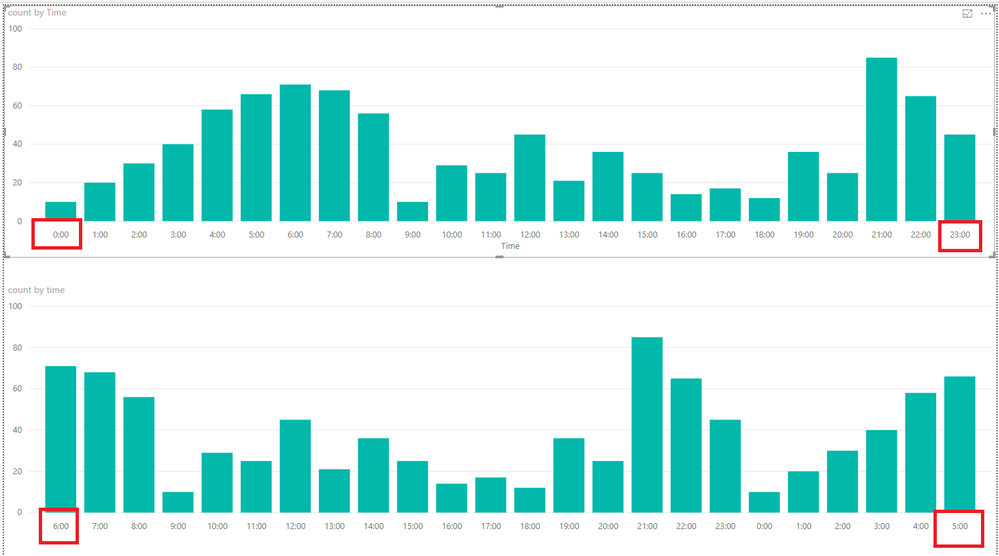
Then create the relationship between the two tables and go to data view, click time column>>sort by column>>select index like below.
Here is the output.
More details, you could refer to the attachment.
Best Regards,
Cherry
Hi @Anonymous,
You could create another table like below.
time Index
| 6:00 | 1 |
| 7:00 | 2 |
| 8:00 | 3 |
| 9:00 | 4 |
| 10:00 | 5 |
| 11:00 | 6 |
| 12:00 | 7 |
| 13:00 | 8 |
| 14:00 | 9 |
| 15:00 | 10 |
| 16:00 | 11 |
| 17:00 | 12 |
| 18:00 | 13 |
| 19:00 | 14 |
| 20:00 | 15 |
| 21:00 | 16 |
| 22:00 | 17 |
| 23:00 | 18 |
| 0:00 | 19 |
| 1:00 | 20 |
| 2:00 | 21 |
| 3:00 | 22 |
| 4:00 | 23 |
| 5:00 | 24 |
Then create the relationship between the two tables and go to data view, click time column>>sort by column>>select index like below.
Here is the output.
More details, you could refer to the attachment.
Best Regards,
Cherry
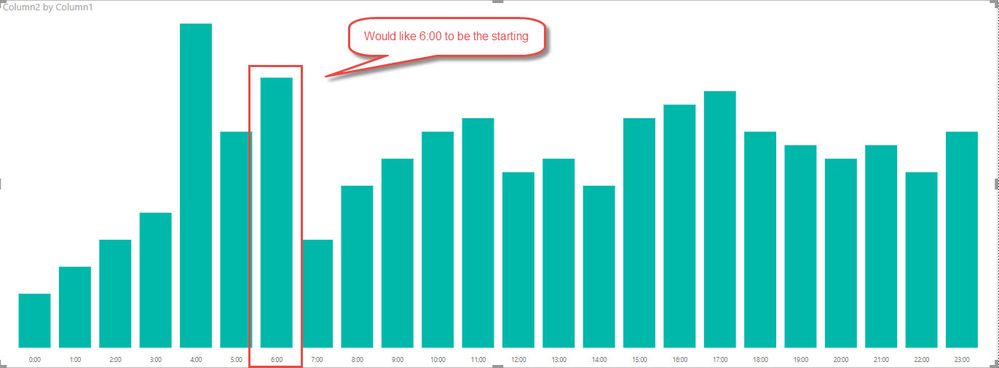
I just wanted to add a graphical representation of what I'm trying to do.
Check out the November 2025 Power BI update to learn about new features.
Advance your Data & AI career with 50 days of live learning, contests, hands-on challenges, study groups & certifications and more!