Join us at FabCon Atlanta from March 16 - 20, 2026, for the ultimate Fabric, Power BI, AI and SQL community-led event. Save $200 with code FABCOMM.
Register now!The Power BI Data Visualization World Championships is back! Get ahead of the game and start preparing now! Learn more
Hello,
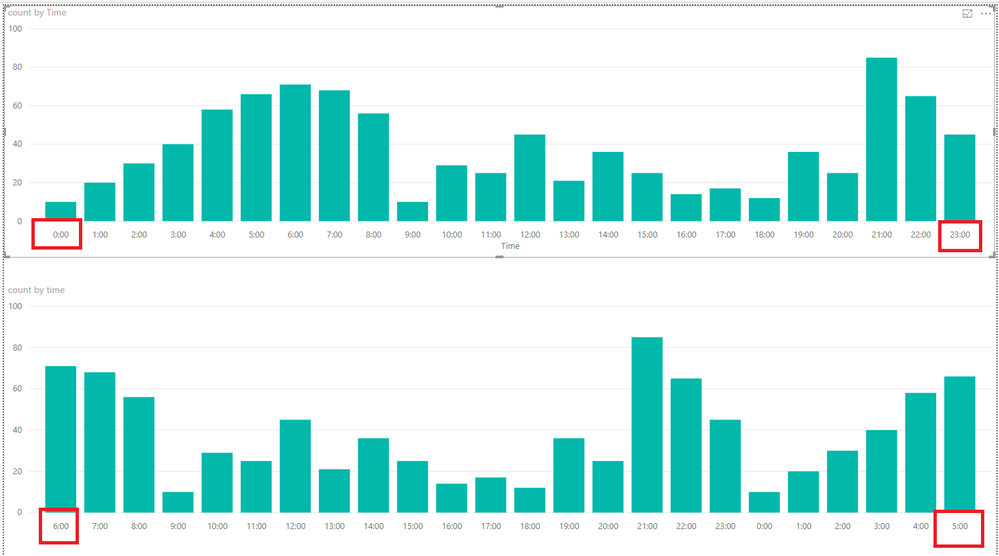
I have a bar chart, with daily count as bars and hours on x-axis, by default x-axis starts at 12:00am to 11:00pm but I want to start from 6:00am to 5:00am
Is it possible to do that
Current x-axis:
12:00 -- 1:00 -- 2:00 -- 3:00 ------ -----------------------11:00
Want
6:00 -- 7:00 -- 8:00 -----------------------------------------5:00
Solved! Go to Solution.
Hi @Anonymous,
You could create another table like below.
time Index
| 6:00 | 1 |
| 7:00 | 2 |
| 8:00 | 3 |
| 9:00 | 4 |
| 10:00 | 5 |
| 11:00 | 6 |
| 12:00 | 7 |
| 13:00 | 8 |
| 14:00 | 9 |
| 15:00 | 10 |
| 16:00 | 11 |
| 17:00 | 12 |
| 18:00 | 13 |
| 19:00 | 14 |
| 20:00 | 15 |
| 21:00 | 16 |
| 22:00 | 17 |
| 23:00 | 18 |
| 0:00 | 19 |
| 1:00 | 20 |
| 2:00 | 21 |
| 3:00 | 22 |
| 4:00 | 23 |
| 5:00 | 24 |
Then create the relationship between the two tables and go to data view, click time column>>sort by column>>select index like below.
Here is the output.
More details, you could refer to the attachment.
Best Regards,
Cherry
Hi @Anonymous,
You could create another table like below.
time Index
| 6:00 | 1 |
| 7:00 | 2 |
| 8:00 | 3 |
| 9:00 | 4 |
| 10:00 | 5 |
| 11:00 | 6 |
| 12:00 | 7 |
| 13:00 | 8 |
| 14:00 | 9 |
| 15:00 | 10 |
| 16:00 | 11 |
| 17:00 | 12 |
| 18:00 | 13 |
| 19:00 | 14 |
| 20:00 | 15 |
| 21:00 | 16 |
| 22:00 | 17 |
| 23:00 | 18 |
| 0:00 | 19 |
| 1:00 | 20 |
| 2:00 | 21 |
| 3:00 | 22 |
| 4:00 | 23 |
| 5:00 | 24 |
Then create the relationship between the two tables and go to data view, click time column>>sort by column>>select index like below.
Here is the output.
More details, you could refer to the attachment.
Best Regards,
Cherry
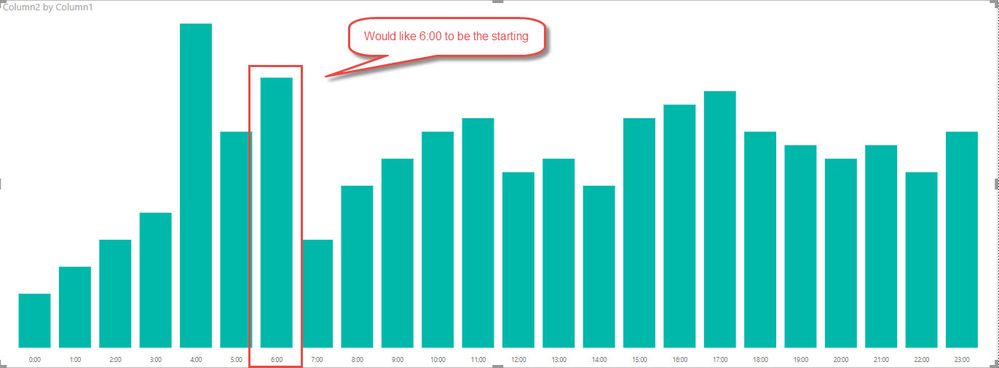
I just wanted to add a graphical representation of what I'm trying to do.
The Power BI Data Visualization World Championships is back! Get ahead of the game and start preparing now!
Check out the November 2025 Power BI update to learn about new features.
| User | Count |
|---|---|
| 59 | |
| 43 | |
| 42 | |
| 23 | |
| 17 |
| User | Count |
|---|---|
| 190 | |
| 122 | |
| 96 | |
| 66 | |
| 47 |