
cancel
Showing results for 
Search instead for 
Did you mean: 

The Power BI Data Visualization World Championships is back! Get ahead of the game and start preparing now! Learn more

Reply
NJ81858
Helper IV
Helper IV

Custom Total in Matrix

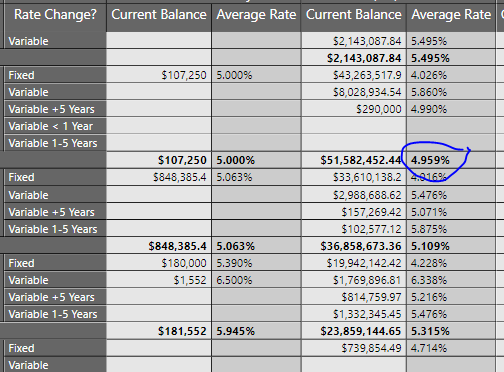
So I have this matrix that has rates and balances on it, inside each type I have a total, but it gives a flat rate average, when I want it to be a weighted average based on the current balance. I have this value calculated in my table, but there is nowhere to put it that it looks like a total.

Loan Int Rate Matrix.PNG

1 ACCEPTED SOLUTION

@NJ81858 Right, so as described in those articles, I generally get the measure correct for an individual row. Then, create a new measure that uses that measure for individual rows but performs a SUMMARIZE or GROUPBY for subtotal rows and grand total rows. You can use ISINSCOPE or HASONEVALUE to identify where you are in the hierarchy. 


Follow on LinkedIn
@ me in replies or I'll lose your thread!!!
Instead of a Kudo, please vote for this idea
Become an expert!: Enterprise DNA
External Tools: MSHGQM
YouTube Channel!: Microsoft Hates Greg
Latest book!:
DAX For Humans

DAX is easy, CALCULATE makes DAX hard...

View solution in original post

5 REPLIES 5
Greg_Deckler
Community Champion
Community Champion

@NJ81858 Here are two techniques for modifying the total row/aggregate row of a matrix:

This looks like a measure totals problem. Very common. See my post about it here: https://community.powerbi.com/t5/DAX-Commands-and-Tips/Dealing-with-Measure-Totals/td-p/63376

Also, this Quick Measure, Measure Totals, The Final Word should get you what you need:
https://community.powerbi.com/t5/Quick-Measures-Gallery/Measure-Totals-The-Final-Word/m-p/547907


Also, MM3TR&R: Matrix Measure Total Triple Threat Rock & Roll - Microsoft Power BI Community


Follow on LinkedIn
@ me in replies or I'll lose your thread!!!
Instead of a Kudo, please vote for this idea
Become an expert!: Enterprise DNA
External Tools: MSHGQM
YouTube Channel!: Microsoft Hates Greg
Latest book!:
DAX For Humans

DAX is easy, CALCULATE makes DAX hard...

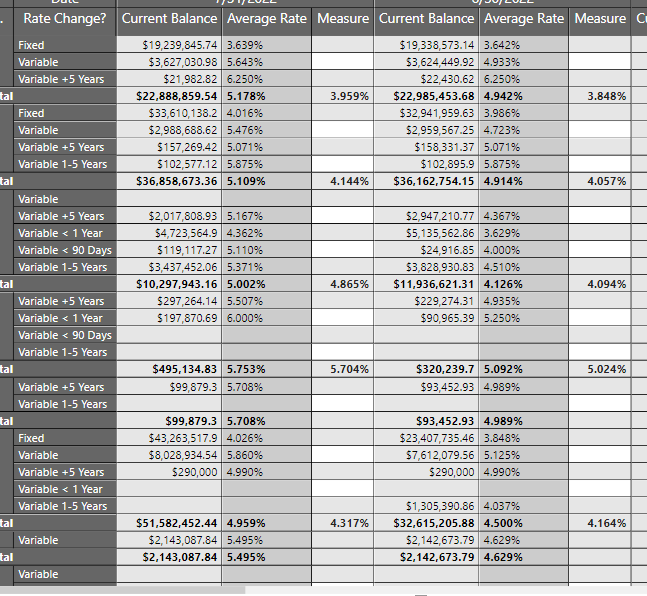
Update: I did get the correct measure, it just won't show up unless there is a subtotal in there with the wrong value.

Measure.PNG

This is what I have built out for a potential weighted average, but it isn't quite correct, as it just reflects every value, rather than being an average of the value. I also am having trouble getting it to show up as a row subtotal.WA of WA.PNG

@NJ81858 Right, so as described in those articles, I generally get the measure correct for an individual row. Then, create a new measure that uses that measure for individual rows but performs a SUMMARIZE or GROUPBY for subtotal rows and grand total rows. You can use ISINSCOPE or HASONEVALUE to identify where you are in the hierarchy. 


Follow on LinkedIn
@ me in replies or I'll lose your thread!!!
Instead of a Kudo, please vote for this idea
Become an expert!: Enterprise DNA
External Tools: MSHGQM
YouTube Channel!: Microsoft Hates Greg
Latest book!:
DAX For Humans

DAX is easy, CALCULATE makes DAX hard...

Helpful resources

Announcements
Power BI DataViz World Championships

Power BI Dataviz World Championships

The Power BI Data Visualization World Championships is back! Get ahead of the game and start preparing now!

December 2025 Power BI Update Carousel

Power BI Monthly Update - December 2025

Check out the December 2025 Power BI Holiday Recap!

FabCon Atlanta 2026 carousel

FabCon Atlanta 2026

Join us at FabCon Atlanta, March 16-20, for the ultimate Fabric, Power BI, AI and SQL community-led event. Save $200 with code FABCOMM.