This time we’re going bigger than ever. Fabric, Power BI, SQL, AI and more. We're covering it all. You won't want to miss it.
Learn moreLevel up your Power BI skills this month - build one visual each week and tell better stories with data! Get started
Hi all,
I’m relatively new to Power BI.
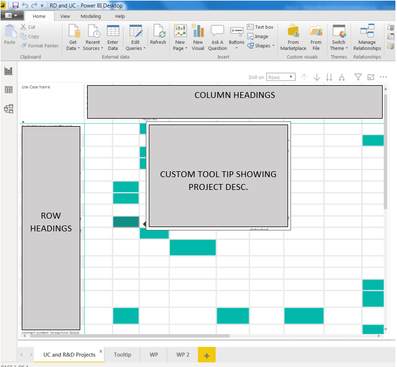
Trying to display data as a matrix with headings on columns and rows. These headings represent projects and the matrix shows where they overlap. I would like a description of these projects to be available to the user without them having to drill down and look for it. A tool tip is an ideal solution but I want the tool tip to show the description when you hover over the row or column title, not the data which is what I’ve achieved so far with custom tool tips. Is there a way to achieve this?
Hi @PBrady4 ,
You can refer to the document to learn more about creating Tooltip: Create tooltips based on report pages in Power BI Desktop.
Best Regards,
Amy
Community Support Team _ Amy
If this post helps, then please consider Accept it as the solution to help the other members find it more quickly.
Hi @v-xicai ,
Yep. That is the page I used to learn how to create custom tool tips. Unfortunatly following its directions is not giving me the result I want.
Regards,
Patsy
Use the tooltip page function. Just drop the description field in a card on the tooltip page, and then configure the tooltips in your matrix to look at that page
Check out the April 2026 Power BI update to learn about new features.
Sign up to receive a private message when registration opens and key events begin.
If you have recently started exploring Fabric, we'd love to hear how it's going. Your feedback can help with product improvements.
| User | Count |
|---|---|
| 35 | |
| 32 | |
| 26 | |
| 21 | |
| 18 |
| User | Count |
|---|---|
| 68 | |
| 36 | |
| 32 | |
| 25 | |
| 23 |