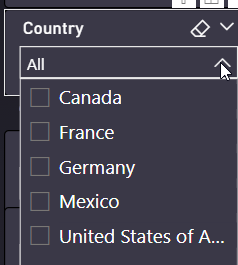
With the newest desktop push, our previous .json color themes no longer work and throw many different errors.
I started with a new .pbix file, and started rebuilding the color theme from scratch. However, I cannot figure out how to set the background color for slicers.
I have reviewed the .json documentation, but am getting an error when trying to add anything to this section which is working.
 "slicer": {
      "*": {
        "background": [
          {
            "color": {
              "solid": {
                "color": "#3A3847"
              }
            },
            "transparency": 0
          }
        ],
        "outspace": [
          {
            "color": {
              "solid": {
                "color": "#3A3847"
              }
            }
          }
        ]
      }
    }
However, slicers look like then when clicked, and users cannot read the items for selection. I am trying to change the color of this background in the dropdown to match the darker color, while also having white text, so that users can see their selections.
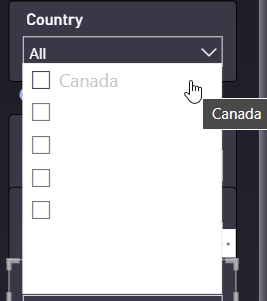
Here's the full .json I have so far.
{
  "name": "User Dark Theme",
  "dataColors": [
    "#00FFB0",
    "#2155FF",
    "#F8B225",
    "#F600ED",
    "#F600ED",
    "#6D63FF",
    "#FF707A",
    "#E5EFD8",
    "#3599B8",
    "#DFBFBF",
    "#4AC5BB",
    "#5F6B6D",
    "#FB8281",
    "#F4D25A",
    "#7F898A",
    "#A4DDEE",
    "#FDAB89",
    "#B687AC",
    "#28738A",
    "#A78F8F",
    "#168980",
    "#293537",
    "#BB4A4A",
    "#B59525",
    "#475052",
    "#6A9FB0",
    "#BD7150",
    "#7B4F71",
    "#1B4D5C",
    "#706060",
    "#0F5C55",
    "#1C2325"
  ],
  "bad": "#C4314B",
  "neutral": "#FDB913",
  "good": "#92C353",
  "foreground": "#FFFFFF",
  "foregroundNeutralSecondary": "#FFFFFF",
  "backgroundLight": "#3C395D",
  "foregroundNeutralTertiary": "#C2C2C2",
  "background": "#11111C",
  "backgroundNeutral": "#85858D",
  "visualStyles": {
    "*": {
      "*": {
        "background": [
          {
            "color": {
              "solid": {
                "color": "#000000"
              }
            },
            "transparency": 69
          }
        ],
        "border": [
          {
            "show": true,
            "radius": 4
          }
        ],
        "outspacePane": [
          {
            "backgroundColor": {
              "solid": {
                "color": "#726E8A"
              }
            }
          }
        ],
        "filterCard": [
          {
            "$id": "Available",
            "backgroundColor": {
              "solid": {
                "color": "#726E8A"
              }
            },
            "foregroundColor": {
              "solid": {
                "color": "#FFFFFF"
              }
            },
            "transparency": 0
          },
          {
            "$id": "Applied",
            "foregroundColor": {
              "solid": {
                "color": "#FFFFFF"
              }
            }
          }
        ]
      }
    },
    "page": {
      "*": {
        "background": [
          {
            "color": {
              "solid": {
                "color": "#3A3847"
              }
            },
            "transparency": 0
          }
        ],
        "outspace": [
          {
            "color": {
              "solid": {
                "color": "#3A3847"
              }
            }
          }
        ]
      }
    },
    "slicer": {
      "*": {
        "background": [
          {
            "color": {
              "solid": {
                "color": "#3A3847"
              }
            },
            "transparency": 0
          }
        ],
        "outspace": [
          {
            "color": {
              "solid": {
                "color": "#3A3847"
              }
            }
          }
        ]
      }
    }
  },

  "textClasses": {
    "label": {
      "color": "#FFFFFF"
    },
    "callout": {
      "color": "#FFFFFF"
    },
    "title": {
      "color": "#FFFFFF"
    },
    "header": {
      "color": "#FFFFFF"
    }
  }
}