
Join us at FabCon Atlanta from March 16 - 20, 2026, for the ultimate Fabric, Power BI, AI and SQL community-led event. Save $200 with code FABCOMM.
Register now!The Power BI Data Visualization World Championships is back! Get ahead of the game and start preparing now! Learn more
I have followed the steps of this answer and this answer, but neither of them are working.
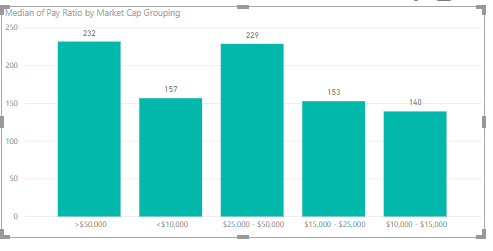
I have this chart:
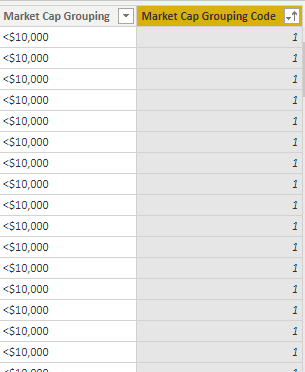
That I want sort logically, so I created this column in the S&P 500 data table:
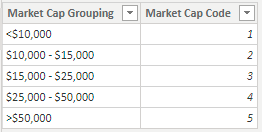
Then created this table:
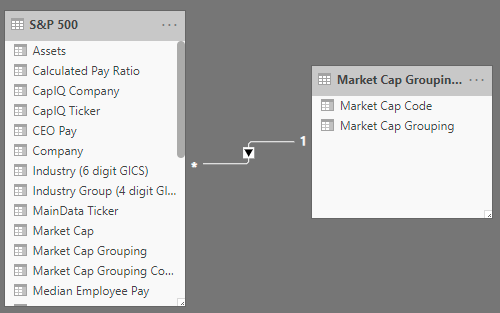
and related it to my main table:
to create this related column:
Then I sorted the S&P 500 data table by that column:
But my column chart is still not sorted. Further, If I click on the actual chart and go to the Modeling tab, nothing happens when I click the "Sort by Column" button. How can I sort this chart?
Solved! Go to Solution.
You should just need to Sort by Column on the Market Cap Grouping (the same one you're using for your x-axis) based on your your Market Cap Code.
So after you created your Market Cap Grouping table, go into Data > Select your Market Cap Grouping column > Modeling > Sort by Column > Market Cap Code
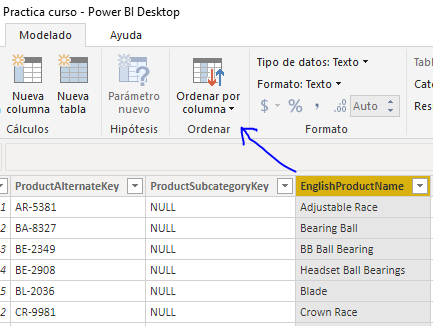
Hi. Selecct you market cup grouping and the under "modeling tab -> sort by column". Then select marrket cap code. Like this:
Ordenar columna por
Then you can build the visualization again or change the sort to refresh the changes.
Hope this helps,
If this post helps, then please consider Accept it as the solution to help the other members find it more quickly.
Happy to help!
You should just need to Sort by Column on the Market Cap Grouping (the same one you're using for your x-axis) based on your your Market Cap Code.
So after you created your Market Cap Grouping table, go into Data > Select your Market Cap Grouping column > Modeling > Sort by Column > Market Cap Code
The Power BI Data Visualization World Championships is back! Get ahead of the game and start preparing now!
| User | Count |
|---|---|
| 40 | |
| 35 | |
| 34 | |
| 31 | |
| 28 |
| User | Count |
|---|---|
| 137 | |
| 102 | |
| 68 | |
| 66 | |
| 64 |