Learn from the best! Meet the four finalists headed to the FINALS of the Power BI Dataviz World Championships! Register now
Hi all,
Has there been any progress with getting a customer sort feature in the visualizations?
I haven't seen any real solutions to this in previous posts I've read.
The only work arounds I've read are to create a measure (limited sucess) or sorting by another column, which I wasn't able to do.
Thank you,
Mike
Solved! Go to Solution.
You may take a look at Sort by column in Power BI Desktop.
Hi Sam,
I tried this and it is still not allowing me to sort as I would like.
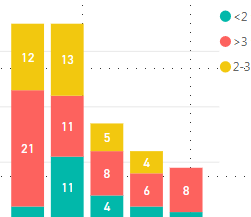
The Legend categories inlcudes (<2, >3, and 2-3), in that order, and I would like to sort as <2, 2-3, and >3.
Is there a way I can facilitate this type of sort, which would put the stacked data bars in this way as well?
If you have recently started exploring Fabric, we'd love to hear how it's going. Your feedback can help with product improvements.
A new Power BI DataViz World Championship is coming this June! Don't miss out on submitting your entry.
Share feedback directly with Fabric product managers, participate in targeted research studies and influence the Fabric roadmap.
| User | Count |
|---|---|
| 57 | |
| 38 | |
| 34 | |
| 19 | |
| 16 |
| User | Count |
|---|---|
| 68 | |
| 67 | |
| 42 | |
| 30 | |
| 26 |