cancel
Showing results for 
Search instead for 
Did you mean: 

Vote for your favorite vizzies from the Power BI Dataviz World Championship submissions. Vote now!

Reply
Brite
Helper I
Helper I

Custom Quarter Column

Hello,


I am trying to create a custom column with the below requirements:


1) If the Month has more than 30 days, then the quarter should be the same until the next Sunday date

2) Else return the next quarter 


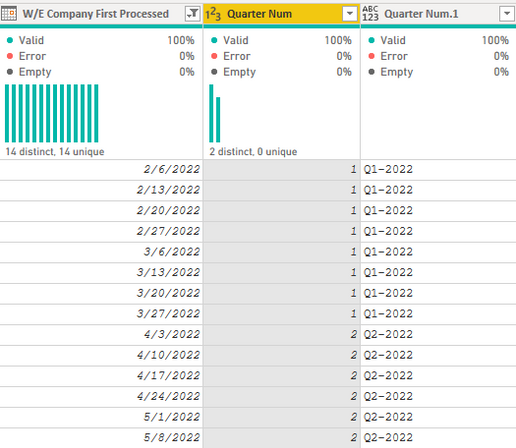
This is an example of what I have now

Brite_2-1652726509209.png


I am looking for:

(March 2022 had 31 days and the next Sunday was 04/03 therefore any day up until the next Sunday (04/03) should be Quarter 1)

W/E Company First Processed   Quarter Num                                 Quarter Num.1

2/6/2022                              1                                                      Q1-2022              
2/13/20221Q1-2022
2/20/20221Q1-2022
2/27/20221Q1-2022
3/6/20221Q1-2022
3/13/20221Q1-2022
3/20/20221Q1-2022
3/27/20221Q1-2022
4/3/20221Q1-2022
4/10/20222Q2-2022
4/17/20222Q2-2022
4/24/20222Q2-2022
5/1/20222Q2-2022
5/8/20222Q2-2022


1 ACCEPTED SOLUTION
v-yalanwu-msft
Community Support
Community Support

Hi, @Brite ;

You add custom in powerbi query.

[date]-#duration(1,0,0,0)
= Table.AddColumn(#"Added Custom", "Start of Week", each Date.StartOfWeek([Custom])+#duration(1,0,0,0))
= Table.AddColumn(#"Inserted Start of Week", "Quarter1", each Date.QuarterOfYear([Start of Week]), Int64.Type)
= Table.RemoveColumns(#"Inserted Quarter",{"Custom", "Start of Week"})

M lanuage:

let
    Source = Table.FromRows(Json.Document(Binary.Decompress(Binary.FromText("fc1BCoAwDETRq0jWlTSTaL1G16X3v0atiCAkXWQRHsxvjcAnIwMbJZL7quzzpZ6miT7oGvLCSmT69lyKc7rI6SJnHE4ayzc5r+JnJTZYZAdLTJdLfQA=", BinaryEncoding.Base64), Compression.Deflate)), let _t = ((type nullable text) meta [Serialized.Text = true]) in type table [#"W/E Company" = _t, num = _t, Quarter = _t]),
    #"Changed Type" = Table.TransformColumnTypes(Source,{{"W/E Company", type date}, {"num", Int64.Type}, {"Quarter", type text}}),
    #"Renamed Columns" = Table.RenameColumns(#"Changed Type",{{"W/E Company", "date"}}),
    #"Added Custom" = Table.AddColumn(#"Renamed Columns", "Custom", each [date]-#duration(1,0,0,0)),
    #"Inserted Start of Week" = Table.AddColumn(#"Added Custom", "Start of Week", each Date.StartOfWeek([Custom])+#duration(1,0,0,0)),
    #"Inserted Quarter" = Table.AddColumn(#"Inserted Start of Week", "Quarter1", each Date.QuarterOfYear([Start of Week]), Int64.Type),
    #"Removed Columns1" = Table.RemoveColumns(#"Inserted Quarter",{"Custom", "Start of Week"})
in
    #"Removed Columns1"

The final show:

vyalanwumsft_0-1652932789178.png


Best Regards,
Community Support Team _ Yalan Wu
If this post helps, then please consider Accept it as the solution to help the other members find it more quickly.

View solution in original post

1 REPLY 1
v-yalanwu-msft
Community Support
Community Support

Hi, @Brite ;

You add custom in powerbi query.

[date]-#duration(1,0,0,0)
= Table.AddColumn(#"Added Custom", "Start of Week", each Date.StartOfWeek([Custom])+#duration(1,0,0,0))
= Table.AddColumn(#"Inserted Start of Week", "Quarter1", each Date.QuarterOfYear([Start of Week]), Int64.Type)
= Table.RemoveColumns(#"Inserted Quarter",{"Custom", "Start of Week"})

M lanuage:

let
    Source = Table.FromRows(Json.Document(Binary.Decompress(Binary.FromText("fc1BCoAwDETRq0jWlTSTaL1G16X3v0atiCAkXWQRHsxvjcAnIwMbJZL7quzzpZ6miT7oGvLCSmT69lyKc7rI6SJnHE4ayzc5r+JnJTZYZAdLTJdLfQA=", BinaryEncoding.Base64), Compression.Deflate)), let _t = ((type nullable text) meta [Serialized.Text = true]) in type table [#"W/E Company" = _t, num = _t, Quarter = _t]),
    #"Changed Type" = Table.TransformColumnTypes(Source,{{"W/E Company", type date}, {"num", Int64.Type}, {"Quarter", type text}}),
    #"Renamed Columns" = Table.RenameColumns(#"Changed Type",{{"W/E Company", "date"}}),
    #"Added Custom" = Table.AddColumn(#"Renamed Columns", "Custom", each [date]-#duration(1,0,0,0)),
    #"Inserted Start of Week" = Table.AddColumn(#"Added Custom", "Start of Week", each Date.StartOfWeek([Custom])+#duration(1,0,0,0)),
    #"Inserted Quarter" = Table.AddColumn(#"Inserted Start of Week", "Quarter1", each Date.QuarterOfYear([Start of Week]), Int64.Type),
    #"Removed Columns1" = Table.RemoveColumns(#"Inserted Quarter",{"Custom", "Start of Week"})
in
    #"Removed Columns1"

The final show:

vyalanwumsft_0-1652932789178.png


Best Regards,
Community Support Team _ Yalan Wu
If this post helps, then please consider Accept it as the solution to help the other members find it more quickly.
Helpful resources

Announcements
Power BI DataViz World Championships

Power BI Dataviz World Championships

Vote for your favorite vizzies from the Power BI World Championship submissions!

Sticker Challenge 2026 Carousel

Join our Community Sticker Challenge 2026

If you love stickers, then you will definitely want to check out our Community Sticker Challenge!

January Power BI Update Carousel

Power BI Monthly Update - January 2026

Check out the January 2026 Power BI update to learn about new features.

FabCon Atlanta 2026 carousel

FabCon Atlanta 2026

Join us at FabCon Atlanta, March 16-20, for the ultimate Fabric, Power BI, AI and SQL community-led event. Save $200 with code FABCOMM.