- Power BI forums
- Get Help with Power BI
- Desktop
- Service
- Report Server
- Power Query
- Mobile Apps
- Developer
- DAX Commands and Tips
- Custom Visuals Development Discussion
- Health and Life Sciences
- Power BI Spanish forums
- Translated Spanish Desktop
- Training and Consulting
- Instructor Led Training
- Dashboard in a Day for Women, by Women
- Galleries
- Data Stories Gallery
- Themes Gallery
- Contests Gallery
- QuickViz Gallery
- Quick Measures Gallery
- Visual Calculations Gallery
- Notebook Gallery
- Translytical Task Flow Gallery
- TMDL Gallery
- R Script Showcase
- Webinars and Video Gallery
- Ideas
- Custom Visuals Ideas (read-only)
- Issues
- Issues
- Events
- Upcoming Events
We've captured the moments from FabCon & SQLCon that everyone is talking about, and we are bringing them to the community, live and on-demand. Starts on April 14th. Register now
- Power BI forums
- Forums
- Get Help with Power BI
- Desktop
- Re: Custom Month Creation
- Subscribe to RSS Feed
- Mark Topic as New
- Mark Topic as Read
- Float this Topic for Current User
- Bookmark
- Subscribe
- Printer Friendly Page

- Mark as New
- Bookmark
- Subscribe
- Mute
- Subscribe to RSS Feed
- Permalink
- Report Inappropriate Content
Custom Month Creation
Hey all,
I'm trying to do calculations for a time report but hitting a snag because we report time from the 25th of each month to the 24th of the next, rather than on the calendar months. So for January's time report we actually need to pull Dec. 25th-Jan 24th. Is there a way to create a custom month table so that in the slicer when I pick January it automatically pulls from the 25th of the previous month.
The relative date filter isn't working for my matrix currently because it is pulling ALL dates instead of just the ones I choose.
Solved! Go to Solution.


- Mark as New
- Bookmark
- Subscribe
- Mute
- Subscribe to RSS Feed
- Permalink
- Report Inappropriate Content
@cedmiston - You could create additional columns as:
NewMonthNum =
IF (
    DAY ( 'Table'[Date] ) < 25,
    MONTH ( 'Table'[Date] ),
    MOD ( MONTH ( 'Table'[Date] ) + 1, 12 )
)
and
SwitchMonthName =
SWITCH(
    TRUE(),
    'Table'[NewMonthNum] = 1, "Jan",
    'Table'[NewMonthNum] = 2, "Feb",
    "etc"
)
Then you could use this as your slicer.
Did I answer your question? Mark my post as a solution!
Did my answers help arrive at a solution? Give it a kudos by clicking the Thumbs Up!
Proud to be a Super User!

- Mark as New
- Bookmark
- Subscribe
- Mute
- Subscribe to RSS Feed
- Permalink
- Report Inappropriate Content
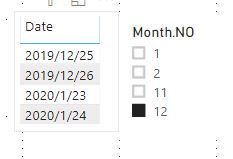
Try create a month column, should be something like this:
Month.NO =
VAR Monthno_ =SWITCH (TRUE(),
    'Table'[Date].[Day]<25, MONTH([Date])-1,
    'Table'[Date].[Day]>=25,MONTH('Table'[Date]))
RETURN IF(Monthno_=0, MONTH(CALCULATE(MAX([Date]),FILTER('Table',[Date].[Year]=EARLIER('Table'[Date].[Year])-1))),Monthno_)
Paul Zheng
If this post helps, then please consider Accept it as the solution to help the other members find it more quickly.


- Mark as New
- Bookmark
- Subscribe
- Mute
- Subscribe to RSS Feed
- Permalink
- Report Inappropriate Content
Good morning cedmiston,
Hereby my Power query solution:
- I've created a custom function "SetCustomMonth" that retunrs the month number based on another start day (25 instead of 1 in your example)
- you can invoke this function in Power Query to create a new column for your month.
/*
Return the month number based on a custom start day of month
For example, if inputStartDayofMonth = 25 and inputDate = 1/17/2019 then it will return 1 (January)
For example, if inputStartDayofMonth = 25 and inputDate = 1/26/2019 then it will return 2 (February)

Parameter
    inputDate: Date for which the month needs to be defined.
    inputStartDayofMonth: the day of the month that is considered as the first day of the month.

Disclaimer:
   - the date column used must always have a value otherwise an error will be thrown
   - This function won't work yet with a inputStartDayofMonth of 31

homepage: <>
*/

let
    SetCustomMonth = (inputDate as date, inputStartDayofMonth as number) as number =>
        let
            //get day in Gregorian calendar month
            DayofMonth = Date.Day(inputDate),

            //Year input date
            YearInputDate = Date.Year(inputDate),

            //Month input date
            MonthInputDate = Date.Month(inputDate),

            //Month input date + 1 month
            MonthInputDatePlus1mth = Date.Month(Date.AddMonths(inputDate,1)),

            //DayofMonthBased is the difference in day between the inputDate and the start periode
            CustomMonth =
            if
                DayofMonth >= inputStartDayofMonth
            then
                MonthInputDatePlus1mth
            else
                MonthInputDate
        in
            CustomMonth
in
    SetCustomMonth
Did I answer your question, please mark my post as a solution
If you liked my solution, please give it a thumbs up.
Thank you and keep up the good job!
Kind regards,
Lohic Beneyzet
- Mark as New
- Bookmark
- Subscribe
- Mute
- Subscribe to RSS Feed
- Permalink
- Report Inappropriate Content
Try create a month column, should be something like this:
Month.NO =
VAR Monthno_ =SWITCH (TRUE(),
    'Table'[Date].[Day]<25, MONTH([Date])-1,
    'Table'[Date].[Day]>=25,MONTH('Table'[Date]))
RETURN IF(Monthno_=0, MONTH(CALCULATE(MAX([Date]),FILTER('Table',[Date].[Year]=EARLIER('Table'[Date].[Year])-1))),Monthno_)
Paul Zheng
If this post helps, then please consider Accept it as the solution to help the other members find it more quickly.
- Mark as New
- Bookmark
- Subscribe
- Mute
- Subscribe to RSS Feed
- Permalink
- Report Inappropriate Content
- Mark as New
- Bookmark
- Subscribe
- Mute
- Subscribe to RSS Feed
- Permalink
- Report Inappropriate Content
@cedmiston - You could create additional columns as:
NewMonthNum =
IF (
    DAY ( 'Table'[Date] ) < 25,
    MONTH ( 'Table'[Date] ),
    MOD ( MONTH ( 'Table'[Date] ) + 1, 12 )
)
and
SwitchMonthName =
SWITCH(
    TRUE(),
    'Table'[NewMonthNum] = 1, "Jan",
    'Table'[NewMonthNum] = 2, "Feb",
    "etc"
)
Then you could use this as your slicer.
Did I answer your question? Mark my post as a solution!
Did my answers help arrive at a solution? Give it a kudos by clicking the Thumbs Up!
Proud to be a Super User!
- Mark as New
- Bookmark
- Subscribe
- Mute
- Subscribe to RSS Feed
- Permalink
- Report Inappropriate Content
This worked great thank you!
There was one bug in that the end of November (25-30) showed up as 0 instead of 1-12, but I just added this to the switch formula as well to populate as our "December".
Helpful resources

New to Fabric Survey
If you have recently started exploring Fabric, we'd love to hear how it's going. Your feedback can help with product improvements.

Power BI DataViz World Championships - June 2026
A new Power BI DataViz World Championship is coming this June! Don't miss out on submitting your entry.

Join our Fabric User Panel
Share feedback directly with Fabric product managers, participate in targeted research studies and influence the Fabric roadmap.

Power BI Community Update - March 2026
Check out the March 2026 Power BI update to learn about new features.

| User | Count |
|---|---|
| 57 | |
| 38 | |
| 33 | |
| 19 | |
| 16 |


| User | Count |
|---|---|
| 67 | |
| 66 | |
| 40 | |
| 34 | |
| 25 |


