
Join us at FabCon Atlanta from March 16 - 20, 2026, for the ultimate Fabric, Power BI, AI and SQL community-led event. Save $200 with code FABCOMM.
Register now!Get Fabric certified for FREE! Don't miss your chance! Learn more
Hi All,
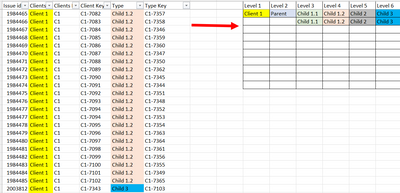
I am trying to achieve the below hierarchy in PQ, but not getting much success. Any chance of help?
Expected outcome:
Sample file link.
Many thanks
Solved! Go to Solution.
Hey
I have tried the same and achieve the hierarchy you have mentioned.
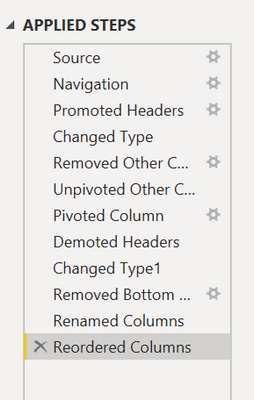
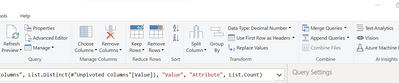
please find the Screenshots for your reference.
Let me describe you the Applied Steps:
1. Unpivot the Type column
2. Pivot the value column by keeping Attribute in value dropdown.
3. Use Headers as First Row.
4. Remove the Bottom row (1).
5. Rename the Column names as per your levels,
6. Sort the columns as required.
Please like the solution if you got success.
Hey
I have tried the same and achieve the hierarchy you have mentioned.
please find the Screenshots for your reference.
Let me describe you the Applied Steps:
1. Unpivot the Type column
2. Pivot the value column by keeping Attribute in value dropdown.
3. Use Headers as First Row.
4. Remove the Bottom row (1).
5. Rename the Column names as per your levels,
6. Sort the columns as required.
Please like the solution if you got success.
Any chance of sharing the working files please? You can use this free site to upload it. thanks "https://easyupload.io/!
Share feedback directly with Fabric product managers, participate in targeted research studies and influence the Fabric roadmap.
Check out the February 2026 Power BI update to learn about new features.
| User | Count |
|---|---|
| 68 | |
| 60 | |
| 47 | |
| 20 | |
| 16 |