Get Fabric or SQL Certified for Free.
Get certified for free when you join Fabric Data Days 2026 and dive into Fabric, Power BI, SQL, AI, and other essential data skills.
Join now- Power BI forums
- Get Help with Power BI
- Desktop
- Service
- Report Server
- Power Query
- Mobile Apps
- Developer
- DAX Commands and Tips
- Custom Visuals Development Discussion
- Health and Life Sciences
- Power BI Spanish forums
- Translated Spanish Desktop
- Training and Consulting
- Instructor Led Training
- Dashboard in a Day for Women, by Women
- Galleries
- Data Stories Gallery
- Themes Gallery
- Contests Gallery
- QuickViz Gallery
- Quick Measures Gallery
- Visual Calculations Gallery
- Notebook Gallery
- Translytical Task Flow Gallery
- TMDL Gallery
- R Script Showcase
- Webinars and Video Gallery
- Ideas
- Custom Visuals Ideas (read-only)
- Issues
- Issues
- Events
- Upcoming Events
Try your skills in the Power BI Dataviz World Championship! Round one ends June 26. Join now
- Power BI forums
- Forums
- Get Help with Power BI
- Desktop
- Re: Custom Date
- Subscribe to RSS Feed
- Mark Topic as New
- Mark Topic as Read
- Float this Topic for Current User
- Bookmark
- Subscribe
- Printer Friendly Page

- Mark as New
- Bookmark
- Subscribe
- Mute
- Subscribe to RSS Feed
- Permalink
- Report Inappropriate Content
Custom Date
Hi All,
I want to make my custome date where I need to show only as per example formate. "SEP-08-MON".
I tried with hirarchies but still not getting the required result.
If any one know please share.
Here is the file link current date view.
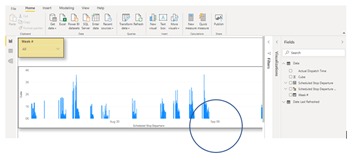
Thanks
Solved! Go to Solution.


- Mark as New
- Bookmark
- Subscribe
- Mute
- Subscribe to RSS Feed
- Permalink
- Report Inappropriate Content
Hey @Anonymous ,
you can use DAX to create column in your Calendar table like this:
Custom Date =
FORMAT('Calendar'[Date] , "MMM-DD-DDD")
The result will look like this, here a table visual:
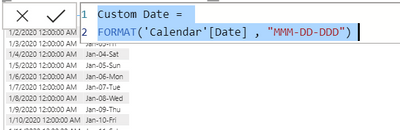
Just use the column Custom Date on the axis.
Please be aware that data of multiple years might be aggregated.
Hopefully, this provides what you are looking for.
Regards,
Tom
Did I answer your question? Mark my post as a solution, this will help others!
Proud to be a Super User!
I accept Kudos 😉
Hamburg, Germany

- Mark as New
- Bookmark
- Subscribe
- Mute
- Subscribe to RSS Feed
- Permalink
- Report Inappropriate Content
Hello @Amjad ,
Create a new custom date column with the following DAX:
Give it a thumbs up if this post helped you in any way and mark this post as a solution if you solved your !!!
- Mark as New
- Bookmark
- Subscribe
- Mute
- Subscribe to RSS Feed
- Permalink
- Report Inappropriate Content
- Mark as New
- Bookmark
- Subscribe
- Mute
- Subscribe to RSS Feed
- Permalink
- Report Inappropriate Content
Hello @Amjad ,
just use the formula of my post, it is exactly the same formula published by @Anand24, only without the UPPER. Looks like I assumed you didn't need all the uppercase and lowercase characters.
Best regards
Tom
Did I answer your question? Mark my post as a solution, this will help others!
Proud to be a Super User!
I accept Kudos 😉
Hamburg, Germany
- Mark as New
- Bookmark
- Subscribe
- Mute
- Subscribe to RSS Feed
- Permalink
- Report Inappropriate Content
Hello @Amjad ,
Create a new custom date column with the following DAX:
Give it a thumbs up if this post helped you in any way and mark this post as a solution if you solved your !!!
- Mark as New
- Bookmark
- Subscribe
- Mute
- Subscribe to RSS Feed
- Permalink
- Report Inappropriate Content
Hey Anand,
If I need to make"Sep-08-Tue" is there other DAX?
Thanks
- Mark as New
- Bookmark
- Subscribe
- Mute
- Subscribe to RSS Feed
- Permalink
- Report Inappropriate Content
Hello @Amjad ,
just use the formula of my post, it is exactly the same formula published by @Anand24, only without the UPPER. Looks like I assumed you didn't need all the uppercase and lowercase characters.
Best regards
Tom
Did I answer your question? Mark my post as a solution, this will help others!
Proud to be a Super User!
I accept Kudos 😉
Hamburg, Germany
- Mark as New
- Bookmark
- Subscribe
- Mute
- Subscribe to RSS Feed
- Permalink
- Report Inappropriate Content
Hi Tom,
Yes I did and got solution thanks. I am stuck with one area. currently, I am making week number from my Schedule Stop Departure,
(Week = WEEKNUM(Data[Scheduled Stop Departure - Copy],1),but I want to make week canlander as per my orgnization weeks calander which is diffrent than general calander.
For example, next year 2021 my week 1 will be start 03/Jan/2021. but in excel if you type 03/jan/2021 and use Weeknum function it will show week 2. I want to make calander that match to my orgnization canlander.
If you could help will be appreciated.
Thanks
- Mark as New
- Bookmark
- Subscribe
- Mute
- Subscribe to RSS Feed
- Permalink
- Report Inappropriate Content
Hey @Anonymous ,
I have no idea, how to make the date 2021-01-03 the start of the second week of the year, as I'm just experienced with ISO dates, and ISO weeks.
If you get to know how your company calendar is different from the ISO calendar you can create a little algorithm that aligns the week number in Power BI to the week number of your company.
I guess you have to talk to your IT department, or to the sales department, as sometimes the calendar is defined by the sales department.
Regards,
Tom
Did I answer your question? Mark my post as a solution, this will help others!
Proud to be a Super User!
I accept Kudos 😉
Hamburg, Germany
- Mark as New
- Bookmark
- Subscribe
- Mute
- Subscribe to RSS Feed
- Permalink
- Report Inappropriate Content
Hi Tom,
Yes I made on excel but I want to make from my original data thats the challenge.
But thanks.
Thanks
Amjad
- Mark as New
- Bookmark
- Subscribe
- Mute
- Subscribe to RSS Feed
- Permalink
- Report Inappropriate Content
I found it how to. I just need to remove Upper and it work.
- Mark as New
- Bookmark
- Subscribe
- Mute
- Subscribe to RSS Feed
- Permalink
- Report Inappropriate Content
Thanks Anand.
It is working.
- Mark as New
- Bookmark
- Subscribe
- Mute
- Subscribe to RSS Feed
- Permalink
- Report Inappropriate Content
Hi Anand,
eventhough I have timing in my Schedule Departure stop?
- Mark as New
- Bookmark
- Subscribe
- Mute
- Subscribe to RSS Feed
- Permalink
- Report Inappropriate Content
Hey @Anonymous ,
you can use DAX to create column in your Calendar table like this:
Custom Date =
FORMAT('Calendar'[Date] , "MMM-DD-DDD")
The result will look like this, here a table visual:
Just use the column Custom Date on the axis.
Please be aware that data of multiple years might be aggregated.
Hopefully, this provides what you are looking for.
Regards,
Tom
Did I answer your question? Mark my post as a solution, this will help others!
Proud to be a Super User!
I accept Kudos 😉
Hamburg, Germany
- Mark as New
- Bookmark
- Subscribe
- Mute
- Subscribe to RSS Feed
- Permalink
- Report Inappropriate Content
Hi Tom,
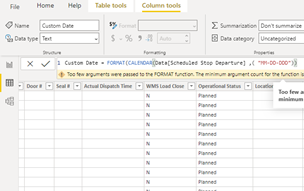
I tried to create colmun and I got error in result.
I am not sure I am doing correct. I am using Schedule Stop Departure column.
Thanks

- Mark as New
- Bookmark
- Subscribe
- Mute
- Subscribe to RSS Feed
- Permalink
- Report Inappropriate Content
@Anonymous,
Try this considering name of table is "Data":
Custom Date = FORMAT(Data[Scheduled Stop Departure],"MMM-DD-DDD"))
Give a thumbs up if this post helped you in any way and mark this post as solution if it solved your query !!!
Helpful resources

Data Days 2026
Don't miss out on Data Days, June 15 through August 7. Learn Fabric, Power BI, SQL, AI and more.

Power BI DataViz World Championships - June 2026
A new Power BI DataViz World Championship is coming this June! Don't miss out on submitting your entry.

| User | Count |
|---|---|
| 22 | |
| 22 | |
| 20 | |
| 19 | |
| 11 |


| User | Count |
|---|---|
| 65 | |
| 54 | |
| 46 | |
| 44 | |
| 31 |


