Don't miss your chance to take exam DP-600 or DP-700 on us!
Request nowLearn from the best! Meet the four finalists headed to the FINALS of the Power BI Dataviz World Championships! Register now
Hi,
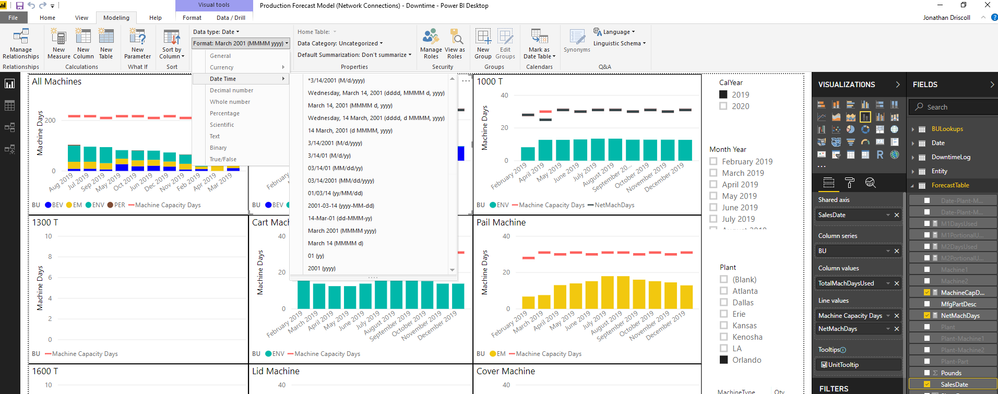
I am trying to format a date column as MMM YYYY. I see that there is MMMM YYYY, but this takes up a lot of space on the x-axis of my charts. Is there a way to plug in the custom format of MMM YYYY?
Thanks!
@Anonymous ,
There's no such built-in format. So you may use dax function to construct such format using FORMAT(<value>, <format_string>), CONCATENATEX(<table>, <expression>, [delimiter]) and other string implementation functions.
Community Support Team _ Jimmy Tao
If this post helps, then please consider Accept it as the solution to help the other members find it more quickly.
@v-yuta-msft , I tried using a format function, but in doing so, it changes the column to a text format rather than date, which I don't want because then it doesn't sort properly.
@Anonymous ,
Actually the format will be changed to text when you use format() or concatenatex(), I would suggest you to submit your idea here to help power bi add more types.
Community Support Team _ Jimmy Tao
If this post helps, then please consider Accept it as the solution to help the other members find it more quickly.
Share feedback directly with Fabric product managers, participate in targeted research studies and influence the Fabric roadmap.
Check out the February 2026 Power BI update to learn about new features.
| User | Count |
|---|---|
| 54 | |
| 47 | |
| 39 | |
| 16 | |
| 15 |
| User | Count |
|---|---|
| 83 | |
| 71 | |
| 39 | |
| 29 | |
| 27 |