This is best Fabric, Power BI, SQL and AI community event. How do we know? The last event sold out! Save €200 with code FABCMTY200.
Register nowA new Data Days event is coming soon! This time we’re going bigger than ever. Fabric, Power BI, SQL, AI and more. Don't miss out.
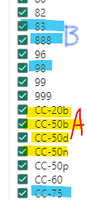
My very first question, new to Power Bi. I am trying to find the way to create new measure or new column called "NewProduct" using text values from the existing column. So I tried to use simple If statement to select yellow values and name them "ProductA", and select several other blue highlighted values as "ProductB", and ignore the rest of the values in the existing column, but could not find dax expression for it. So what is the best way to use these parameters from my existing column to create new values in a new column. Much apprecite any help.
Solved! Go to Solution.
Hi @Mk60,
I'd recommend you to check the SWITCH function.
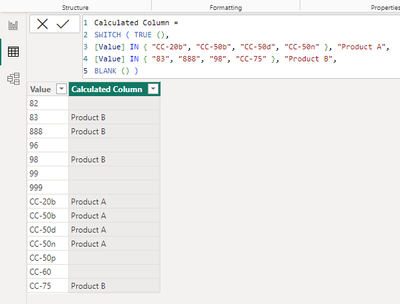
You could do something like this:
In plain text:
Calculated Column =
SWITCH ( TRUE (),
[Value] IN { "CC-20b", "CC-50b", "CC-50d", "CC-50n" }, "Product A",
[Value] IN { "83", "888", "98", "CC-75" }, "Product B",
BLANK () )
Best Regards,
Alexander
So happy to receive my very first reply with a great DAX suggestion that worked for me! Thanks so much, Alexander! Greatly apprecite your time and consideration to respond to a brand new user 🙂
Hi @Mk60,
I'd recommend you to check the SWITCH function.
You could do something like this:
In plain text:
Calculated Column =
SWITCH ( TRUE (),
[Value] IN { "CC-20b", "CC-50b", "CC-50d", "CC-50n" }, "Product A",
[Value] IN { "83", "888", "98", "CC-75" }, "Product B",
BLANK () )
Best Regards,
Alexander
So happy to receive my very first reply with a great DAX suggestion that worked for me! Thanks so much, Alexander! Greatly apprecite your time and consideration to respond to a brand new user 🙂
Check out the May 2026 Power BI update to learn about new features.
Sign up to receive a private message when registration opens and key events begin.
If you have recently started exploring Fabric, we'd love to hear how it's going. Your feedback can help with product improvements.
| User | Count |
|---|---|
| 31 | |
| 26 | |
| 23 | |
| 22 | |
| 15 |
| User | Count |
|---|---|
| 63 | |
| 45 | |
| 28 | |
| 24 | |
| 22 |