Share feedback directly with Fabric product managers, participate in targeted research studies and influence the Fabric roadmap.
Sign up nowGet Fabric certified for FREE! Don't miss your chance! Learn more
Current column is [Days to Close] new custom column is Avg. Days Worked
I would the like formula to say if [days to close] is greater than or equal to 181 then 90 and if [days to close] is less than or equal to 180 then divide the days to close by 2.
the first part of my formula works but the second part isn't and I have spent too many hours trying to rework the formula.
=if [Days to Close]>=181 then 90 else if [Days to Close]<=180 then Value.Divide ([Days to Close], 2)
Solved! Go to Solution.
@Anonymous
Create a new column using the following DAX
@Anonymous
create a new column as
Hi @Anonymous ,
In M Code
Custom Column=if [Days to Close]>=181 then 90 else if [Days to Close]<=180 then [Days to Close]/ 2
In DAX (Calculated Column)
Column =
SWITCH(
TRUE(),
Table[Days to Close] >= 181 , 90,
DIVIDE(Table[Days to CLose],2)
Regards,
Harsh Nathani
Did I answer your question? Mark my post as a solution! Appreciate with a Kudos!! (Click the Thumbs Up Button)
@harshnathani Thank you, I am using M code. My formula changed and this is what I have entered. I am still getting the "Token Else expected" error.
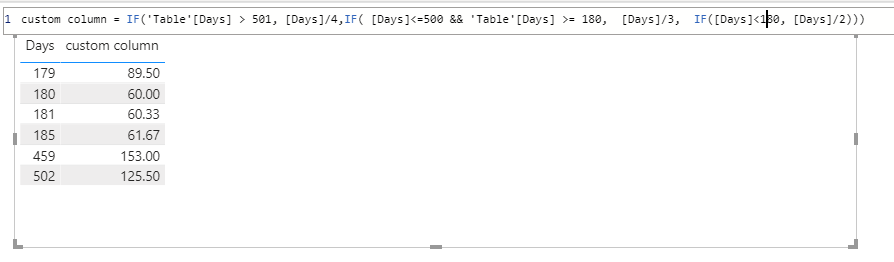
custom column=if[Days to Close]>501 then [Days to Close]/4 else if [Days to Close]<=500 then [Days to Close]/3 else if [Days to Close]<180 then [Days to Close]/2
Do you think this would be easier in DAX?
Hi @Anonymous .
Use this for M Code.
if [Days to Close]<180 then [Days to Close]/2 else if [Days to Close]<=500 then [Days to Close]/3 else [Days to Close]/4
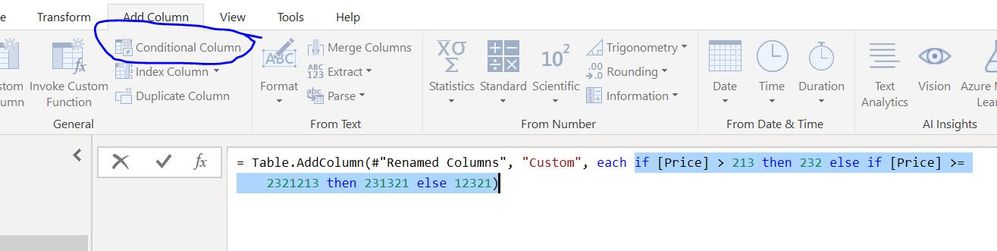
Additionally, you can use add contional columns
To nest an if within another if we use the same if – then – else methodology, as shown below
= if [thing to to test #1] = "something else" then [do this if true] else if [thing to to test #2] = "something else" then [do this if true] else [do this if false]
https://exceloffthegrid.com/power-query-if-statements-for-conditional-logic/
Regards,
Harsh Nathani
Did I answer your question? Mark my post as a solution! Appreciate with a Kudos!! (Click the Thumbs Up Button)
@Anonymous
Create a new column using the following DAX
let's consider your column name is days_close.
You can try this DAX in your calculated columns using Divide function,
=if([days_close]>=181, 90, if([days_close]<=180, Divide([days_close],2),0))
Share feedback directly with Fabric product managers, participate in targeted research studies and influence the Fabric roadmap.
If you love stickers, then you will definitely want to check out our Community Sticker Challenge!
Check out the January 2026 Power BI update to learn about new features.
| User | Count |
|---|---|
| 63 | |
| 62 | |
| 42 | |
| 20 | |
| 18 |