Get certified for free when you join Fabric Data Days 2026 and dive into Fabric, Power BI, SQL, AI, and other essential data skills.
Join nowJuly 7 - July 17 | Round 2 of the Power BI Dataviz World Championships. Don't miss your chance! Learn more
I have Custom Column where I combine 4 columns of which 3 are Employee Names.
I use = [Employee Last Name]&", "&[Employee First Name]&" "&[Employee Middle Name]&" - "&[Employee Birth Date Text]
This works until there is no Employee Middle Name and it returns null values in the combined column.
How do I include values for Last. First and Birth Date Text if there is no middle name? .
Solved! Go to Solution.
Hi,
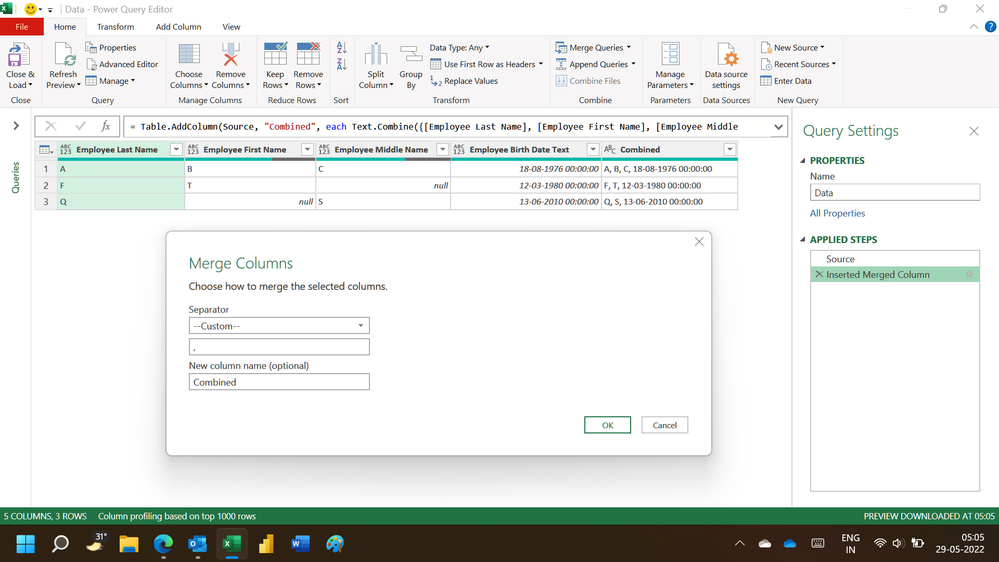
In the Query Editor, select the 4 columns and go to Add Column > Merge Columns. See the screenshot
Hi,
In the Query Editor, select the 4 columns and go to Add Column > Merge Columns. See the screenshot
Join us in Barcelona for FabCon and SQLCon, the Fabric, Power BI, SQL, and AI community event. Save €200 with code FABCMTY200.
If you love stickers, then you will definitely want to check out our community sticker challenge, Barcelona edition!
Check out the July 2026 Power BI update to learn about new features.
| User | Count |
|---|---|
| 30 | |
| 26 | |
| 23 | |
| 23 | |
| 14 |
| User | Count |
|---|---|
| 46 | |
| 33 | |
| 20 | |
| 18 | |
| 16 |