This time we’re going bigger than ever. Fabric, Power BI, SQL, AI and more. We're covering it all. You won't want to miss it.
Learn moreLevel up your Power BI skills this month - build one visual each week and tell better stories with data! Get started
Hi there,
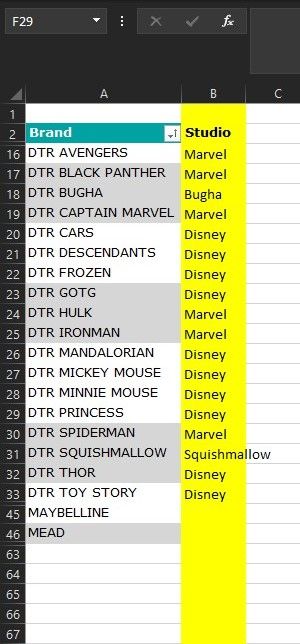
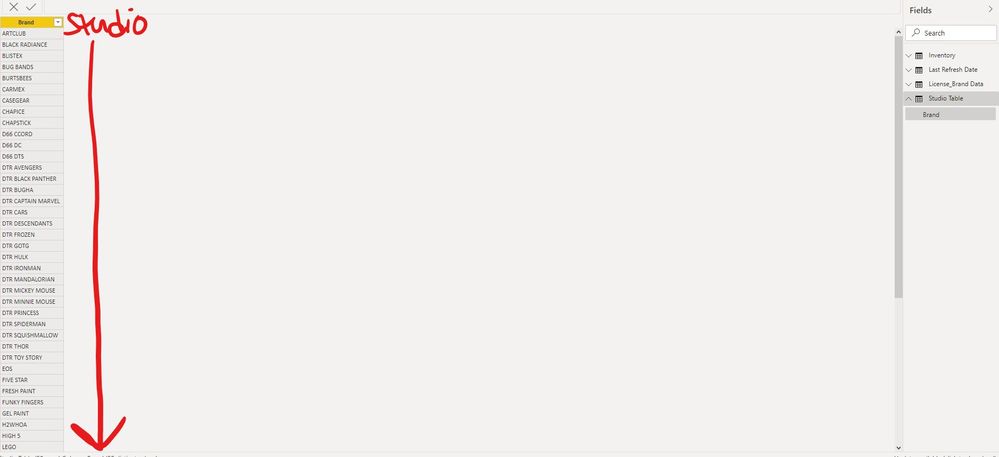
I am trying to esentially create a custom column to create specific Studios off of a Brand field in my underlying excel data.
What is the best way to add my custom studio listing? I've attached an example of what this looks like in Excel but I would love to have this created in Power BI.
Esentially, I would add the custom Studio column as a slicer in my dashboard.
Thanks!
Solved! Go to Solution.
@Anonymous , one way, is to load it from excel and merge the data
https://radacad.com/append-vs-merge-in-power-bi-and-power-query
Enter Data and append data
or write a formula using Switch
refer video: Switch-Case statement of #PowerBI: https://www.youtube.com/watch?v=gelJWktlR80&list=PLPaNVDMhUXGaaqV92SBD5X2hk3TMNlHhb&index=56
Switch(true(),
[brand] in {"DTR CAR", "DTR Frozen"}, "Disney",
// add other
//else
)
Hi @Anonymous
I want to know how do you import the data ? If you import data from excel file ,you can add the Studio column in your excel then import to desktop .Then choose the Studio field as a slicer to filter data .
If you import the data by Enter Date in desktop , you can directly enter the value in the Studio column or modify it in the source settings in Query Editor . Instead of adding Custom Column . Then choose the Studio field as a slicer to filter data .
So what kind of effect do you want to achieve through Custom Column, can you describe it clearly?
If you want to know more info about the function of Custom Column , you can refer to this link :
https://docs.microsoft.com/en-us/power-bi/create-reports/desktop-add-custom-column
Best Regards
Community Support Team _ Ailsa Tao
If this post helps, then please consider Accept it as the solution to help the other members find it more quickly.
@Anonymous , one way, is to load it from excel and merge the data
https://radacad.com/append-vs-merge-in-power-bi-and-power-query
Enter Data and append data
or write a formula using Switch
refer video: Switch-Case statement of #PowerBI: https://www.youtube.com/watch?v=gelJWktlR80&list=PLPaNVDMhUXGaaqV92SBD5X2hk3TMNlHhb&index=56
Switch(true(),
[brand] in {"DTR CAR", "DTR Frozen"}, "Disney",
// add other
//else
)
Check out the April 2026 Power BI update to learn about new features.
Sign up to receive a private message when registration opens and key events begin.
If you have recently started exploring Fabric, we'd love to hear how it's going. Your feedback can help with product improvements.
| User | Count |
|---|---|
| 36 | |
| 29 | |
| 29 | |
| 21 | |
| 18 |
| User | Count |
|---|---|
| 71 | |
| 43 | |
| 33 | |
| 24 | |
| 23 |