cancel
Showing results for 
Search instead for 
Did you mean: 

The Power BI Data Visualization World Championships is back! Get ahead of the game and start preparing now! Learn more

Reply
Anonymous
Not applicable

Custom Column If and If and If then

Hello I am looking to compare 9 different columns of which 2 will always match if they match a specific name then I want to return a value.  I was trying to do this in a custom column and was playing around with the "switch" command, but I don't think it does what I need. 


If the two "L Columns" match and they are both "Jeff 1234" then return a custom value.  Any help would be greatly appreciated. Thank you!


L1L2L3L4L5L6L7L8L9Layer
   Jeff 1234Jeff 1234    L5
 Jeff 1234Jeff 1234      L3
Jeff 1234Jeff 1234       

L2

  Jeff 1234Jeff 1234     L4
1 ACCEPTED SOLUTION
v-lionel-msft
Community Support
Community Support

Hi @Anonymous ,


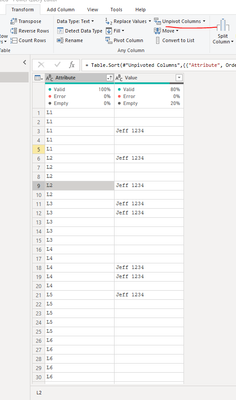
Maybe you can unpivot the table first and compare the values.
It is best to give a table of expected output.

v-lionel-msft_0-1613527936972.png


Best regards,
Lionel Chen

If this post helps, then please consider Accept it as the solution to help the other members find it more quickly.


View solution in original post

4 REPLIES 4
v-lionel-msft
Community Support
Community Support

Hi @Anonymous ,


Maybe you can unpivot the table first and compare the values.
It is best to give a table of expected output.

v-lionel-msft_0-1613527936972.png


Best regards,
Lionel Chen

If this post helps, then please consider Accept it as the solution to help the other members find it more quickly.


PaulDBrown
Community Champion
Community Champion

@Anonymous 

Please read this thread to help us help you.

https://community.powerbi.com/t5/Desktop/How-to-Get-Your-Question-Answered-Quickly/m-p/1447523 


Did I answer your question? Mark my post as a solution!
In doing so, you are also helping me. Thank you!

Proud to be a Super User!
Paul on Linkedin.


Anonymous
Not applicable

Thank you Paul, I've read it before and tried to follow it. Always good to refresh though. I'll add my formula to follow the guidelines, though I don't think my formula is even close, maybe I'll get lucky.


If L2=L3 and if L3 = "Jeff 1234" then "L3" else ""   


Hopefully that helps.

@Anonymous 

What would really help is if you provided a sample dataset or PBIX file (change the column names to preserve confidentiality) so that we can work on the problem. A depiction of the expected result is also essential. 


Did I answer your question? Mark my post as a solution!
In doing so, you are also helping me. Thank you!

Proud to be a Super User!
Paul on Linkedin.


Helpful resources

Announcements
Power BI DataViz World Championships

Power BI Dataviz World Championships

The Power BI Data Visualization World Championships is back! Get ahead of the game and start preparing now!

December 2025 Power BI Update Carousel

Power BI Monthly Update - December 2025

Check out the December 2025 Power BI Holiday Recap!

FabCon Atlanta 2026 carousel

FabCon Atlanta 2026

Join us at FabCon Atlanta, March 16-20, for the ultimate Fabric, Power BI, AI and SQL community-led event. Save $200 with code FABCOMM.