cancel
Showing results for 
Search instead for 
Did you mean: 

Data Days is here! Join us now for 60+ days of learning, challenges, and connection. Learn more

Reply
Anonymous
Not applicable

Custom Column Formula

Hi


I have a column with 6 different entries, contract 1, contract 2, contract 3, contract 4, contract 5, contract 6. How do you do a formula in a custom column to say if column says contract 1,2 or 3 put new contract in the custom column and if column says contract 4,5,6 put old contract,


many thanks

1 ACCEPTED SOLUTION
Anonymous
Not applicable

Brilliant thanks for your help

View solution in original post

4 REPLIES 4
MattAllington
Community Champion
Community Champion

Case sensitive as follows


= if [column] = "contract 1" or [column] = "contract 2" or [column] = "contract 3" then "new" else "old"


* Matt is an 8 times Microsoft MVP (Power BI) and author of the Power BI Book Supercharge Power BI.
I will not give you bad advice, even if you unknowingly ask for it.
Anonymous
Not applicable

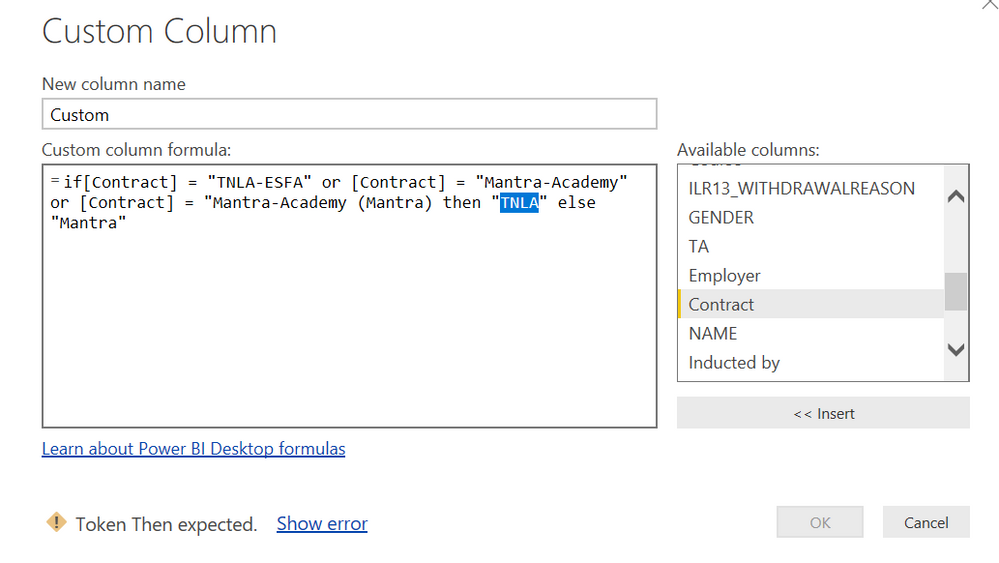
Thanks Matt, I have followed that but get the below error


Capture.PNG


You seem to be missing a " after (Mantra)


* Matt is an 8 times Microsoft MVP (Power BI) and author of the Power BI Book Supercharge Power BI.
I will not give you bad advice, even if you unknowingly ask for it.
Anonymous
Not applicable

Brilliant thanks for your help

Helpful resources

Announcements
Fabric Data Days is here Carousel

Fabric Data Days 2026

Don't miss out on Data Days, June 15 through August 7. Learn Fabric, Power BI, SQL, AI and more.

May Power BI Update Carousel

Power BI Monthly Update - May 2026

Check out the May 2026 Power BI update to learn about new features.

Power BI DataViz World Championships carousel

Power BI DataViz World Championships - June 2026

A new Power BI DataViz World Championship is coming this June! Don't miss out on submitting your entry.