Join us at FabCon Atlanta from March 16 - 20, 2026, for the ultimate Fabric, Power BI, AI and SQL community-led event. Save $200 with code FABCOMM.
Register now!Learn from the best! Meet the four finalists headed to the FINALS of the Power BI Dataviz World Championships! Register now
HI
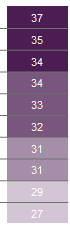
I have One table.In that I have 3 Columns.So I need to change color for 3 cells One color and below attached Image.
We tried for Conditional formating but It will be change color cell to cell .
PLease help me out.
Hi @indu
Could you please be more descriptive, what you expect and what is the result is right now...??
HI,
I have a table.In this we have 3 columns.Right now I am displaying 6 rows.So I need first 3 rows in Exact Green color then next 3 rows in Red.
I have work around got conditional formatting.But it is displaying color changing cell to cell like red,light red like this.
Thanks,
@indu,
We are not able to custom color as your describe in Power BI Desktop. A similar idea about this issue has been submitted in this link, you can vote it up and add comments there.
Conditional formatting applies to a range of values in a single column of your original table, after you define colors for lowest value and highest value of the column, gradient color between the two colors will apply to the values in this column.
Regards,
Lydia
Share feedback directly with Fabric product managers, participate in targeted research studies and influence the Fabric roadmap.
Check out the February 2026 Power BI update to learn about new features.
| User | Count |
|---|---|
| 62 | |
| 55 | |
| 39 | |
| 16 | |
| 15 |
| User | Count |
|---|---|
| 93 | |
| 85 | |
| 33 | |
| 31 | |
| 25 |