This time we’re going bigger than ever. Fabric, Power BI, SQL, AI and more. We're covering it all. You won't want to miss it.
Learn moreDid you hear? There's a new SQL AI Developer certification (DP-800). Start preparing now and be one of the first to get certified. Register now
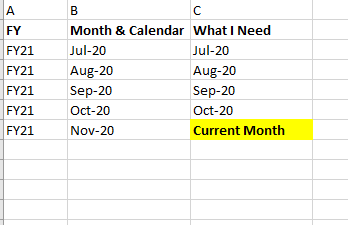
I want a calculated column that will return a customised column as shown in the snip below, so that when i use the column as a filter on my report, users can select current month to show details for the active month.
Many thanks for the assistance.
Solved! Go to Solution.
@Selded , In you date table you can have a column like
Month Type = Switch( True(),
eomonth([Date],0)= eomonth(Today(),0),"Current Month" ,
Format([Date],"MMM-YYYY")
)
or
Month Type = Switch( True(),
eomonth([Date],0) = eomonth(Today(),-1),"Last Month" ,
eomonth([Date],0)= eomonth(Today(),0),"Current Month" ,
Format([Date],"MMM-YY")
)
Sort this on a column Format([Date],"YYYYMM")
Refer: https://www.youtube.com/watch?v=hfn05preQYA
@Selded , In you date table you can have a column like
Month Type = Switch( True(),
eomonth([Date],0)= eomonth(Today(),0),"Current Month" ,
Format([Date],"MMM-YYYY")
)
or
Month Type = Switch( True(),
eomonth([Date],0) = eomonth(Today(),-1),"Last Month" ,
eomonth([Date],0)= eomonth(Today(),0),"Current Month" ,
Format([Date],"MMM-YY")
)
Sort this on a column Format([Date],"YYYYMM")
Refer: https://www.youtube.com/watch?v=hfn05preQYA
Check out the April 2026 Power BI update to learn about new features.
Sign up to receive a private message when registration opens and key events begin.
If you have recently started exploring Fabric, we'd love to hear how it's going. Your feedback can help with product improvements.
| User | Count |
|---|---|
| 36 | |
| 33 | |
| 31 | |
| 21 | |
| 16 |
| User | Count |
|---|---|
| 66 | |
| 55 | |
| 31 | |
| 24 | |
| 23 |