Join us at FabCon Atlanta from March 16 - 20, 2026, for the ultimate Fabric, Power BI, AI and SQL community-led event. Save $200 with code FABCOMM.
Register now!Get Fabric Certified for FREE during Fabric Data Days. Don't miss your chance! Request now
hi Team,
i have a report in Dollars, and i need to create a filter to select if i need to see all values in Dollars as is, OR convert it to Euros if i select euros.
i can have another table with the conversion rates, but can't find a way to do that automatically?
offcourse i don't need to create new columns in Euros as i won't be able to filter on columns, or can i?
Solved! Go to Solution.
Hi @yawerkhan ,
Please check following steps as below.
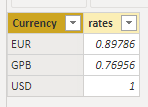
1# Create a conversion rates table and add Currency as slicer.
2# Create a measure as below.
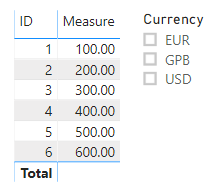
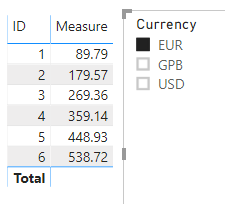
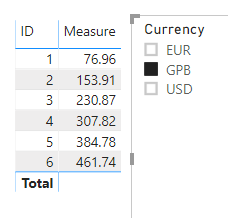
Measure = IF(NOT(ISFILTERED('conversion rates'[Currency])),SELECTEDVALUE('Table'[sales]),SELECTEDVALUE('Table'[sales])*SELECTEDVALUE('conversion rates'[rates]))Result would be shown as below.
Best Regards,
Jay
Community Support Team _ Jay Wang
If this post helps, then please consider Accept it as the solution to help the other members find it more quickly.
Hi @yawerkhan ,
Please check following steps as below.
1# Create a conversion rates table and add Currency as slicer.
2# Create a measure as below.
Measure = IF(NOT(ISFILTERED('conversion rates'[Currency])),SELECTEDVALUE('Table'[sales]),SELECTEDVALUE('Table'[sales])*SELECTEDVALUE('conversion rates'[rates]))Result would be shown as below.
Best Regards,
Jay
Community Support Team _ Jay Wang
If this post helps, then please consider Accept it as the solution to help the other members find it more quickly.
Create another measure in Euro
For that get the rate in your table and create another euro column
Euro Rate column in transaction table = maxx(filter(rate,rate[date]=transaction[date], rate[currency]="EURO"), rate[rate])
Euro Amt transaction = [Euro Rate column in transaction table]*[Value in Dollor]
for measure slicer refer
https://community.powerbi.com/t5/Desktop/Cannot-use-measure-in-slicer/td-p/166909
https://www.youtube.com/watch?v=gYbGNeYD4OY
Check out the November 2025 Power BI update to learn about new features.
Advance your Data & AI career with 50 days of live learning, contests, hands-on challenges, study groups & certifications and more!