Join us at FabCon Atlanta from March 16 - 20, 2026, for the ultimate Fabric, Power BI, AI and SQL community-led event. Save $200 with code FABCOMM.
Register now!Get Fabric certified for FREE! Don't miss your chance! Learn more
Hello,
I am having some trouble.
I need a button that if you click on it, it will filter everything by the current week. I need current day to last 6 days.
Does anyone know how todo this. Is this even possible?
Thank you.
Hi @lucpaymetals ,
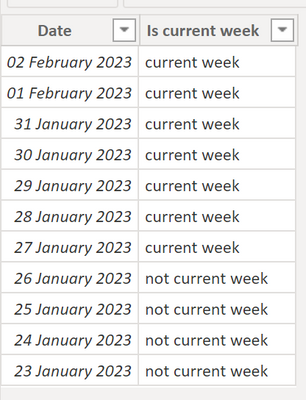
You can add a column to your date dimension like the below (either as a calculated column or in Power Query):
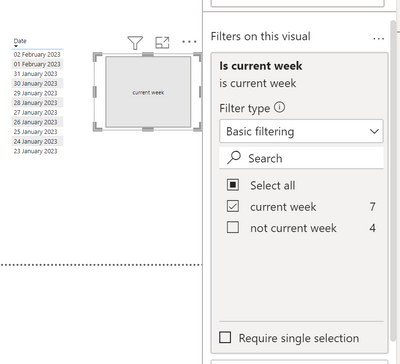
Then you can use that attribute in a slicer like below:
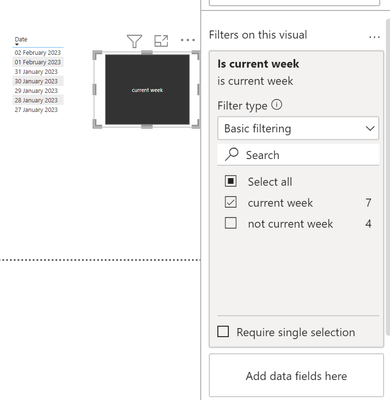
Or if you filter the slicer with just one value, you can actually change the slicer to the "Tile" style to get a button experience:
Let me know if this helps 🙂
/Tom
https://www.tackytech.blog/
https://www.instagram.com/tackytechtom/
| Did I answer your question❓➡️ Please, mark my post as a solution ✔️ |
| Also happily accepting Kudos 🙂 |
| Feel free to connect with me on LinkedIn! | |
| #proudtobeasuperuser | |
Hi @lucpaymetals ,
You could add that logic to your date dimension as an additional column. After, you could use a slicer?
Would that work? 🙂
/Tom
https://www.tackytech.blog/
https://www.instagram.com/tackytechtom/
| Did I answer your question❓➡️ Please, mark my post as a solution ✔️ |
| Also happily accepting Kudos 🙂 |
| Feel free to connect with me on LinkedIn! | |
| #proudtobeasuperuser | |
I am not sure what you mean
Share feedback directly with Fabric product managers, participate in targeted research studies and influence the Fabric roadmap.
Check out the February 2026 Power BI update to learn about new features.
| User | Count |
|---|---|
| 68 | |
| 59 | |
| 48 | |
| 20 | |
| 16 |
| User | Count |
|---|---|
| 107 | |
| 106 | |
| 39 | |
| 27 | |
| 27 |