cancel
Showing results for 
Search instead for 
Did you mean: 

Learn from the best! Meet the four finalists headed to the FINALS of the Power BI Dataviz World Championships! Register now

Reply
michael_knight
Post Prodigy
Post Prodigy

Current Time - Return Score based on Current Time

Hi,


I'm currently working with this piece of DAX code


Current Day - Current Value = 
var MondThursSat = {"Monday", "Tuesday", "Wednesday", "Thursday", "Saturday"}
var FriSun ={"Friday", "Sunday"}

return
IF(
    'Active Leads'[Current day of the week]IN MondThursSat,
    SWITCH( TRUE(),
        'Active Leads'[Now - Time] >= TIME(18,30,00), "7",
        'Active Leads'[Now - Time] >= TIME(18,00,00), "6",
        'Active Leads'[Now - Time] >= TIME(16,30,00), "5",
        'Active Leads'[Now - Time] >= TIME(15,00,00), "5",
        'Active Leads'[Now - Time] >= TIME(13,30,00), "4",
        'Active Leads'[Now - Time] >= TIME(12,00,00), "3",
        'Active Leads'[Now - Time] >= TIME(10,30,00), "2",
        'Active Leads'[Now - Time] >= TIME(08,00,00), "1",
        'Active Leads'[Now - Time] >= TIME(00,00,01), "0"),
IF(
 'Active Leads'[Weekday] IN FriSun,
    SWITCH( TRUE(),
        'Active Leads'[Now - Time] >= TIME(17,00,00), "6",
        'Active Leads'[Now - Time] >= TIME(16,30,00), "6",
        'Active Leads'[Now - Time] >= TIME(15,00,00), "5",
        'Active Leads'[Now - Time] >= TIME(13,30,00), "4",
        'Active Leads'[Now - Time] >= TIME(12,00,00), "3",
        'Active Leads'[Now - Time] >= TIME(10,30,00), "2",
        'Active Leads'[Now - Time] >= TIME(08,00,00), "1",
        'Active Leads'[Now - Time] >= TIME(00,00,01), "0")
))


What this code is doing is detemining what day of the week we're currently on (Tuesday today), seeing what the current time is and then giving points depending on the time of day


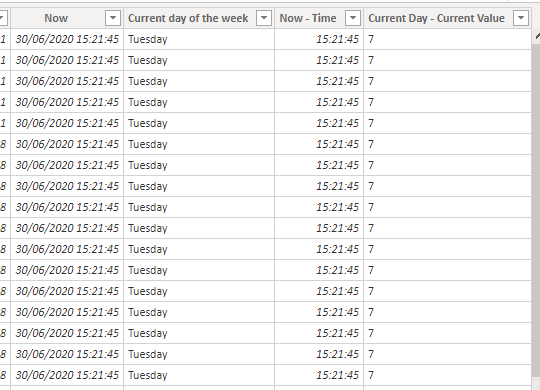
As I'm writing this post it's current 15:24 on a Tuesday, which means the score returned should be 5, however I'm getting 7 as my returning value


Here's a picture of the data, I'll link a dropbox below the picture incase you want a better look
Time help.PNG

https://www.dropbox.com/s/sh7za59gg8ubj84/Help%20-%20Calls.pbix?dl=0


Does anyone know where the problem my lie?


Any help appreciated


Cheers,

Mike

1 ACCEPTED SOLUTION
Mariusz
Community Champion
Community Champion

Hi @michael_knight 


Try using the below, 

TIMEVALUE( 'Active Leads'[Now - Time] ) >= TIME( 18, 30, 00 )

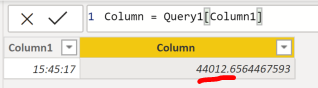
 if you changed only the Data Type to Time this is not enough as the actual underlying value is date-time and you need to isolate time from it
image.png


Best Regards,
Mariusz

If this post helps, then please consider Accepting it as the solution.

Please feel free to connect with me.
LinkedIn


View solution in original post

3 REPLIES 3
Mariusz
Community Champion
Community Champion

Hi @michael_knight 


Try using the below, 

TIMEVALUE( 'Active Leads'[Now - Time] ) >= TIME( 18, 30, 00 )

 if you changed only the Data Type to Time this is not enough as the actual underlying value is date-time and you need to isolate time from it
image.png


Best Regards,
Mariusz

If this post helps, then please consider Accepting it as the solution.

Please feel free to connect with me.
LinkedIn


Brilliant. Thank you @Mariusz 

Hi @michael_knight 


No problem!


Helpful resources

Announcements
New to Fabric survey Carousel

New to Fabric Survey

If you have recently started exploring Fabric, we'd love to hear how it's going. Your feedback can help with product improvements.

Power BI DataViz World Championships carousel

Power BI DataViz World Championships - June 2026

A new Power BI DataViz World Championship is coming this June! Don't miss out on submitting your entry.

Join our Fabric User Panel

Join our Fabric User Panel

Share feedback directly with Fabric product managers, participate in targeted research studies and influence the Fabric roadmap.

March Power BI Update Carousel

Power BI Community Update - March 2026

Check out the March 2026 Power BI update to learn about new features.