cancel
Showing results for 
Search instead for 
Did you mean: 

We've captured the moments from FabCon & SQLCon that everyone is talking about, and we are bringing them to the community, live and on-demand. Starts on April 14th. Register now

Reply
AlanP514
Post Patron
Post Patron

Cumulative value error

AlanP514_2-1652959224243.png

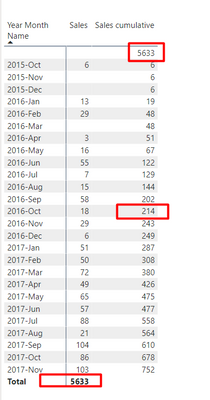
Hai, I had created cumulative but in between, it showed wrong values
you can see if we add 202 + 18 = 220(Actual) But I am getting 214 I am confused why this is showing in this way
And  the second error is the sales total is shown below and my cumulative total is shown in the top 
How I can solve these two issues Please help me 

And this is the dax i had used

sales Cumulative =
CALCULATE (
[sales],
DATES BETWEEN (
'Calendar'[Date],
NEXTDAY ( SAMEPERIODLASTYEAR ( LASTDATE ( 'Calendar'[Date] ) ) ),
LASTDATE ( 'Calendar'[Date] )
)
)


1 ACCEPTED SOLUTION
v-zhangti
Community Support
Community Support

Hi, @AlanP514 


You can try the following methods.

Sales Cumulative =
CALCULATE (
    [Sales],
    FILTER (
        ALL ( 'Table' ),
        [Year Month] <= SELECTEDVALUE ( 'Table'[Year Month] )
    )
)

vzhangti_0-1653300195128.png

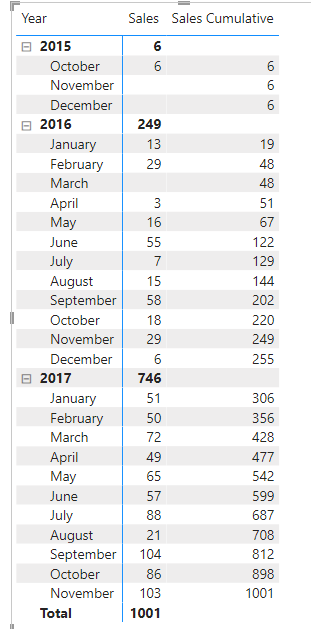
Is this the result you expect?


Best Regards,

Community Support Team _Charlotte

If this post helps, then please consider Accept it as the solution to help the other members find it more quickly.

View solution in original post

3 REPLIES 3
v-zhangti
Community Support
Community Support

Hi, @AlanP514 


You can try the following methods.

Sales Cumulative =
CALCULATE (
    [Sales],
    FILTER (
        ALL ( 'Table' ),
        [Year Month] <= SELECTEDVALUE ( 'Table'[Year Month] )
    )
)

vzhangti_0-1653300195128.png

Is this the result you expect?


Best Regards,

Community Support Team _Charlotte

If this post helps, then please consider Accept it as the solution to help the other members find it more quickly.

Hai,Your solution really helped me i will accept as a solution,
can you help me to solve this requirement
https://community.powerbi.com/t5/Desktop/Converting-static-to-Dynamic-Measure/m-p/2550780

ddpl
Solution Sage
Solution Sage

Try this:

Step 1: Create Measure


Cumulative Total =
CALCULATE (
SUM ( 'Table'[Sales] ),
FILTER ( ALLSELECTED ( 'Table' ), 'Table'[Date] <= MAX ( 'Table'[Date] ) )
)


Accept as solution if its worked.

Helpful resources

Announcements
New to Fabric survey Carousel

New to Fabric Survey

If you have recently started exploring Fabric, we'd love to hear how it's going. Your feedback can help with product improvements.

Power BI DataViz World Championships carousel

Power BI DataViz World Championships - June 2026

A new Power BI DataViz World Championship is coming this June! Don't miss out on submitting your entry.

Join our Fabric User Panel

Join our Fabric User Panel

Share feedback directly with Fabric product managers, participate in targeted research studies and influence the Fabric roadmap.

March Power BI Update Carousel

Power BI Community Update - March 2026

Check out the March 2026 Power BI update to learn about new features.