cancel
Showing results for 
Search instead for 
Did you mean: 

The Power BI Data Visualization World Championships is back! Get ahead of the game and start preparing now! Learn more

Reply
justinmpalmer
Frequent Visitor

Cumulative total for Line Chart with Year/Other Slicer Support

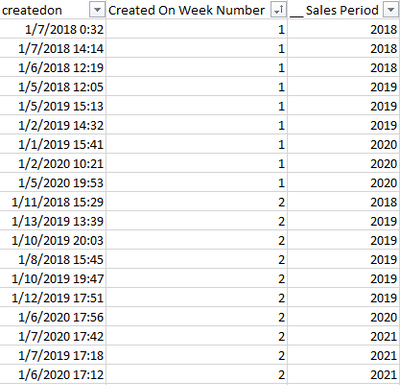
I have the following table:


justinmpalmer_0-1603911122963.png

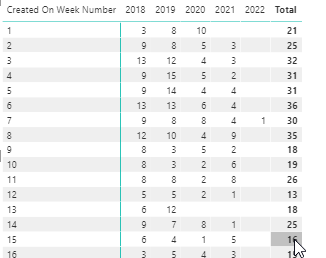
I can display a Matrix in PowerBI with the count per week/year, that generates something like:

justinmpalmer_1-1603911264905.png


You can see that the weeks for each year are not totaling based on previous weeks results. As an example week 2 for 2018 should show 12.


This works with my slicers, but now I need to add a line chart that cumulates the totals to show sales growth per year.  I have searched the forum and can't seem to find the solution. Thoughts?


1 ACCEPTED SOLUTION
Anonymous
Not applicable

Hello @justinmpalmer ,

In my opinion, you want to accumulate the count based on the number of weeks each year, don't you?

You can use the following formula:

Measure =
CALCULATE (
    COUNTROWS ( 'Table' ),
    FILTER (
        ALL ( 'Table' ),
        'Table'[Sales period] = MAX ( 'Table'[Sales period] )
            && 'Table'[Created on Week Number] <= MAX ( 'Table'[Created on Week Number] )
    )
)

My visualization looks like this:

11.4.2.1.PNG

Here's the pbix file.

Have I answered your question? Please mark my answer as a solution. Thanks a lot.
If not, load some insensitive data samples and expected output.

Best regards
Eyelyn Qin

View solution in original post

3 REPLIES 3
Anonymous
Not applicable

Hi @justinmpalmer ,


Could you tell me if your problem has been solved? If it is, kindly Accept it as the solution. More people will benefit from it. Or you are still confused about it, please provide me with more details about your table and your problem or share me with your pbix file from your Onedrive for Business.


Best Regards,
Eyelyn Qin

Anonymous
Not applicable

Hello @justinmpalmer ,

In my opinion, you want to accumulate the count based on the number of weeks each year, don't you?

You can use the following formula:

Measure =
CALCULATE (
    COUNTROWS ( 'Table' ),
    FILTER (
        ALL ( 'Table' ),
        'Table'[Sales period] = MAX ( 'Table'[Sales period] )
            && 'Table'[Created on Week Number] <= MAX ( 'Table'[Created on Week Number] )
    )
)

My visualization looks like this:

11.4.2.1.PNG

Here's the pbix file.

Have I answered your question? Please mark my answer as a solution. Thanks a lot.
If not, load some insensitive data samples and expected output.

Best regards
Eyelyn Qin

amitchandak
Super User
Super User

@justinmpalmer , Assume you already have measure and sales_period is year

CALCUALTE([measure], filter(allselected(Table), Table[Created on Week Number] <= max(Table[Created on Week Number]) && Table[_sales_period] =max(Table[_sales_period] )))


or


CALCUALTE(countrows(Table) ,  filter(allselected(Table), Table[Created on Week Number] <= max(Table[Created on Week Number]) && Table[_sales_period] =max(Table[_sales_period] )))

Share with Power BI Enthusiasts: Full Power BI Video (20 Hours) YouTube
Microsoft Fabric Series 60+ Videos YouTube
Microsoft Fabric Hindi End to End YouTube

Helpful resources

Announcements
November Power BI Update Carousel

Power BI Monthly Update - November 2025

Check out the November 2025 Power BI update to learn about new features.

Fabric Data Days Carousel

Fabric Data Days

Advance your Data & AI career with 50 days of live learning, contests, hands-on challenges, study groups & certifications and more!

FabCon Atlanta 2026 carousel

FabCon Atlanta 2026

Join us at FabCon Atlanta, March 16-20, for the ultimate Fabric, Power BI, AI and SQL community-led event. Save $200 with code FABCOMM.

Top Kudoed Authors