
cancel
Showing results for 
Search instead for 
Did you mean: 

The Power BI Data Visualization World Championships is back! Get ahead of the game and start preparing now! Learn more

Reply
Anonymous
Not applicable

Cumulative total filter by day

Hi All,


I have a table of hourly production table and a line chart.


I would like to draw a line chart to show the cumulative total of 'Inc' & 'Act' of the one day with the selection of dates in my slicer.


I wrote my measure, but it won't reset after new day.


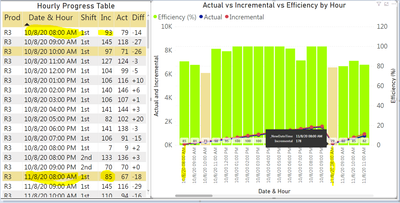
From the image below, on 11/8/2020 8AM the Incremental value should show 85 instead of (85+93 = 178) which is the cumulative total from previous day (10/8/2020 8AM). When it goes to new day, the cumulative should restart. 


jenas6423_0-1600760158392.png


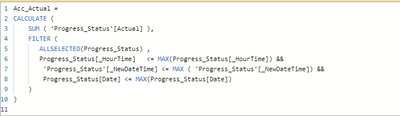
Here is my measure:

jenas6423_1-1600760287720.png


Can anyone please help? Thank you.


Regards.


Jenas


1 ACCEPTED SOLUTION

@Anonymous , You are using <= , means take date less than that to

Use =  means only for that day. That will force it reset on the day.


if did not work

Can you share sample data and sample output in table format? Or a sample pbix after removing sensitive data.

Share with Power BI Enthusiasts: Full Power BI Video (20 Hours) YouTube
Microsoft Fabric Series 60+ Videos YouTube
Microsoft Fabric Hindi End to End YouTube

View solution in original post

3 REPLIES 3
amitchandak
Super User
Super User

@Anonymous , if you want to reset on each day then, you need have something like


table[Date] = max(Table[Date])


or

table[Datetime].date = max(Table[Datetime].date)

or

table[Datetime].date = max(Table[Datetime]).date

Share with Power BI Enthusiasts: Full Power BI Video (20 Hours) YouTube
Microsoft Fabric Series 60+ Videos YouTube
Microsoft Fabric Hindi End to End YouTube
Anonymous
Not applicable

Hi @amitchandak 


I have added date into the filter, but it still doesnt work. Can you advise. Thank you.

jenas6423_1-1600761472548.png


@Anonymous , You are using <= , means take date less than that to

Use =  means only for that day. That will force it reset on the day.


if did not work

Can you share sample data and sample output in table format? Or a sample pbix after removing sensitive data.

Share with Power BI Enthusiasts: Full Power BI Video (20 Hours) YouTube
Microsoft Fabric Series 60+ Videos YouTube
Microsoft Fabric Hindi End to End YouTube

Helpful resources

Announcements
Power BI DataViz World Championships

Power BI Dataviz World Championships

The Power BI Data Visualization World Championships is back! Get ahead of the game and start preparing now!

December 2025 Power BI Update Carousel

Power BI Monthly Update - December 2025

Check out the December 2025 Power BI Holiday Recap!

FabCon Atlanta 2026 carousel

FabCon Atlanta 2026

Join us at FabCon Atlanta, March 16-20, for the ultimate Fabric, Power BI, AI and SQL community-led event. Save $200 with code FABCOMM.