Don't miss your chance to take the Fabric Data Engineer (DP-700) exam on us!
Learn moreWe've captured the moments from FabCon & SQLCon that everyone is talking about, and we are bringing them to the community, live and on-demand. Starts on April 14th. Register now
I've attempted to follow the Ferrari / Russo DAX pattern for cumulative sum, where they suggest (based on their own sample data):
Cumulative Quantity = IF(MIN('Date'[Date]) <= CALCULATE(MAX(Transactions[Date]), ALL (Transactions)),
CALCULATE(SUM(Transactions[Quantity]), FILTER(ALL('Date'[Date]), 'Date'[Date] <= MAX('Date'[Date] ))))
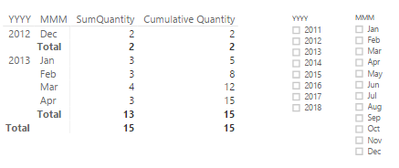
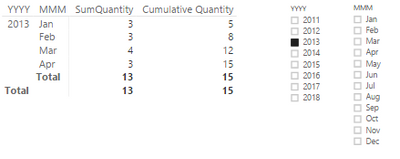
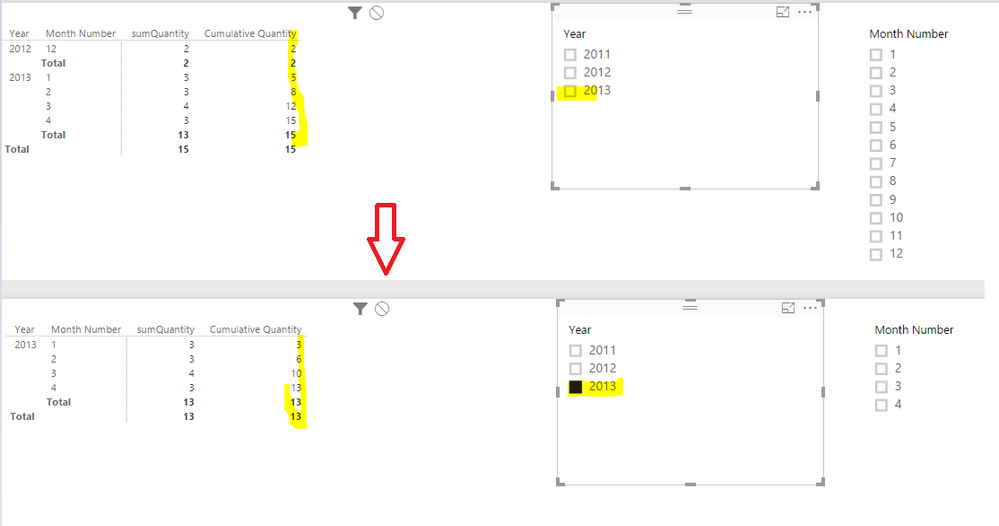
The problem is that, when you use a slicer from the Date table (after joining it to Transactions) to filter a matrix visualisation down to 2013 only, the Cumulative Quantity measure is bringing through the SUM(Transactions[Quantity]) for all of the previous year and adding the 2012 amount to Jan 2013. This is shown in the two images below, showing before and after filtering. How can I change the above DAX so that Jan 2013 will show 3 for the Cumulative Quantity measure, rather than 5 (carrying on the 2012 total)? I need a way for the cumulative measure to effectively start from what is sliced, not the whole Date table. I've tried ALLSELECTED and other things -- I've got a feeling there's a second FILTER statement you could add to the second CALCULATE to do it, but I've had no luck so far.
Solved! Go to Solution.
ALLSELECTED shall work. Try
Cumulative Quantity =
IF (
MIN ( 'Date'[Date] )
<= CALCULATE ( MAX ( Transactions[Date] ), ALLSELECTED ( Transactions ) ),
CALCULATE (
SUM ( Transactions[Quantity] ),
FILTER ( ALLSELECTED ( 'Date' ), 'Date'[Date] <= MAX ( 'Date'[Date] ) )
)
)
Check a demo in the attached pbix.
ALLSELECTED shall work. Try
Cumulative Quantity =
IF (
MIN ( 'Date'[Date] )
<= CALCULATE ( MAX ( Transactions[Date] ), ALLSELECTED ( Transactions ) ),
CALCULATE (
SUM ( Transactions[Quantity] ),
FILTER ( ALLSELECTED ( 'Date' ), 'Date'[Date] <= MAX ( 'Date'[Date] ) )
)
)
Check a demo in the attached pbix.
Thanks for the quick response on that; my problem was omitting ALLSELECTED from the first part of the formula before the 2nd CALCULATE. Nice work.
Regards
Miguel Félix
Proud to be a Super User!
Check out my blog: Power BI em PortuguêsIf you have recently started exploring Fabric, we'd love to hear how it's going. Your feedback can help with product improvements.
A new Power BI DataViz World Championship is coming this June! Don't miss out on submitting your entry.
Share feedback directly with Fabric product managers, participate in targeted research studies and influence the Fabric roadmap.
| User | Count |
|---|---|
| 55 | |
| 39 | |
| 35 | |
| 19 | |
| 17 |
| User | Count |
|---|---|
| 73 | |
| 70 | |
| 37 | |
| 35 | |
| 26 |