- Power BI forums
- Updates
- News & Announcements
- Get Help with Power BI
- Desktop
- Service
- Report Server
- Power Query
- Mobile Apps
- Developer
- DAX Commands and Tips
- Custom Visuals Development Discussion
- Health and Life Sciences
- Power BI Spanish forums
- Translated Spanish Desktop
- Power Platform Integration - Better Together!
- Power Platform Integrations (Read-only)
- Power Platform and Dynamics 365 Integrations (Read-only)
- Training and Consulting
- Instructor Led Training
- Dashboard in a Day for Women, by Women
- Galleries
- Community Connections & How-To Videos
- COVID-19 Data Stories Gallery
- Themes Gallery
- Data Stories Gallery
- R Script Showcase
- Webinars and Video Gallery
- Quick Measures Gallery
- 2021 MSBizAppsSummit Gallery
- 2020 MSBizAppsSummit Gallery
- 2019 MSBizAppsSummit Gallery
- Events
- Ideas
- Custom Visuals Ideas
- Issues
- Issues
- Events
- Upcoming Events
- Community Blog
- Power BI Community Blog
- Custom Visuals Community Blog
- Community Support
- Community Accounts & Registration
- Using the Community
- Community Feedback
Register now to learn Fabric in free live sessions led by the best Microsoft experts. From Apr 16 to May 9, in English and Spanish.
- Power BI forums
- Forums
- Get Help with Power BI
- Desktop
- Re: Cumulative per day per person
- Subscribe to RSS Feed
- Mark Topic as New
- Mark Topic as Read
- Float this Topic for Current User
- Bookmark
- Subscribe
- Printer Friendly Page


- Mark as New
- Bookmark
- Subscribe
- Mute
- Subscribe to RSS Feed
- Permalink
- Report Inappropriate Content
Cumulative per day per person
Hi
My dashboard is to measure the production of KG's packed, per person, per day in a factory.
My data looks like this:
| Date | Person | Real Weight |
| 01-Jan-22 | Person A | 1 |
| 01-Jan-22 | Person A | 1.5 |
| 01-Jan-22 | Person A | 1 |
| 01-Jan-22 | Person A | 1.6 |
| 01-Jan-22 | Person A | 1 |
| 01-Jan-22 | Person B | 3.5 |
| 01-Jan-22 | Person B | 3 |
| 01-Jan-22 | Person B | 1.5 |
| 01-Jan-22 | Person B | 2 |
| 02-Jan-22 | Person A | 1.5 |
| 02-Jan-22 | Person A | 1 |
| 02-Jan-22 | Person A | 1 |
| 02-Jan-22 | Person A | 0.5 |
| 02-Jan-22 | Person B | 1 |
| 02-Jan-22 | Person B | 2 |
I Need to get it as follows:
| Date | Person | Real Weight | Cumulative Weight |
| 01-Jan-22 | Person A | 1 | 1 |
| 01-Jan-22 | Person A | 1.5 | 2.5 |
| 01-Jan-22 | Person A | 1 | 3.5 |
| 01-Jan-22 | Person A | 1.6 | 5.1 |
| 01-Jan-22 | Person A | 1 | 6.1 |
| 01-Jan-22 | Person B | 3.5 | 3.5 |
| 01-Jan-22 | Person B | 3 | 6.5 |
| 01-Jan-22 | Person B | 1.5 | 8 |
| 01-Jan-22 | Person B | 2 | 10 |
| 02-Jan-22 | Person A | 1.5 | 1.5 |
| 02-Jan-22 | Person A | 1 | 2.5 |
| 02-Jan-22 | Person A | 1 | 3.5 |
| 02-Jan-22 | Person A | 0.5 | 4 |
| 02-Jan-22 | Person B | 1 | 1 |
| 02-Jan-22 | Person B | 2 | 3 |
I then have a futher requirement, where I need to know how much was below and how much over 4 KG.
So my table needs to expand to this
| Date | Person | Real Weight | Cumulative Weight | Below 4 | Above 4 |
| 01-Jan-22 | Person A | 1 | 1 | 1 | |
| 01-Jan-22 | Person A | 1.5 | 2.5 | 1.5 | |
| 01-Jan-22 | Person A | 1 | 3.5 | 1 | |
| 01-Jan-22 | Person A | 1.6 | 5.1 | 0.5 | 1.1 |
| 01-Jan-22 | Person A | 1 | 6.1 | 1 | |
| 01-Jan-22 | Person B | 3.5 | 3.5 | 3.5 | |
| 01-Jan-22 | Person B | 3 | 6.5 | 0.5 | 2.5 |
| 01-Jan-22 | Person B | 1.5 | 8 | 1.5 | |
| 01-Jan-22 | Person B | 2 | 10 | 2 | |
| 02-Jan-22 | Person A | 1.5 | 1.5 | 1.5 | |
| 02-Jan-22 | Person A | 1 | 2.5 | 1 | |
| 02-Jan-22 | Person A | 1 | 3.5 | 1 | |
| 02-Jan-22 | Person A | 0.5 | 4 | 0.5 | |
| 02-Jan-22 | Person B | 1 | 1 | 1 | |
| 02-Jan-22 | Person B | 2 | 3 | 2 |
I have tried about 5 different ways that I could see on the forum, so thanks to those who's answered a similar problem. I have however not found one that gives me the answer I require.
If any of you can assist, it will be much appreciated !
Thanks
Roelf
Solved! Go to Solution.


- Mark as New
- Bookmark
- Subscribe
- Mute
- Subscribe to RSS Feed
- Permalink
- Report Inappropriate Content
Hi @roelf ,
According to your description, here's my solution.
Add an index column in Power Query, then create three calculated columns.
Cumulative Weight =
SUMX (
    FILTER (
        'Table',
        'Table'[Date] = EARLIER ( 'Table'[Date] )
            && 'Table'[Person] = EARLIER ( 'Table'[Person] )
            && 'Table'[Index] <= EARLIER ( 'Table'[Index] )
    ),
    'Table'[Real Weight]
)
Above 4 =
VAR _Cum =
    MAXX (
        FILTER (
            'Table',
            'Table'[Date] = EARLIER ( 'Table'[Date] )
                && 'Table'[Person] = EARLIER ( 'Table'[Person] )
                && 'Table'[Cumulative Weight] > 4
                && 'Table'[Cumulative Weight] < EARLIER ( 'Table'[Cumulative Weight] )
        ),
        'Table'[Cumulative Weight]
    )
RETURN
    IF (
        [Cumulative Weight] > 4,
        [Cumulative Weight]
            - IF ( _Cum = BLANK (), 4, _Cum )
    )
Below 4 =
IF (
    [Cumulative Weight] < 4,
    'Table'[Real Weight],
    IF (
        'Table'[Real Weight] - 'Table'[Above 4] = 0,
        BLANK (),
        'Table'[Real Weight] - 'Table'[Above 4]
    )
)
Get the correct result.
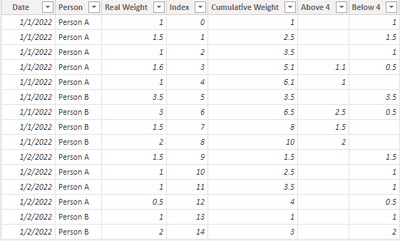
I attach my sample below for your reference.
Best Regards,
Community Support Team _ kalyj
If this post helps, then please consider Accept it as the solution to help the other members find it more quickly.
- Mark as New
- Bookmark
- Subscribe
- Mute
- Subscribe to RSS Feed
- Permalink
- Report Inappropriate Content
Thank you all for your suggestions - they all worked 100%
What I ended up using:
- Sorted the data in the Power Query
- Then added an index
- Then used the formula given to get the cumulative amount
I have also checked out other examples which suggesting using "RANKX" as a method instead of adding an index column - not sure which is better. I personally preferred adding an index in the query so that I am sure all rows have values.
Thanks again all - much appreciated !!
- Mark as New
- Bookmark
- Subscribe
- Mute
- Subscribe to RSS Feed
- Permalink
- Report Inappropriate Content
Hi @roelf ,
According to your description, here's my solution.
Add an index column in Power Query, then create three calculated columns.
Cumulative Weight =
SUMX (
    FILTER (
        'Table',
        'Table'[Date] = EARLIER ( 'Table'[Date] )
            && 'Table'[Person] = EARLIER ( 'Table'[Person] )
            && 'Table'[Index] <= EARLIER ( 'Table'[Index] )
    ),
    'Table'[Real Weight]
)
Above 4 =
VAR _Cum =
    MAXX (
        FILTER (
            'Table',
            'Table'[Date] = EARLIER ( 'Table'[Date] )
                && 'Table'[Person] = EARLIER ( 'Table'[Person] )
                && 'Table'[Cumulative Weight] > 4
                && 'Table'[Cumulative Weight] < EARLIER ( 'Table'[Cumulative Weight] )
        ),
        'Table'[Cumulative Weight]
    )
RETURN
    IF (
        [Cumulative Weight] > 4,
        [Cumulative Weight]
            - IF ( _Cum = BLANK (), 4, _Cum )
    )
Below 4 =
IF (
    [Cumulative Weight] < 4,
    'Table'[Real Weight],
    IF (
        'Table'[Real Weight] - 'Table'[Above 4] = 0,
        BLANK (),
        'Table'[Real Weight] - 'Table'[Above 4]
    )
)
Get the correct result.
I attach my sample below for your reference.
Best Regards,
Community Support Team _ kalyj
If this post helps, then please consider Accept it as the solution to help the other members find it more quickly.


- Mark as New
- Bookmark
- Subscribe
- Mute
- Subscribe to RSS Feed
- Permalink
- Report Inappropriate Content


- Mark as New
- Bookmark
- Subscribe
- Mute
- Subscribe to RSS Feed
- Permalink
- Report Inappropriate Content
@roelf , Add an index column in power query first and then try a new column
cumm = sumx(filter(Table, [Person] = earlier([Person]) && [Index] <= earlier([index]) ), [Weight])
Microsoft Power BI Learning Resources, 2023 !!
Learn Power BI - Full Course with Dec-2022, with Window, Index, Offset, 100+ Topics !!
Did I answer your question? Mark my post as a solution! Appreciate your Kudos !! Proud to be a Super User! !!

Helpful resources

Microsoft Fabric Learn Together
Covering the world! 9:00-10:30 AM Sydney, 4:00-5:30 PM CET (Paris/Berlin), 7:00-8:30 PM Mexico City

Power BI Monthly Update - April 2024
Check out the April 2024 Power BI update to learn about new features.

Fabric Community Update - April 2024
Find out what's new and trending in the Fabric Community.

| User | Count |
|---|---|
| 110 | |
| 109 | |
| 89 | |
| 76 | |
| 66 |


| User | Count |
|---|---|
| 125 | |
| 111 | |
| 100 | |
| 83 | |
| 71 |


