cancel
Showing results for 
Search instead for 
Did you mean: 

The Power BI Data Visualization World Championships is back! Get ahead of the game and start preparing now! Learn more

Reply
Luggruff
Frequent Visitor

Cumulative daily average in selected range

I am trying to figure out how to present cumulative average per day for a measure, based on the dates selected in a slicer. However, none of the examples I manage to Google quite fits.


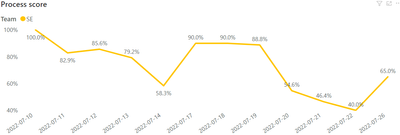
So I want to change this, to not be what the average is per day, but what the cumulative average is:

Current result (per individual day):

Luggruff_0-1658910101744.png


Current Measure:

Process Score = CALCULATE(
AVERAGE(fact__scores[Process score]),
USERELATIONSHIP(dim_Calendar[date],fact_scores[Handle Date])
)

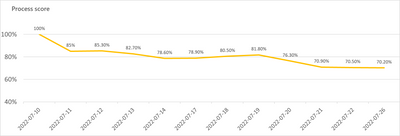
Expected result:
(actual cumulative percentage)
Luggruff_1-1658909672061.png


I tried adapting this https://blog.enterprisedna.co/calculating-a-rolling-average-in-power-bi-using-dax/ although I could not get the right result. I tried for example:

Rolling average Process score = 
AVERAGEX(
FILTER(ALLSELECTED(fact_scores[Handle Date]),
fact_scores[Handle Date] <= MAX(fact_scores[Handle Date])),
[Process Score])

I guess it has to do with "fact_scores[Handle Date]" not specifying the relationship to use, mixed with the measure that already does? I tried adding the "USERELATIONSHIP(dim_Calendar[date],fact_scores[Handle Date])" part to different parts of the rolling average formula, although it would not be accepted anywhere.

Is there any way to do this in DAX, or am I forced to create a new table first that has a cumulative score, cumulative possible score and split score by possible score in a third column, then simply just display it into a visual? My original data table is quite large, so I rather not add calculated columns directly in the table, row by row.

1 ACCEPTED SOLUTION

Nice! Thanks. It almost worked, although close enough. I had to switch ALL to ALLSELECTED, like so:

From:
Process Score = CALCULATE( CALCULATE(
AVERAGE(fact__scores[Process score]),
USERELATIONSHIP(dim_Calendar[date],fact_scores[Handle Date])
), Filter( all(dim_Calendar) , dim_Calendar[date] <= max(dim_Calendar[date]) )  )

To:
Process Score = CALCULATE( CALCULATE(
AVERAGE(fact__scores[Process score]),
USERELATIONSHIP(dim_Calendar[date],fact_scores[Handle Date])
), Filter( ALLSELECTED(dim_Calendar) , dim_Calendar[date] <= max(dim_Calendar[date]) )  )

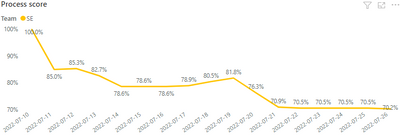
End result:

Luggruff_0-1658946157425.png


If you want to update the answer, I will mark it as the solution.

View solution in original post

2 REPLIES 2
amitchandak
Super User
Super User

@Luggruff , try like


Process Score = CALCULATE( CALCULATE(
AVERAGE(fact__scores[Process score]),
USERELATIONSHIP(dim_Calendar[date],fact_scores[Handle Date])
), Filter( all(dim_Calendar) , dim_Calendar[date] <= max(dim_Calendar[date]) )  )

Share with Power BI Enthusiasts: Full Power BI Video (20 Hours) YouTube
Microsoft Fabric Series 60+ Videos YouTube
Microsoft Fabric Hindi End to End YouTube

Nice! Thanks. It almost worked, although close enough. I had to switch ALL to ALLSELECTED, like so:

From:
Process Score = CALCULATE( CALCULATE(
AVERAGE(fact__scores[Process score]),
USERELATIONSHIP(dim_Calendar[date],fact_scores[Handle Date])
), Filter( all(dim_Calendar) , dim_Calendar[date] <= max(dim_Calendar[date]) )  )

To:
Process Score = CALCULATE( CALCULATE(
AVERAGE(fact__scores[Process score]),
USERELATIONSHIP(dim_Calendar[date],fact_scores[Handle Date])
), Filter( ALLSELECTED(dim_Calendar) , dim_Calendar[date] <= max(dim_Calendar[date]) )  )

End result:

Luggruff_0-1658946157425.png


If you want to update the answer, I will mark it as the solution.

Helpful resources

Announcements
Power BI DataViz World Championships

Power BI Dataviz World Championships

The Power BI Data Visualization World Championships is back! Get ahead of the game and start preparing now!

December 2025 Power BI Update Carousel

Power BI Monthly Update - December 2025

Check out the December 2025 Power BI Holiday Recap!

FabCon Atlanta 2026 carousel

FabCon Atlanta 2026

Join us at FabCon Atlanta, March 16-20, for the ultimate Fabric, Power BI, AI and SQL community-led event. Save $200 with code FABCOMM.