cancel
Showing results for 
Search instead for 
Did you mean: 

The Power BI Data Visualization World Championships is back! Get ahead of the game and start preparing now! Learn more

Reply
siminaserban
New Member

Cumulative count

Guys,


Need your help. I am lost :).


So, basically, we are trying to calculate a cumulative count of days per week. What is strange is that in one of the reports, in another file with other data, it is working and in another one, it is not.


The team is coming from a Team table, the week is coming from the Calendar table.


We have used the follwoing measure in both files:


Cumulative_ByTeam =
CALCULATE(
COUNTA('Table1'[Travel Date]),
FILTER(ALL('Table1'), 'Table1'[Travel_Week] <= MAX('Calendar Table'[WeekEnding])), VALUES('Team Data'[Team]))


Another trial was this one:

Cumulative_Test =
CALCULATE(
COUNTA('Table1'[Travel Date]),
FILTER(ALLSELECTED('Table1'), 'Table1'[Travel Week]<=MAX('Calendar Table'[WeekEnding])&&('Table1'[Travel Week])<>BLANK()), VALUES('Team Data'[Team]))


We want for every week, even if there is no value to be counted to show the previous value. The data where the measure is not working has many blanks.


Any hints? What iI am missing? I have compared both files multiple times, but I cannot see any differences.


Thanks,

Simina
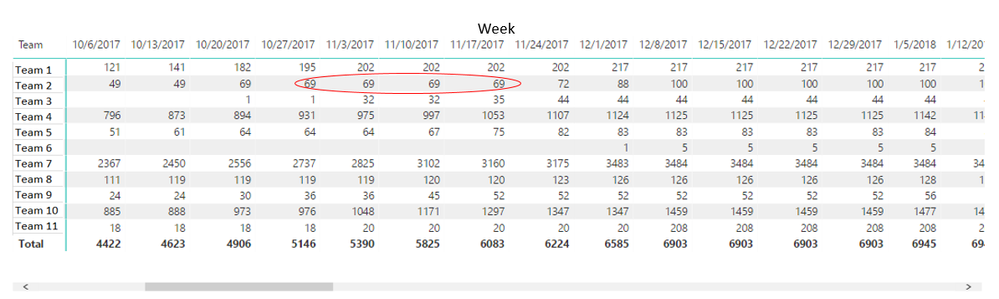
 

This one is workingThis one is workingThis one is not workingThis one is not working


1 ACCEPTED SOLUTION

Hi All,


In sanitizing the data and recreating the dat amodel I have notice the issue in the data model.


One of the joins had the cross filter direction set to both. What I found strange is that this affected also the cumulative counts from other tables where there was not a direct relationship to this table.


Thanks for all the support! This has been solved


View solution in original post

3 REPLIES 3
v-jiascu-msft
Microsoft Employee
Microsoft Employee

Hi @siminaserban,


Since it works in one file, there could be something wrong other than the measures.

1. Where are the columns from? Are they from similar position of the mode?

2. Are the relationships different?

Can you share the file with us? Please mask the private data first.


Best Regards,

Dale

Community Support Team _ Dale
If this post helps, then please consider Accept it as the solution to help the other members find it more quickly.

Dale,


1) The data sources are Excel files at this point. They will be sharepoint lists in the end. The data models in both pbix are created in the same way.

2) The relationships are the same.


I will sanitize the data and uploaded here. I do not get it where is the issue.


Thanks,

Simina

Hi All,


In sanitizing the data and recreating the dat amodel I have notice the issue in the data model.


One of the joins had the cross filter direction set to both. What I found strange is that this affected also the cumulative counts from other tables where there was not a direct relationship to this table.


Thanks for all the support! This has been solved


Helpful resources

Announcements
Power BI DataViz World Championships

Power BI Dataviz World Championships

The Power BI Data Visualization World Championships is back! Get ahead of the game and start preparing now!

December 2025 Power BI Update Carousel

Power BI Monthly Update - December 2025

Check out the December 2025 Power BI Holiday Recap!

FabCon Atlanta 2026 carousel

FabCon Atlanta 2026

Join us at FabCon Atlanta, March 16-20, for the ultimate Fabric, Power BI, AI and SQL community-led event. Save $200 with code FABCOMM.