cancel
Showing results for 
Search instead for 
Did you mean: 

The Power BI Data Visualization World Championships is back! Get ahead of the game and start preparing now! Learn more

Reply
Anonymous
Not applicable

Cumulative count for graph

Hello,


I am trying to produce a cumulative count for my data, I've attempted to use a method that I see frequently in the forums but cannot seem to get it to work.


See screen shot attached with attempted DAX formula, and the graph it outputs (which is clearly not cumulative).


cumulative = CALCULATE (COUNTROWS('Asta Outputs - Task'), FILTER (ALLSELECTED('Asta Outputs - Task'), 'Asta Outputs - Task'[StartDate] <= MAX('Asta Outputs - Task'[StartDate])))

So Im attampting to create a count of rows building up by date.


Any help would be appricated.


Attempt at Cumulative Count.PNG

Graph.PNG

1 ACCEPTED SOLUTION
Anonymous
Not applicable

Hi @Anonymous,


I think the issue may related to the NOT(ISBLANK('Asta Outputs - Task'[ActualStart])), perhaps you can try to move the blank filter into filter function.


Cumulative Tasks Actually Started = CALCULATE (COUNTROWS('Asta Outputs - Task'), FILTER (ALLSELECTED('Asta Outputs - Task'), 'Asta Outputs - Task'[ActualStart] <= MAX('Asta Outputs - Task'[ActualStart])&&[ActualStart]<>BLANK()))


Regards,

Xiaoxin Sheng

View solution in original post

4 REPLIES 4
Anonymous
Not applicable

I initally solved this issue, and now Ive made it far more complicated.


I essentially have a table with two dates in it: StartDate and ActualStart. Every row has a StartDate but the ActualStart can be blank so I adapted the formula to ignore blanks. 


My adaptatons work perfectly if I put them in indiviual graphs but I need to overlay them on on graph. Using either date as the X axis breaks the other count (Because I think it ignores dates and just counts values)


Attached are the Measures and some images of the current broken graph. 


As you see in the data the line Cumulative Tasks Actually Started shouldnt stay flat? But tasks planned to start is perfect. If i change the X axis to ActualStart then it reverses with Actually Started working but Start Date broken.


Cumulative Tasks Planned To Start = CALCULATE (COUNTROWS('Asta Outputs - Task'), FILTER (ALLSELECTED('Asta Outputs - Task'), 'Asta Outputs - Task'[StartDate] <= MAX('Asta Outputs - Task'[StartDate])))
Cumulative Tasks Actually Started = CALCULATE (COUNTROWS('Asta Outputs - Task'), FILTER (ALLSELECTED('Asta Outputs - Task'), 'Asta Outputs - Task'[ActualStart] <= MAX('Asta Outputs - Task'[ActualStart])), NOT(ISBLANK('Asta Outputs - Task'[ActualStart])))
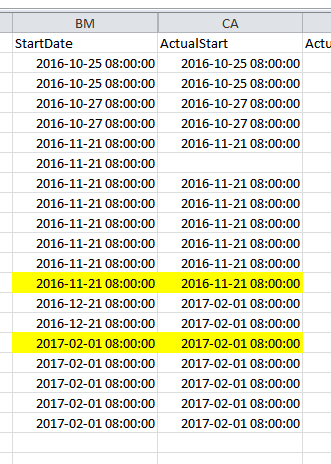
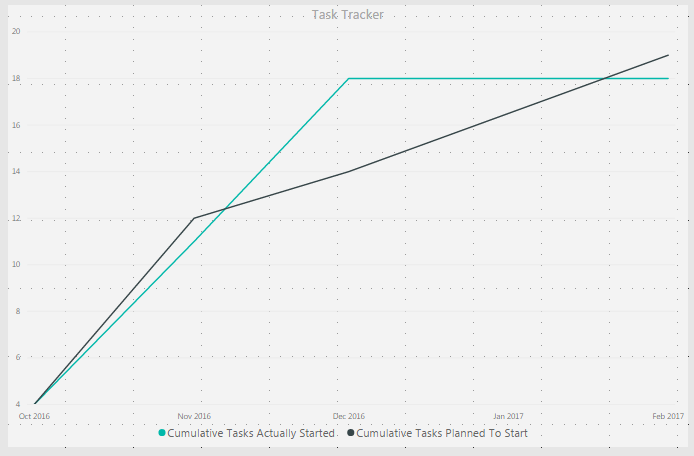
Dates Extract.PNGGraph.PNG

Thanks,

Anonymous
Not applicable

Hi @Anonymous,


I think the issue may related to the NOT(ISBLANK('Asta Outputs - Task'[ActualStart])), perhaps you can try to move the blank filter into filter function.


Cumulative Tasks Actually Started = CALCULATE (COUNTROWS('Asta Outputs - Task'), FILTER (ALLSELECTED('Asta Outputs - Task'), 'Asta Outputs - Task'[ActualStart] <= MAX('Asta Outputs - Task'[ActualStart])&&[ActualStart]<>BLANK()))


Regards,

Xiaoxin Sheng

Anonymous
Not applicable

Hi @Anonymous,


Please use measure to instead the calculate column, current power bi not support dynamic calculated column based on slicer or filter.


Regards,

Xiaoxin Sheng

vanessafvg
Super User
Super User

@Anonymous i think the issue here is that you need to create a date table, have you done that and then link the date to the date table


If I took the time to answer your question and I came up with a solution, please mark my post as a solution and /or give kudos freely for the effort 🙂 Thank you!

Proud to be a Super User!


Helpful resources

Announcements
Power BI DataViz World Championships

Power BI Dataviz World Championships

The Power BI Data Visualization World Championships is back! Get ahead of the game and start preparing now!

December 2025 Power BI Update Carousel

Power BI Monthly Update - December 2025

Check out the December 2025 Power BI Holiday Recap!

FabCon Atlanta 2026 carousel

FabCon Atlanta 2026

Join us at FabCon Atlanta, March 16-20, for the ultimate Fabric, Power BI, AI and SQL community-led event. Save $200 with code FABCOMM.