Join us at FabCon Atlanta from March 16 - 20, 2026, for the ultimate Fabric, Power BI, AI and SQL community-led event. Save $200 with code FABCOMM.
Register now!Vote for your favorite vizzies from the Power BI Dataviz World Championship submissions. Vote now!
Solved! Go to Solution.
Hi @Vijayashree9820 ,
Please update the formula of measure [CumulativeCurrentYearSales ] as below and check if it can return the expected result...
CumulativeCurrentYearSales =
CALCULATE (
View_SalesRevenue[Sales Amount MC],
FILTER (
ALLSELECTED ( View_SalesRevenue ),
YEAR ( View_SalesRevenue[RevenueDate] ) = YEAR ( TODAY () )
&& View_SalesRevenue[RevenueDate]
<= SELECTEDVALUE ( View_SalesRevenue[RevenueDate] )
)
)
In addition, you can refer the following links to get the culmulative values...
Cumulative Total/ Running Total in Power BI - Power BI Docs
Power BI Blog: Calculating Cumulative Totals for Time Periods
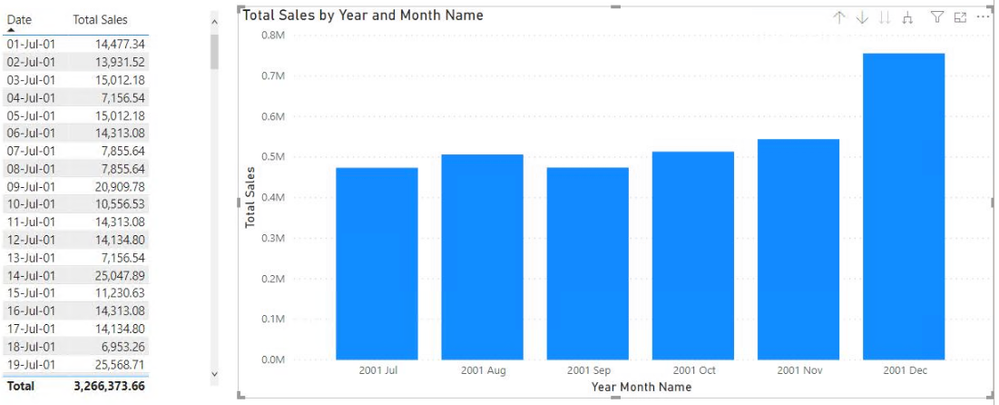
If the above ones can't help you get the expected result, please provide some sample data in your table 'View_SalesRevenue' (exclude sensitive data) with Text format and your expected result with special examples and screenshots. Later I will check if there is any workaround to achieve your requirement. You can refer the following link to share the required info:
How to provide sample data in the Power BI Forum
And It is better if you can share a simplified pbix file. You can refer the following link to upload the file to the community. Thank you.
How to upload PBI in Community
Best Regards
Hi @Vijayashree9820 ,
Please update the formula of measure [CumulativeCurrentYearSales ] as below and check if it can return the expected result...
CumulativeCurrentYearSales =
CALCULATE (
View_SalesRevenue[Sales Amount MC],
FILTER (
ALLSELECTED ( View_SalesRevenue ),
YEAR ( View_SalesRevenue[RevenueDate] ) = YEAR ( TODAY () )
&& View_SalesRevenue[RevenueDate]
<= SELECTEDVALUE ( View_SalesRevenue[RevenueDate] )
)
)
In addition, you can refer the following links to get the culmulative values...
Cumulative Total/ Running Total in Power BI - Power BI Docs
Power BI Blog: Calculating Cumulative Totals for Time Periods
If the above ones can't help you get the expected result, please provide some sample data in your table 'View_SalesRevenue' (exclude sensitive data) with Text format and your expected result with special examples and screenshots. Later I will check if there is any workaround to achieve your requirement. You can refer the following link to share the required info:
How to provide sample data in the Power BI Forum
And It is better if you can share a simplified pbix file. You can refer the following link to upload the file to the community. Thank you.
How to upload PBI in Community
Best Regards
Hi @Vijayashree9820
Can you please try below DAX
CumulativeCurrentYearSales =
CALCULATE (
View_SalesRevenue[Sales Amount MC],
FILTER (
ALL (View_SalesRevenue[RevenueDate]),
&& View_SalesRevenue[RevenueDate] <= MAX ( View_SalesRevenue[RevenueDate] )
))
Let me know if that works for you
If your requirement is solved, please make THIS ANSWER a SOLUTION ✔️ and help other users find the solution quickly. Please hit the LIKE 👍 button if this comment helps you.
Thanks
Pijush
Linkedin
Proud to be a Super User! | |
Vote for your favorite vizzies from the Power BI World Championship submissions!
If you love stickers, then you will definitely want to check out our Community Sticker Challenge!
Check out the January 2026 Power BI update to learn about new features.
| User | Count |
|---|---|
| 64 | |
| 56 | |
| 43 | |
| 20 | |
| 17 |
| User | Count |
|---|---|
| 123 | |
| 108 | |
| 44 | |
| 32 | |
| 26 |