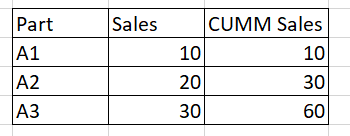
You can achieve this via Power Query:
The meat of the code works starting from GroupMe and all the way down:
let
    Source = Table.FromRows(Json.Document(Binary.Decompress(Binary.FromText("i45WcjRU0lEyNAASSrE6QK4RkGWE4BoDWcYQbiwA", BinaryEncoding.Base64), Compression.Deflate)), let _t = ((type text) meta [Serialized.Text = true]) in type table [Part = _t, Sales = _t, dd = _t]),
    #"Changed Type" = Table.TransformColumnTypes(Source,{{"Part", type text}, {"Sales", Int64.Type}}),
    GroupMe = Table.AddColumn(#"Changed Type", "GroupMe", each 1),
    #"Added Index" = Table.AddIndexColumn(GroupMe, "Index", 0, 1),
    #"Grouped Rows" = Table.Group(#"Added Index", {"GroupMe"}, {{"All_Rows", each _, type table}}),
    #"Duplicated Column" = Table.DuplicateColumn(#"Grouped Rows", "All_Rows", "All_Rows - Copy"),
    #"Expanded All_Rows" = Table.ExpandTableColumn(#"Duplicated Column", "All_Rows", {"Part", "Sales", "Index"}, {"Part", "Sales", "Index"}),
    #"Expanded All_Rows - Copy" = Table.ExpandTableColumn(#"Expanded All_Rows", "All_Rows - Copy", {"Part", "Sales", "Index"}, {"Part.1", "Sales.1", "Index.1"}),
    #"Added Custom" = Table.AddColumn(#"Expanded All_Rows - Copy", "Find_Cumulative", each [Index] >= [Index.1]),
    #"Filtered Rows" = Table.SelectRows(#"Added Custom", each ([Find_Cumulative] = true)),
    #"Regroup for Cumulative" = Table.Group(#"Filtered Rows", {"GroupMe", "Sales", "Index", "Part"}, {{"Cumulative Total", each List.Sum([Sales.1]), type number}})
in
    #"Regroup for Cumulative"
Did I answer your question?
Please help by clicking the thumbs up button and mark my post as a solution!