We've captured the moments from FabCon & SQLCon that everyone is talking about, and we are bringing them to the community, live and on-demand. Starts on April 14th. Register now
Hi all,
I'm encountering difficulties in finding the right formula to calculate Running Total on measure that comes from a virtual column.
Just to let you know, this is the formula behind this measure:
you just need to pay to attention to the last part where there is the SUMX formula
test =
VAR _Table =
CALCULATETABLE(
ADDCOLUMNS(
'PHISICAL_TABLE',
"@Key",
IF(NOT ISBLANK(PHISICAL_TABLE[Actual/Planned Dummy]),
PHISICAL_TABLE[Year]+1&FORMAT(PHISICAL_TABLE[Week Dummy],"00")&'PHISICAL_TABLE'[Brand]&'PHISICAL_TABLE'[Cluster],
PHISICAL_TABLE[Key Brand])
),
REMOVEFILTERS(PHISICAL_TABLE[Year],PHISICAL_TABLE[Year&Week]))
VAR _Table1=
FILTER(
ADDCOLUMNS(
ADDCOLUMNS(
_Table,
"@Actual/PlannedPY",
IF(ISBLANK(PHISICAL_TABLE[Actual/Planned]),
CALCULATE(
MAX ( PHISICAL_TABLE[Actual/Planned] ),
FILTER (
_Table,
[@Key] = EARLIER ([@Key]))))),
"@Actual/PlannedPY2",IF(SELECTEDVALUE(PHISICAL_TABLE[Year])=VALUE(LEFT([@Key],4)),[@Actual/PlannedPY],BLANK())),
NOT ISBLANK([@Actual/PlannedPY2]))
VAR _Result = SUMX(_Table2,[@Actual/PlannedPY2])
RETURN
_Result
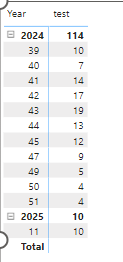
What I need to do, is calculate the running total for variable column (@Actual/PlannedPY2), for each year/week.
Any suggestion?
Thank you!
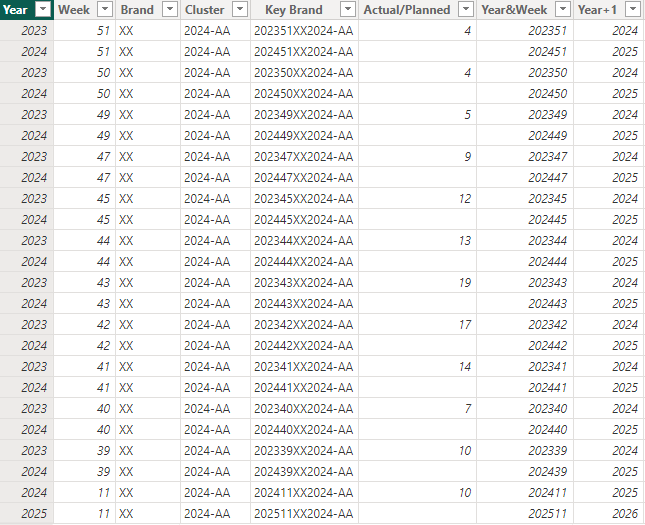
Here below the dataset used:
| Year | Week | Brand | Cluster | Key Brand | Actual/Planned | Year&Week | Year+1 |
| 2023 | 51 | XX | 2024-AA | 202351XX2024-AA | 4 | 202351 | 2024 |
| 2024 | 51 | XX | 2024-AA | 202451XX2024-AA | 202451 | 2025 | |
| 2023 | 50 | XX | 2024-AA | 202350XX2024-AA | 4 | 202350 | 2024 |
| 2024 | 50 | XX | 2024-AA | 202450XX2024-AA | 202450 | 2025 | |
| 2023 | 49 | XX | 2024-AA | 202349XX2024-AA | 5 | 202349 | 2024 |
| 2024 | 49 | XX | 2024-AA | 202449XX2024-AA | 202449 | 2025 | |
| 2023 | 47 | XX | 2024-AA | 202347XX2024-AA | 9 | 202347 | 2024 |
| 2024 | 47 | XX | 2024-AA | 202447XX2024-AA | 202447 | 2025 | |
| 2023 | 45 | XX | 2024-AA | 202345XX2024-AA | 12 | 202345 | 2024 |
| 2024 | 45 | XX | 2024-AA | 202445XX2024-AA | 202445 | 2025 | |
| 2023 | 44 | XX | 2024-AA | 202344XX2024-AA | 13 | 202344 | 2024 |
| 2024 | 44 | XX | 2024-AA | 202444XX2024-AA | 202444 | 2025 | |
| 2023 | 43 | XX | 2024-AA | 202343XX2024-AA | 19 | 202343 | 2024 |
| 2024 | 43 | XX | 2024-AA | 202443XX2024-AA | 202443 | 2025 | |
| 2023 | 42 | XX | 2024-AA | 202342XX2024-AA | 17 | 202342 | 2024 |
| 2024 | 42 | XX | 2024-AA | 202442XX2024-AA | 202442 | 2025 | |
| 2023 | 41 | XX | 2024-AA | 202341XX2024-AA | 14 | 202341 | 2024 |
| 2024 | 41 | XX | 2024-AA | 202441XX2024-AA | 202441 | 2025 | |
| 2023 | 40 | XX | 2024-AA | 202340XX2024-AA | 7 | 202340 | 2024 |
| 2024 | 40 | XX | 2024-AA | 202440XX2024-AA | 202440 | 2025 | |
| 2023 | 39 | XX | 2024-AA | 202339XX2024-AA | 10 | 202339 | 2024 |
| 2024 | 39 | XX | 2024-AA | 202439XX2024-AA | 202439 | 2025 | |
| 2024 | 11 | XX | 2024-AA | 202411XX2024-AA | 10 | 202411 | 2025 |
| 2025 | 11 | XX | 2024-AA | 202511XX2024-AA | 202511 | 2026 |
Solved! Go to Solution.
Hi @planc7 ,
I create a table as you mentioned.
Then I do some changes in your DAX codes. I delete SELECTEDVALUE function and here is the DAX code.
test =
VAR _Table =
CALCULATETABLE (
ADDCOLUMNS (
'PHISICAL_TABLE',
"@Key",
IF (
NOT ISBLANK ( PHISICAL_TABLE[Actual/Planned] ),
PHISICAL_TABLE[Year] + 1
& FORMAT ( PHISICAL_TABLE[Week], "00" ) & 'PHISICAL_TABLE'[Brand] & 'PHISICAL_TABLE'[Cluster],
PHISICAL_TABLE[Key Brand]
)
),
REMOVEFILTERS ( PHISICAL_TABLE[Year], PHISICAL_TABLE[Year&Week] )
)
VAR _Table1 =
FILTER (
ADDCOLUMNS (
ADDCOLUMNS (
_Table,
"@Actual/PlannedPY",
IF (
ISBLANK ( PHISICAL_TABLE[Actual/Planned] ),
CALCULATE (
MAX ( PHISICAL_TABLE[Actual/Planned] ),
FILTER ( _Table, [@Key] = EARLIER ( [@Key] ) )
)
)
),
"@Actual/PlannedPY2",
IF (
PHISICAL_TABLE[Year] = VALUE ( LEFT ( [@Key], 4 ) ),
[@Actual/PlannedPY],
BLANK ()
)
),
NOT ISBLANK ( [@Actual/PlannedPY2] )
)
RETURN
SUMX ( _Table1, [@Actual/PlannedPY2] )
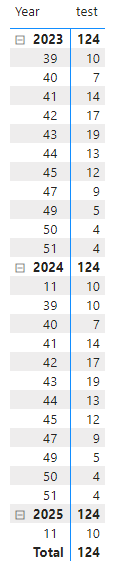
Finally you will see what you want.
Best Regards
Yilong Zhou
If this post helps, then please consider Accept it as the solution to help the other members find it more quickly.
Try the preview feature of Visual Calculations in DAX
Using visual calculations in Power BI Desktop - Power BI | Microsoft Learn
There is a built-in function for Running Sum!
Proud to be a Super User! | |
Ok, really interesting! But I can't use visual calculation in a line chart with even the secondary axis populated or in a Line and Stacked Column Chart. The visual calculation option become, unfortunately, greyed-out.
Nobody has a solution please? Thank you in advance!
Hi @planc7 ,
I create a table as you mentioned.
Then I do some changes in your DAX codes. I delete SELECTEDVALUE function and here is the DAX code.
test =
VAR _Table =
CALCULATETABLE (
ADDCOLUMNS (
'PHISICAL_TABLE',
"@Key",
IF (
NOT ISBLANK ( PHISICAL_TABLE[Actual/Planned] ),
PHISICAL_TABLE[Year] + 1
& FORMAT ( PHISICAL_TABLE[Week], "00" ) & 'PHISICAL_TABLE'[Brand] & 'PHISICAL_TABLE'[Cluster],
PHISICAL_TABLE[Key Brand]
)
),
REMOVEFILTERS ( PHISICAL_TABLE[Year], PHISICAL_TABLE[Year&Week] )
)
VAR _Table1 =
FILTER (
ADDCOLUMNS (
ADDCOLUMNS (
_Table,
"@Actual/PlannedPY",
IF (
ISBLANK ( PHISICAL_TABLE[Actual/Planned] ),
CALCULATE (
MAX ( PHISICAL_TABLE[Actual/Planned] ),
FILTER ( _Table, [@Key] = EARLIER ( [@Key] ) )
)
)
),
"@Actual/PlannedPY2",
IF (
PHISICAL_TABLE[Year] = VALUE ( LEFT ( [@Key], 4 ) ),
[@Actual/PlannedPY],
BLANK ()
)
),
NOT ISBLANK ( [@Actual/PlannedPY2] )
)
RETURN
SUMX ( _Table1, [@Actual/PlannedPY2] )
Finally you will see what you want.
Best Regards
Yilong Zhou
If this post helps, then please consider Accept it as the solution to help the other members find it more quickly.
If you have recently started exploring Fabric, we'd love to hear how it's going. Your feedback can help with product improvements.
A new Power BI DataViz World Championship is coming this June! Don't miss out on submitting your entry.
Share feedback directly with Fabric product managers, participate in targeted research studies and influence the Fabric roadmap.
| User | Count |
|---|---|
| 54 | |
| 39 | |
| 32 | |
| 17 | |
| 15 |
| User | Count |
|---|---|
| 64 | |
| 63 | |
| 37 | |
| 36 | |
| 22 |